Picture Lab A6: Mirroring Pictures
From CS Awesome 2CC BY-NC-SA 4.0Original page
Java1 class period4 exercises19 graded tests
Files
Picture Lab A6: Mirroring Pictures
Each coding exercise has its own folder. Open its .java file and press Run to try it. Run Tests checks every graded exercise in this lesson at once.
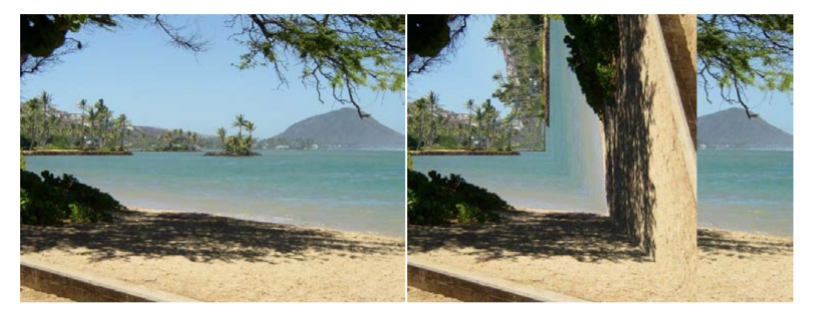
Car designers at General Motors Research Labs only sculpt half of a car out of clay and then use a vertical mirror to reflect that half to see the whole car. What if we want to see what a picture would look like if we placed a mirror on a vertical line in the center of the width of the picture to reflect the left side (Figure 1)?
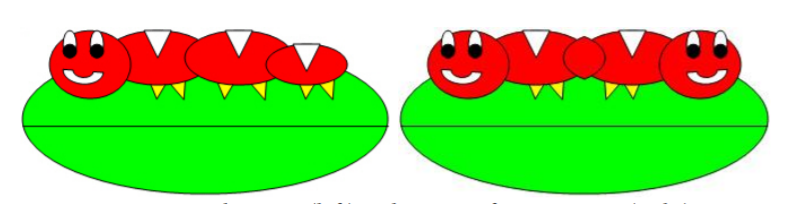
Original picture (left) and picture after mirroring (right)
How can we write a method to mirror a picture in this way? One way to figure out the algorithm, which is a description of the steps for solving a problem, is to try it on smaller and simpler data. Figure 2 shows the result of mirroring a two-dimensional array of numbers from left to right vertically.
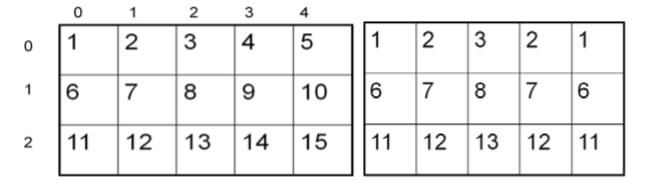
Two-Dimensional array of numbers (left) and mirrored result (right)
Can you figure out the algorithm for this process? Test your algorithm on different sizes of twodimensional arrays of integers. Will it work for 2D arrays with an odd number of columns? Will it work for 2D arrays with an even number of columns?
One algorithm is to loop through all the rows and half the columns. You need to get a pixel from the left side of the picture and a pixel from the right side of the picture, which is the same distance from the right end as the left pixel is from the left end. Set the color of the right pixel to the color of the left pixel. The column number at the right end is the number of columns, also known as the width, minus one. So assuming there are at least 3 pixels in a row,
- The first left pixel will be at row=0, col=0 and the first right pixel will be at row=0, col=width-1.
- The second left pixel will be at row=0, col=1 and the corresponding right pixel will be at row=0, col=width-1-1.
- The third left pixel will be at row=0, col=2 and its right pixel will be at row=0, col=width-1-2.
- Each time the left pixel is at (current row value, current column value), the corresponding right pixel is at (current row value, width - 1 - (current column value)).
The following method implements this algorithm. Note that, because the method is not looping through all the pixels, it cannot use a nested for-each loop.
public void mirrorVertical()
{
     Pixel[][] pixels = this.getPixels2D();
     Pixel leftPixel = null;
     Pixel rightPixel = null;
     int width = pixels[0].length;
     for (int row = 0; row < pixels.length; row++)
     {
          for (int col = 0; col < width / 2; col++)
          {
               leftPixel = pixels[row][col];
               rightPixel = pixels[row][width - 1 - col];
               rightPixel.setColor(leftPixel.getColor());
          }
     }
}
You can see mirrorVertical in action by running the exercise in the exercise below.
You can use caterpillar.jpg, puppy.jpg, redmotorcycle.jpg, or beach.jpg in the exercises below which are autograded.
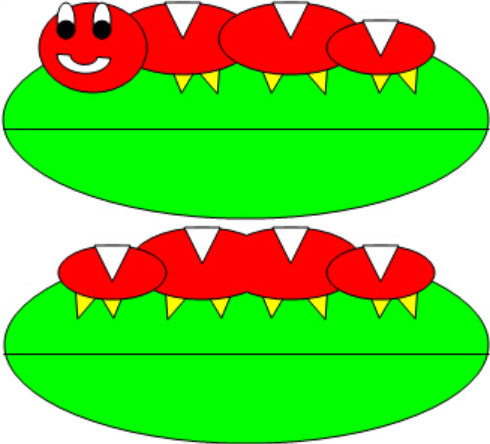
- Write the method mirrorVerticalRightToLeft that mirrors a picture around a mirror placed vertically from right to left, so that you get 2 tails for the caterpillar instead of two heads. Hint: you can copy the body of
mirrorVerticaland only change one line in the body of the method to accomplish this.
Exercise 1
Picture Lab A6 Mirroring: Write a method mirrorVerticalRightToLeft that mirrors a picture around a mirror placed vertically from right to left so that you get two tails for the caterpillar instead of two heads. Hint: you can copy the body of mirrorVertical and only change one line in the body of the method to accomplish this. Change the method call in the main method.
Open the
01-picture-lab-A6-mirrorVerticalRightToLeftfolder and editPicture.java. Press Run to try it; Run Tests checks it (4 tests). Its tests check your code, not what it prints: “mirrorVerticalRightToLeft() method”, “mirrorVerticalRightToLeft() sets leftPixel's color”, “mirrorVerticalRightToLeft() uses rightPixel's getColor”, “Checking that mirrorVerticalRightToLeft() contains 2 for loops”. It draws pictures: Run saves the drawing as an image in its folder, and Run Tests checks the code without the drawing.
More practice
- Write the method
mirrorHorizontalthat mirrors a picture around a mirror placed horizontally at the middle of the height of the picture. Mirror from top to bottom as shown in the pictures below (Figure 3).
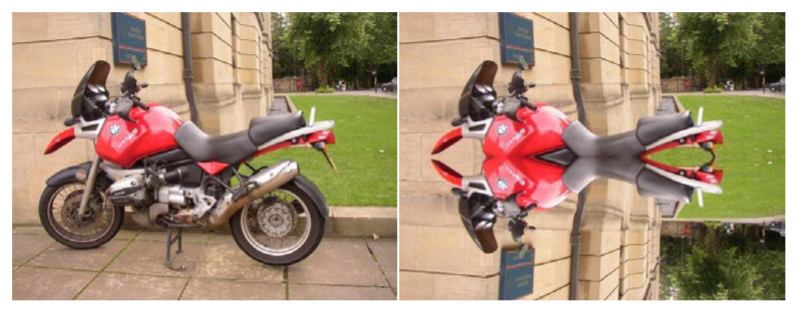
Original picture (left) and mirrored from top to bottom (right)
Exercise 2
Picture Lab A6 Mirroring: Write a method mirrorHorizontal that mirrors a picture around a mirror placed horizontally at the middle of the height of the picture from top to bottom. Change the bottom pixel to be the color of the top pixel.
Open the
02-picture-lab-A6-mirrorHorizontalfolder and editPicture.java. Press Run to try it; Run Tests checks it (6 tests). Its tests check your code, not what it prints: “mirrorHorizontal() method”, “mirrorHorizontal() sets height to pixels.length”, “mirrorHorizontal() uses height/2”, “mirrorHorizontal() uses pixels[height - row - 1][col] to get the bottom pixel”, “mirrorHorizontal() uses bottomPixel.setColor to change the bottom pixel”, “Checking that mirrorHorizontal() contains 2 for loops”. It draws pictures: Run saves the drawing as an image in its folder, and Run Tests checks the code without the drawing.
More practice
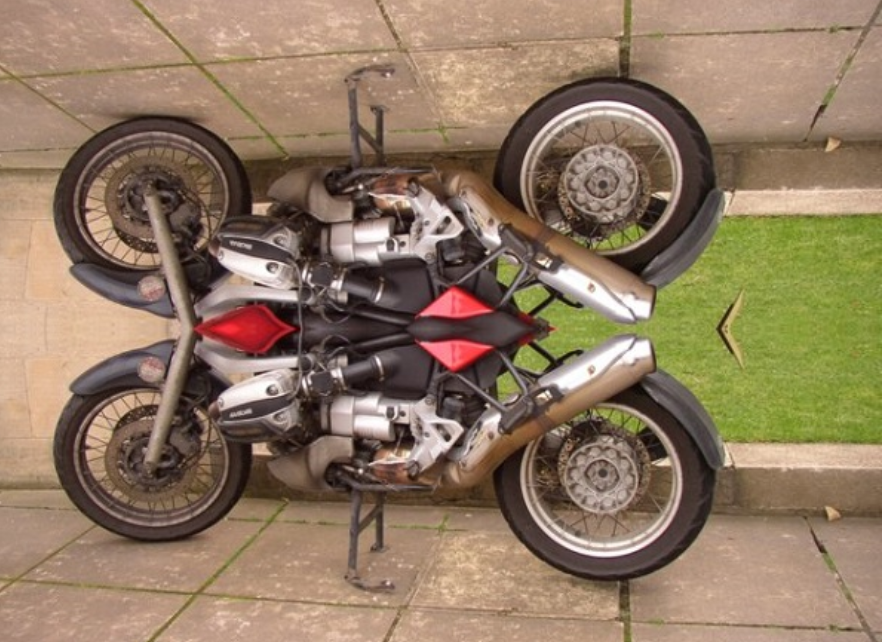
- Write the method
mirrorHorizontalBotToTopthat mirrors the picture around a mirror placed horizontally from bottom to top. Hint: you can copy the body of mirrorHorizontal and only change one line to accomplish this.
Exercise 3
Picture Lab A6 Mirroring: Write the method mirrorHorizontalBotToTop that mirrors the picture around a mirror placed horizontally from bottom to top. Hint: you can copy the body of mirrorHorizontal and only change one line to accomplish this. Change the top pixel to the bottom pixel instead of the other way around.
Open the
03-picture-lab-A6-mirrorHorizontalBotToTopfolder and editPicture.java. Press Run to try it; Run Tests checks it (6 tests). Its tests check your code, not what it prints: “mirrorHorizontalBotToTop() method”, “mirrorHorizontalBotToTop() sets height to pixels.length”, “mirrorHorizontalBotToTop() uses height/2”, “mirrorHorizontalBotToTop() uses pixels[height - row - 1][col]”, “mirrorHorizontalBotToTop() uses setColor to change the topPixel variable”, “Checking that mirrorHorizontalBotToTop() contains 2 for loops”. It draws pictures: Run saves the drawing as an image in its folder, and Run Tests checks the code without the drawing.
More practice
- Challenge — Work in groups to figure out the algorithm for the method
mirrorDiagonalthat mirrors just a square part of the picture from bottom left to top right around a mirror placed on the diagonal line (the diagonal line is the one where the row index equals the column index). This will copy the triangular area to the left and below the diagonal line as shown below. This is like folding a square piece of paper from the bottom left to the top right, painting just the bottom left triangle and then (while the paint is still wet) folding the paper up to the top right again. The paint would be copied from the bottom left to the top right as shown in the pictures below (Figure 2).
Original picture (left) and mirrored around the diagonal line with copying from bottom left to top right (right)
Exercise 4
Picture Lab A6 Mirroring: Write a method method mirrorDiagonal that mirrors just a square part of the picture from bottom left to top right around a mirror placed on the diagonal line (the diagonal line is the one where the row index equals the column index).
Open the
04-picture-lab-A6-mirrorDiagonalfolder and editPicture.java. Press Run to try it; Run Tests checks it (3 tests). Its tests check your code, not what it prints: “mirrorDiagonal() method”, “mirrorDiagonal() loops for col < row”, “Checking that mirrorDiagonal() contains 2 for loops”. It draws pictures: Run saves the drawing as an image in its folder, and Run Tests checks the code without the drawing.
For teachers
Picture Lab A6: Mirroring Pictures
Students read CSAwesome2's “Picture Lab A6: Mirroring Pictures” in CS Room and work through its 4 Java coding exercises.
- Time: 1 class period
- Tests: 19 in 4 graded exercises, set up for you when you import the lesson
Goals
- Practice for Unit 4: Data Collections.
Before class
- Import the lesson into your class from the Lessons page, or with New assignment → Use a lesson. It arrives as a draft with its tests already set up.
- Publish it.
- The original page is on CS Awesome: https://runestone.academy/ns/books/published/csawesome2/pictureLabA6.html
- CS Awesome's own teacher materials: the CS Awesome teacher site
In class
- Students read
README.md. - Students do exercises 01–04, each in its own folder, pressing Run to try their code.
- Run Tests checks every graded exercise at once; scores appear in the Gradebook. Grading uses your copy of the tests, so a student who edits theirs does not change the grade.
Exercises
| Folder | File | Grading | Tests |
|---|---|---|---|
01-picture-lab-A6-mirrorVerticalRightToLeft | Picture.java | Checks code text only (draws pictures; graded without the drawing) | 4 |
02-picture-lab-A6-mirrorHorizontal | Picture.java | Checks code text only (draws pictures; graded without the drawing) | 6 |
03-picture-lab-A6-mirrorHorizontalBotToTop | Picture.java | Checks code text only (draws pictures; graded without the drawing) | 6 |
04-picture-lab-A6-mirrorDiagonal | Picture.java | Checks code text only (draws pictures; graded without the drawing) | 3 |
Teachers can download a reference solution after signing in.