Picture Lab A7: Mirroring Part of a Picture
From CS Awesome 2CC BY-NC-SA 4.0Original page
Java1 class period4 exercises10 graded tests
Files
Picture Lab A7: Mirroring Part of a Picture
Each coding exercise has its own folder. Open its .java file and press Run to try it. Run Tests checks every graded exercise in this lesson at once.
Sometimes you only want to mirror part of a picture. For example, Figure 1 shows a temple in Greece that is missing a part of the roof called the pediment.
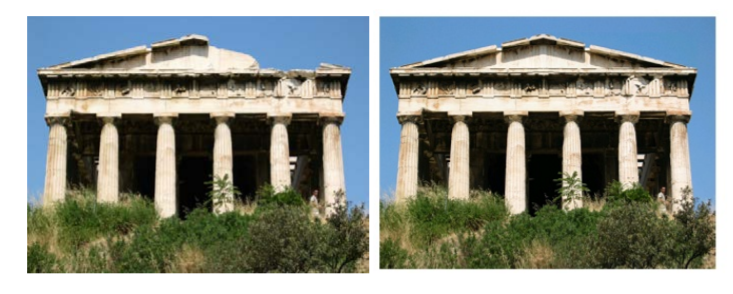
Greek temple before (left) and after (right) mirroring the pediment
To work with just part of a picture, change the starting and ending values for the nested for loops as shown in the following mirrorTemple method. This method also calculates the distance the current column is from the mirrorPoint and then adds that distance to the mirrorPoint to get the column to copy to.
public void mirrorTemple()
{
     int mirrorPoint = 276;
     Pixel leftPixel = null;
     Pixel rightPixel = null;
     int count = 0;
     Pixel[][] pixels = this.getPixels2D();

     // loop through the rows
     for (int row = 27; row < 97; row++)
     {
          // loop from 13 to just before the mirror point
          for (int col = 13; col < mirrorPoint; col++)
          {
               leftPixel = pixels[row][col];
               rightPixel = pixels[row][mirrorPoint - col + mirrorPoint];
               rightPixel.setColor(leftPixel.getColor());
          }
     }
 }
You can test this with the mirrorTemple method below.
Exercise 1
Picture Lab A7: Run to see mirrorTemple() working.
Open the
01-picture-lab-A7-mirrorTemplefolder and runPicture.java. It is an example, so it has no tests. It draws pictures: Run saves the drawing as an image in its folder.
More practice
How many times was leftPixel = pixels[row][col]; executed? The formula for the number of times a nested loop executes is the number of times the outer loop executes multiplied by the number of times the inner loop executes. The outer loop is the one looping through the rows, because it is outside the other loop. The inner loop is the one looping through the columns, because it is inside the row loop.
How many times does the outer loop execute? The outer loop starts with row equal to 27 and ends when it reaches 97, so the last time through the loop row is 96. To calculate the number of times a loop executes, subtract the starting value from the ending value and add one. The outer loop executes 96 – 27 + 1 times, which equals 70 times. The inner loop starts with col equal to 13 and ends when it reaches 276, so, the last time through the loop, col will be 275. It executes 275 - 13 + 1 times, which equals 263 times. The total is 70 * 263, which equals 18,410.
Check your understanding: How many times would the body of this nested for loop execute?
for (int row = 7; row < 17; row++)
    for (int col = 6; col < 15; col++)
Answer it on CS Awesome: https://runestone.academy/ns/books/published/csawesome2/pictureLabA7.html#picture-A7-1
Check your understanding: How many times would the body of this nested for loop execute?
for (int row = 5; row <= 11; row++)
    for (int col = 3; col <= 18; col++)
Answer it on CS Awesome: https://runestone.academy/ns/books/published/csawesome2/pictureLabA7.html#picture-A7-2
Exercise 2
Picture Lab A7 Mirroring: Check the calculation of the number of times the body of the nested loop executes by adding an integer count variable to the mirrorTemple method that starts out at 0 and increments inside the body of the loop. Print the value of count after the nested loop ends which should be 18410.
Open the
02-picture-lab-A7-mirror-temple-countfolder and editPicture.java. Press Run to try it; Run Tests checks it (2 tests). Its tests check your code, not what it prints: “mirrorTemple() has count = 0”, “mirrorTemple() has count++”. It draws pictures: Run saves the drawing as an image in its folder, and Run Tests checks the code without the drawing.
More practice
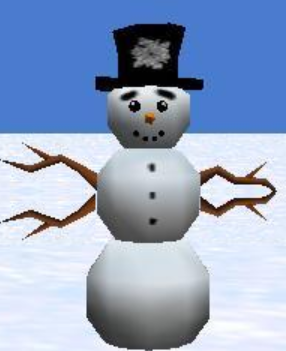
Exercise 3
Picture Lab A7 Mirroring: Write the method mirrorArms to mirror the arms on the snowperson (“snowperson.jpg”) to make a snowperson with 4 arms.
Open the
03-picture-lab-A7-mirrorArmsfolder and editPicture.java. Press Run to try it; Run Tests checks it (4 tests). Its tests check your code, not what it prints: “mirrorArms() method”, “starts looping at row = 155”, “mirrors at pixel 191”, “Checking that mirrorArms() contains 4 (2 nested) for loops for mirroring arms”. It draws pictures: Run saves the drawing as an image in its folder, and Run Tests checks the code without the drawing.
More practice
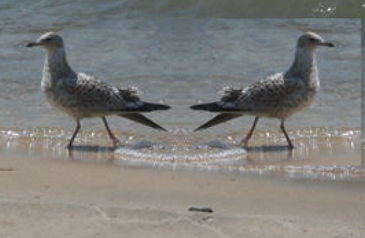
Exercise 4
Picture Lab A7 Mirroring: Write the method mirrorGull to mirror the seagull (“seagull.jpg”) to the right so that there are two seagulls on the beach near each other.
Open the
04-picture-lab-A7-mirrorGullfolder and editPicture.java. Press Run to try it; Run Tests checks it (4 tests). Its tests check your code, not what it prints: “mirrorGull() method”, “starts looping at row = 225”, “mirrors at pixel 350”, “Checking that mirrorGull() contains 2 for loops”. It draws pictures: Run saves the drawing as an image in its folder, and Run Tests checks the code without the drawing.
For teachers
Picture Lab A7: Mirroring Part of a Picture
Students read CSAwesome2's “Picture Lab A7: Mirroring Part of a Picture” in CS Room and work through its 4 Java coding exercises (3 graded, 1 example).
- Time: 1 class period
- Tests: 10 in 3 graded exercises, set up for you when you import the lesson
Goals
- Practice for Unit 4: Data Collections.
Before class
- Import the lesson into your class from the Lessons page, or with New assignment → Use a lesson. It arrives as a draft with its tests already set up.
- Publish it.
- The original page, with its multiple-choice questions, is on CS Awesome: https://runestone.academy/ns/books/published/csawesome2/pictureLabA7.html
- CS Awesome's own teacher materials: the CS Awesome teacher site
In class
- Students read
README.md. Questions that need CS Awesome's interactive widgets link back to it. - Students do exercises 01–04, each in its own folder, pressing Run to try their code.
- Run Tests checks every graded exercise at once; scores appear in the Gradebook. Grading uses your copy of the tests, so a student who edits theirs does not change the grade.
Exercises
| Folder | File | Grading | Tests |
|---|---|---|---|
01-picture-lab-A7-mirrorTemple | Picture.java | Example, not graded (draws pictures) | 0 |
02-picture-lab-A7-mirror-temple-count | Picture.java | Checks code text only (draws pictures; graded without the drawing) | 2 |
03-picture-lab-A7-mirrorArms | Picture.java | Checks code text only (draws pictures; graded without the drawing) | 4 |
04-picture-lab-A7-mirrorGull | Picture.java | Checks code text only (draws pictures; graded without the drawing) | 4 |
Teachers can download a reference solution after signing in.