Picture Lab A5: Picture Classes and Inheritance
From CS Awesome 2CC BY-NC-SA 4.0Original page
Java1 class periodNot autograded
Files
Picture Lab A5: Picture Classes and Inheritance
This lesson has no coding exercises.
Picture Classes: UML and Inheritance
The Picture class inherits attributes and methods from the SimplePicture class and the SimplePicture class implements the DigitalPicture interface as shown in the Unified Modeling Language (UML) class diagram in the figure below.
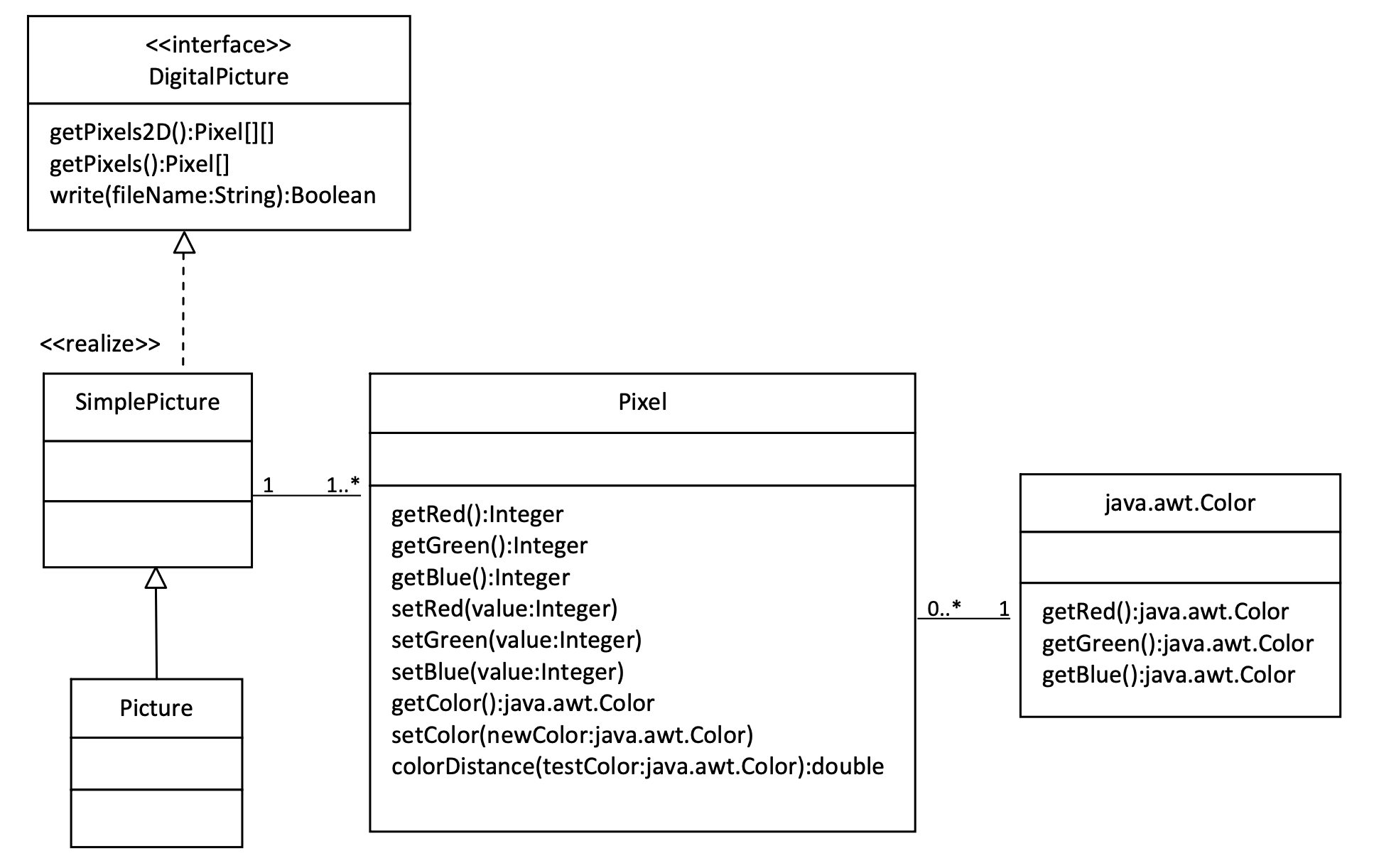
A UML Class diagram
A UML class diagram shows classes and the relationships between the classes. Each class is shown in a box with the class name at the top. The middle area shows attributes (instance or class variables) and the bottom area shows methods. The open triangle points to the class that the connected class inherits from. The straight line links show associations between classes. Association is also called a “has-a” relationship. The numbers at the end of the association links give the number of objects associated with an object at the other end.
For example, it shows that one Pixel object has one Color object associated with it and that a Color object can have zero to many Pixel objects associated with it. You may notice that the UML class diagram doesn’t look exactly like Java code. UML isn’t language specific.
The following questions require some knowledge about inheritance which is no longer covered on the AP exam.
Check your understanding: Take a look at the Picture.java file and look for the method
getPixels2D. Is it there? — answer it on CS Awesome: https://runestone.academy/ns/books/published/csawesome2/pictureLabA5inheritance.html#picture-day5-0a
Check your understanding: Take a look at the SimplePicture.java file and look for the method
getPixels2D. Is it there? — answer it on CS Awesome: https://runestone.academy/ns/books/published/csawesome2/pictureLabA5inheritance.html#picture-day5-1
Check your understanding: This question is about interfaces which are not covered in the AP exam. Interfaces are like abstract templates of a class that specify the method headers but not the definitions. Does the following code compile? — answer it on CS Awesome: https://runestone.academy/ns/books/published/csawesome2/pictureLabA5inheritance.html#picture-day5-1a
Check your understanding: This question is about interfaces which are not covered in the AP exam. Assuming that a no-argument constructor exists for SimplePicture, would the following code compile? DigitalPicture p = new SimplePicture(); — answer it on CS Awesome: https://runestone.academy/ns/books/published/csawesome2/pictureLabA5inheritance.html#picture-day5-2a
Check your understanding: This question is about interfaces which are not covered in the AP exam. Assuming that a no-argument constructor exists for Picture, would the following code compile? DigitalPicture p = new Picture(); — answer it on CS Awesome: https://runestone.academy/ns/books/published/csawesome2/pictureLabA5inheritance.html#picture-day5-3a
Check your understanding: Assuming that a no-argument constructor exists for Picture, does the following code compile? SimplePicture p = new Picture(); — answer it on CS Awesome: https://runestone.academy/ns/books/published/csawesome2/pictureLabA5inheritance.html#picture-day5-4a
Check your understanding: Assuming that a no-argument constructor exists for SimplePicture, does the following code compile? Picture p = new SimplePicture(); — answer it on CS Awesome: https://runestone.academy/ns/books/published/csawesome2/pictureLabA5inheritance.html#picture-day5-5a
Because DigitalPicture declares a getPixels2D method that returns a two-dimensional array of Pixel objects, SimplePicture implements that interface, and Picture inherits from SimplePicture, you can use the getPixels2D method on a Picture object. You can loop through all the Pixel objects in the two-dimensional array to modify the picture. You can get and set the red, green, and/or blue value for a Pixel object. You can also get and/or set the Color value for a Pixel object. For example,
Picture pict = new Picture("beach.jpg");
Pixel[][] pixels = pict.getPixels2D();
Pixel p = pixels[0][0]; // get the first pixel
int blue = p.getBlue(); // get its blue value
System.out.println("Pixel (0,0) has a blue value of " + blue );
p.setBlue(255);  // set its blue value to 255
pict.show();
For teachers
Picture Lab A5: Picture Classes and Inheritance
Students read CSAwesome2's “Picture Lab A5: Picture Classes and Inheritance” in CS Room and work through its questions in class or on CS Awesome.
- Time: 1 class period
- Tests: none
Goals
- Practice for Unit 4: Data Collections.
Before class
- Import the lesson into your class from the Lessons page, or with New assignment → Use a lesson. It arrives as a draft.
- Publish it.
- The original page, with its multiple-choice questions, is on CS Awesome: https://runestone.academy/ns/books/published/csawesome2/pictureLabA5inheritance.html
- CS Awesome's own teacher materials: the CS Awesome teacher site
In class
- Students read
README.md. Questions that need CS Awesome's interactive widgets link back to it.
Exercises
None.