Picture Lab A4: 2D Arrays in Java
From CS Awesome 2CC BY-NC-SA 4.0Original page
Java1 class period3 exercises6 graded tests
Files
Picture Lab A4: 2D Arrays in Java
Each coding exercise has its own folder. Open its .java file and press Run to try it. Run Tests checks every graded exercise in this lesson at once.
In this activity you will work with integer data stored in a two-dimensional array. Some programming languages use a one-dimensional (1D) array to represent a two-dimensional (2D) array with the data in either row-major or column-major order. Row-major order in a 1D array means that all the data for the first row is stored before the data for the next row in the 1D array. Column-major order in a 1D array means that all the data for the first column is stored before the data for the next column in the 1D array. The order matters, because you need to calculate the position in the 1D array based on the order, the number of rows and columns, and the current column and row numbers (indices). The rows and columns are numbered (indexed) and often that numbering starts at 0 as it does in Java. The top left row has an index of 0 and the top left column has an index of 0. The row number (index) increases from top to bottom and the column number (index) increases from left to right.
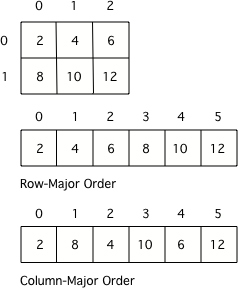
A 2D array stored in row-major order or column-major order as a 1D array.
Check your understanding: Given an array A = { 2 4 6 }, {1 3 5} how would A be stored in a 1D array in row-major order? — answer it on CS Awesome: https://runestone.academy/ns/books/published/csawesome2/pictureLabA4.html#picture-lab-A4-0a
Check your understanding: Given an array A = { 2 4 6 }, {1 3 5} how would A be stored in a 1D array in column-major order? — answer it on CS Awesome: https://runestone.academy/ns/books/published/csawesome2/pictureLabA4.html#picture-lab-A4-1a
Java actually uses arrays of arrays to represent 2D arrays. This means that each element in the outer array is a reference to another array. The data can be in either row-major or column-major order. The AP Computer Science A course specification tells you to assume that all 2D arrays are row-major, which means that the outer array in Java represents the rows and the inner arrays represent the columns.
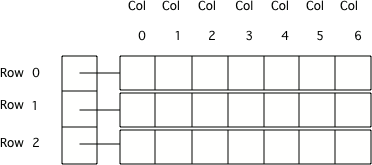
Java arrays of arrays
To loop through the values in a 2D array you must have two indexes. One index is used to change the row index and one is used to change the column index. You can use nested loops, which is one for loop inside of another, to loop through all the values in a 2D array. Let’s try some nested loops with 2D arrays.
Check your understanding: Here is a mysteryMethod in the
IntArrayWorkerclass that uses a private instance variable which is a 2D array namedmatrix. What does this method do?public int mysteryMethod() { int total = 0; for (int row = 0; row < matrix.length; row++) { for (int col = 0; col < matrix[0].length; col++) { total = total + matrix[row][col]; } } return total; }Answer it on CS Awesome: https://runestone.academy/ns/books/published/csawesome2/pictureLabA4.html#picture-lab-A4-2a
Here is the code for the getTotal method in the IntArrayWorker class that totals all the values in a 2D array of integers in a private instance variable (field in the class) named matrix. Notice the nested for loop and how it uses matrix.length to get the number of rows and matrix[0].length to get the number of columns. Since matrix[0] returns the inner array in a 2D array, you can use matrix[0].length to get the number of columns.
public int getTotal()
{
     int total = 0;
     for (int row = 0; row < matrix.length; row++)
     {
          for (int col = 0; col < matrix[0].length; col++)
          {
              total = total + matrix[row][col];
          }
     }
     return total;
}
Because Java two-dimensional arrays are actually arrays of arrays, you can also get the total using nested for-each loops as shown in getTotalNested below. The outer loop will loop through the outer array (each of the rows) and the inner loop will loop through the inner array (columns in that row). You can use a nested for-each loop whenever you want to loop through all items in a 2D array and you don’t need to know the row index or column index.
public int getTotalNested()
{
     int total = 0;
     for (int[] rowArray : matrix)
     {
         for (int item : rowArray)
         {
              total = total + item;
         }
    }
    return total;
}
Check your understanding: Which of these methods correctly sum up the values in a 2D array? Assume the 2D array is called
matrix. — answer it on CS Awesome: https://runestone.academy/ns/books/published/csawesome2/pictureLabA4.html#picture-lab-A4-3a
Exercise 1
Write a getCount method in the IntArrayWorker class that returns the count of the number of times a passed integer value is found in the matrix. There is already a method to test this in IntArrayWorkerTester.
Open the
01-picture-lab-A4-getCountfolder and editIntArrayWorker.java. Press Run to try it; Run Tests checks it (2 tests).
Exercise 2
Write a getLargest method in the IntArrayWorker class that returns the largest value in the matrix. There is already a method to test this in IntArrayWorkerTester.
Open the
02-picture-lab-A4-getLargestfolder and editIntArrayWorker.java. Press Run to try it; Run Tests checks it (2 tests).
Exercise 3
Write a getColTotal method in the IntArrayWorker class that returns the total of all integers in a specified column. There is already a method to test this in IntArrayWorkerTester.
Open the
03-picture-lab-A4-getColTotalfolder and editIntArrayWorker.java. Press Run to try it; Run Tests checks it (2 tests).
For teachers
Picture Lab A4: 2D Arrays in Java
Students read CSAwesome2's “Picture Lab A4: 2D Arrays in Java” in CS Room and work through its 3 Java coding exercises.
- Time: 1 class period
- Tests: 6 in 3 graded exercises, set up for you when you import the lesson
Goals
- Practice for Unit 4: Data Collections.
Before class
- Import the lesson into your class from the Lessons page, or with New assignment → Use a lesson. It arrives as a draft with its tests already set up.
- Publish it.
- The original page, with its multiple-choice questions, is on CS Awesome: https://runestone.academy/ns/books/published/csawesome2/pictureLabA4.html
- CS Awesome's own teacher materials: the CS Awesome teacher site
In class
- Students read
README.md. Questions that need CS Awesome's interactive widgets link back to it. - Students do exercises 01–03, each in its own folder, pressing Run to try their code.
- Run Tests checks every graded exercise at once; scores appear in the Gradebook. Grading uses your copy of the tests, so a student who edits theirs does not change the grade.
Exercises
| Folder | File | Grading | Tests |
|---|---|---|---|
01-picture-lab-A4-getCount | IntArrayWorker.java | Autograded | 2 |
02-picture-lab-A4-getLargest | IntArrayWorker.java | Autograded | 2 |
03-picture-lab-A4-getColTotal | IntArrayWorker.java | Autograded | 2 |
Teachers can download a reference solution after signing in.