Unit 4C - Free Response - Gray Image B
From CS Awesome 2CC BY-NC-SA 4.0Original page
Java1 class period2 exercises4 graded tests
Files
Unit 4C - Free Response - Gray Image B
Each coding exercise has its own folder. Open its .java file and press Run to try it. Run Tests checks every graded exercise in this lesson at once.
The following is part b of a free response question from 2012. It was question 4 on the exam. You can see all the free response questions from past exams at Past AP CSA Exams .
Question 4. A grayscale image is represented by a 2-dimensional rectangular array of pixels (picture elements). A pixel is an integer value that represents a shade of gray. In this question, pixel values can be in the range from 0 through 255, inclusive. A black pixel is represented by 0, and a white pixel is represented by 255. The declaration of the GrayImage class is shown below.
public class GrayImage
{
    public static final int BLACK = 0;
    public static final int WHITE = 255;

    /**
     * The 2-dimensional representation of this image. Guaranteed not to be null.
     * All values in the array are within the range [BLACK, WHITE], inclusive.
     */
    private int[][] pixelValues;

    /**
     * Processes this image in row-major order and decreases the value of each
     * pixel at position (row, col) by the value of the pixel at position (row + 2,
     * col + 2) if it exists. Resulting values that would be less than BLACK are
     * replaced by BLACK. Pixels for which there is no pixel at position (row + 2,
     * col + 2) are unchanged.
     */
    public void processImage()
    {
        /* to be implemented in part (b) */
    }
}
Part b. Write the method processImage that modifies the image by changing the values in the instance variable pixelValues according to the following description. The pixels in the image are processed one at a time in row-major order. Row-major order processes the first row in the array from left to right and then processes the second row from left to right, continuing until all rows are processed from left to right. The first index of pixelValues represents the row number, and the second index represents the column number.
The pixel value at position (row, col) is decreased by the value at position (row + 2, col + 2) if such a position exists. If the result of the subtraction is less than the value BLACK, the pixel is assigned the value of BLACK. The values of the pixels for which there is no pixel at position (row + 2, col + 2) remain unchanged. You may assume that all the original values in the array are within the range [BLACK, WHITE], inclusive.
The following diagram shows the contents of the instance variable pixelValues before and after a call to processImage. The values shown in boldface represent the pixels that could be modified in a grayscale image with 4 rows and 5 columns.
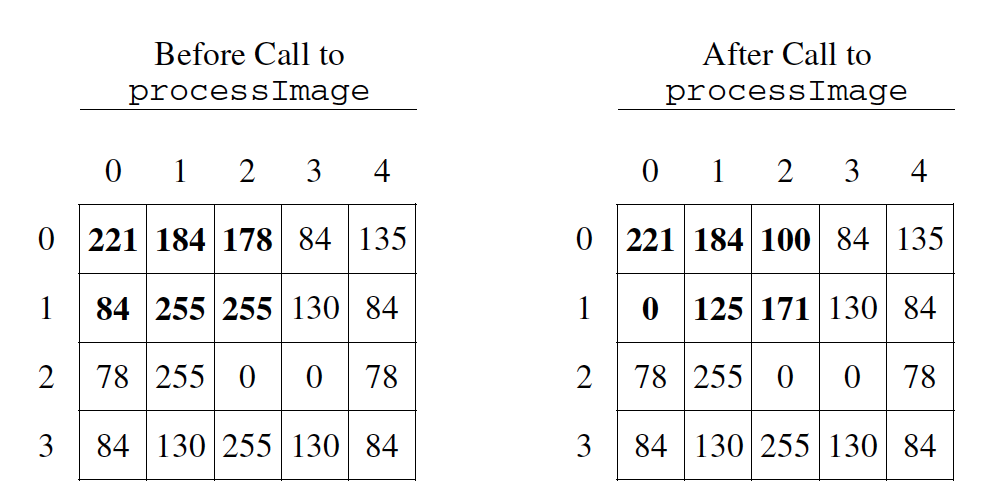
Example before and after a call to processImage
public class GrayImage
{
    public static final int BLACK = 0;
    public static final int WHITE = 255;

    /**
     * The 2-dimensional representation of this image. Guaranteed not to be null.
     * All values in the array are within the range [BLACK, WHITE], inclusive.
     */
    private int[][] pixelValues;

    /**
     * Processes this image in row-major order and decreases the value of each
     * pixel at position (row, col) by the value of the pixel at position (row + 2,
     * col + 2) if it exists. Resulting values that would be less than BLACK are
     * replaced by BLACK. Pixels for which there is no pixel at position (row + 2,
     * col + 2) are unchanged.
     */
    public void processImage()
    {
        /* to be implemented in part (b) */
    }
}
How to solve this problem
Once again, this problem starts with looping through the array of pixels, using a nested for loop for the 2D array. As we loop we will need to subtract pixel values from one another.
Check your understanding: Which is the simplest way to subtract one integer value from another integer value? — answer it on CS Awesome: https://runestone.academy/ns/books/published/csawesome2/grayImageB.html#grayImageB_0
Check your understanding: Which loop is the best for iterating through the image? — answer it on CS Awesome: https://runestone.academy/ns/books/published/csawesome2/grayImageB.html#grayImageB_1
When comparing our pixel values to values deeper in the array, we need to be careful to correctly set the terminating conditions on the for loops.
The code below prints out the pixel value at position (row, col) after it is decreased by the value at position (row + 2, col + 2), but what if (row+2,col+2) is beyond the array bounds? Can you fix the terminating conditions of the loops so that we do not go beyond the array bounds?
Exercise 1
Fix the terminating conditions of the loops so that we do not go beyond the array bounds
Open the
01-lcfrgib3folder and editLoopTest.java. Press Run to try it; Run Tests checks it (1 test).
Algorithm
There are several ways to solve this problem, we will focus on two possible solutions below. It is not required for you to come up with both solutions but it would be good practice.
Explain in plain English what your code will have to do to answer this question. Use the variable names given above.
Discuss this with your class, or answer it on CS Awesome: https://runestone.academy/ns/books/published/csawesome2/grayImageB.html#gray_image_B
This set of questions will focus on a solution that starts indexing the array at zero, and stops 2 spaces before the end.
Check your understanding: What could you write for the outer for loop so that it iterates through the rows but stops 2 before the end? — answer it on CS Awesome: https://runestone.academy/ns/books/published/csawesome2/grayImageB.html#2012GreyScaleB_3
Check your understanding: What could you write for the Inner for loop so that it iterates through the rows but stops 2 before the bottom? — answer it on CS Awesome: https://runestone.academy/ns/books/published/csawesome2/grayImageB.html#2012GreyScaleB_4
Check your understanding: The question requires if any value is less than the value
BLACKafter subtraction, it needs to be replaced with the valueBLACK. How could you write this? — answer it on CS Awesome: https://runestone.academy/ns/books/published/csawesome2/grayImageB.html#2012GreyScaleB_5
Next we will have questions focused on a solution that starts at the beginning of the loop and iterated through the entire thing, but checks for out of bounds errors as it subtracts.
Check your understanding: What could you write for the outer for loop so that it iterates through the rows? — answer it on CS Awesome: https://runestone.academy/ns/books/published/csawesome2/grayImageB.html#2012GreyScaleB_6
Check your understanding: What could you write for the Inner for loop so that it iterates through the columns? — answer it on CS Awesome: https://runestone.academy/ns/books/published/csawesome2/grayImageB.html#2012GreyScaleB_7
Check your understanding: Since you don’t limit the iteration through the array, how can you check to make sure the subtraction isn’t going out of bounds? — answer it on CS Awesome: https://runestone.academy/ns/books/published/csawesome2/grayImageB.html#2012GreyScaleB_b
Try and Solve It
Exercise 2
FRQ Gray Image B: write the code for the method processImage. Please use row and col for your loop variables.
Open the
02-lcfrgib4folder and editGrayImage.java. Press Run to try it; Run Tests checks it (3 tests).
Video - One way to code the solution
The following video is also on YouTube at https://youtu.be/8j34xQkjsJI. It walks through coding a solution.
For teachers
Unit 4C - Free Response - Gray Image B
Students read CSAwesome2's “Unit 4C - Free Response - Gray Image B” in CS Room and work through its 2 Java coding exercises.
- Time: 1 class period
- Tests: 4 in 2 graded exercises, set up for you when you import the lesson
Goals
- Practice for Unit 4: Data Collections.
Before class
- Import the lesson into your class from the Lessons page, or with New assignment → Use a lesson. It arrives as a draft with its tests already set up.
- Publish it.
- The original page, with its free-response and multiple-choice questions, is on CS Awesome: https://runestone.academy/ns/books/published/csawesome2/grayImageB.html
- CS Awesome's own teacher materials: the CS Awesome teacher site
In class
- Students read
README.md. Questions that need CS Awesome's interactive widgets link back to it. - Students do exercises 01–02, each in its own folder, pressing Run to try their code.
- Run Tests checks every graded exercise at once; scores appear in the Gradebook. Grading uses your copy of the tests, so a student who edits theirs does not change the grade.
Exercises
| Folder | File | Grading | Tests |
|---|---|---|---|
01-lcfrgib3 | LoopTest.java | Autograded | 1 |
02-lcfrgib4 | GrayImage.java | Autograded | 3 |
Teachers can download a reference solution after signing in.