Unit 4C - Free Response - Gray Image A
From CS Awesome 2CC BY-NC-SA 4.0Original page
Java1 class period1 exercise4 graded tests
Files
Unit 4C - Free Response - Gray Image A
Each coding exercise has its own folder. Open its .java file and press Run to try it. Run Tests checks every graded exercise in this lesson at once.
The following is part a of a free response question from 2012. It was question 4 on the exam. You can see all the free response questions from past exams at Past AP CSA Exams .
Question 4. A grayscale image is represented by a 2-dimensional rectangular array of pixels (picture elements). A pixel is an integer value that represents a shade of gray. In this question, pixel values can be in the range from 0 through 255, inclusive. A black pixel is represented by 0, and a white pixel is represented by 255. The declaration of the GrayImage class is shown below.
public class GrayImage
{
    public static final int BLACK = 0;
    public static final int WHITE = 255;

    /**
     * The 2-dimensional representation of this image. Guaranteed not to be null.
     * All values in the array are within the range [BLACK, WHITE], inclusive.
     */
    private int[][] pixelValues;

    /**
     * @return the total number of white pixels in this image. Postcondition: this
     *     image has not been changed.
     */
    public int countWhitePixels()
    {
        /* to be implemented in part (a) */
    }
}
Part a. Write the method countWhitePixels that returns the number of pixels in the image that contain the value WHITE. For example, assume that pixelValues contains the following image.
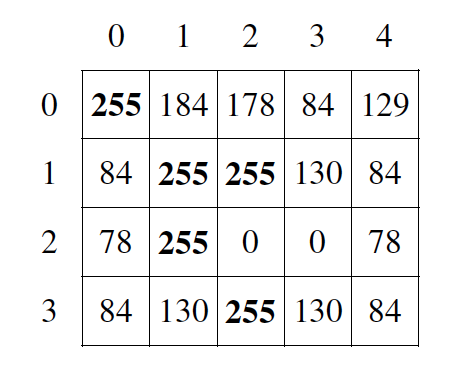
Example 2D array
A call to countWhitePixels method would return 5 because there are 5 entries (shown in boldface) that have the value WHITE.
public class GrayImage
{
    public static final int BLACK = 0;
    public static final int WHITE = 255;

    /**
     * The 2-dimensional representation of this image. Guaranteed not to be null.
     * All values in the array are within the range [BLACK, WHITE], inclusive.
     */
    private int[][] pixelValues;

    /**
     * @return the total number of white pixels in this image. Postcondition: this
     *     image has not been changed.
     */
    public int countWhitePixels()
    {
        /* to be implemented in part (a) */
    }
}
How to solve this problem
To solve this problem, we will need to loop through the entire 2D array, looking for instances of a WHITE pixel, keeping track of our count during the loop.
Check your understanding: What kind of loop could you use to solve this problem? — answer it on CS Awesome: https://runestone.academy/ns/books/published/csawesome2/grayImageA.html#frgia_1
Check your understanding: What is another kind of loop you could use to solve this problem? — answer it on CS Awesome: https://runestone.academy/ns/books/published/csawesome2/grayImageA.html#frgia_1b
Looping through a 2D array is more complicated than the simple arrays we usually see, requiring nested for loops. Check out the questions and code below, which displays how nested for loops work to display a block of numbers.
// Nested indexed for loops
public class NestedIndexedForLoops
{
    public static void main(String[] args)
    {
        for (int i = 0; i < 5; i++)
        {
            for (int j = 0; j < 5; j++)
            {
                System.out.print(j);
            }
            System.out.println();
        }
    }
}
// Nested for each loops
public class NestedForEachLoops
{
    public static void main(String[] args)
    {
        int[][] arr = new int[5][5];
        for (int[] row : arr)
        {
            for (int ent : row)
            {
                System.out.print(ent);
            }
            System.out.println();
        }
    }
}
Algorithm
When approaching this problem, it can be helpful to look for keywords or hints that maybe be in the problem statement. This section contains a plain English explanation of one way to solve this problem as well as problems that test your understanding of how to write the code to do those things.
Explain in plain English what your code will have to do to answer this question. Use the variable names given above.
Discuss this with your class, or answer it on CS Awesome: https://runestone.academy/ns/books/published/csawesome2/grayImageA.html#gray_image_A
Check your understanding: Which class is
countWhitePixelsa method in? — answer it on CS Awesome: https://runestone.academy/ns/books/published/csawesome2/grayImageA.html#2012GreyScale_alg_ans
Check your understanding: What array will you be modifying in this method? — answer it on CS Awesome: https://runestone.academy/ns/books/published/csawesome2/grayImageA.html#2012GreyScale_alg1_ans
There are many ways to solve this question, but we will only cover two in this section. Although it is a good exercise to be able to write the solution in multiple ways, you do not need to write both for the AP exam and you can just look at the problems below which relate to the method that is more intuitive to you.
If you want to solve this problem using nested for loops, complete the three questions below.
Check your understanding: What could you write for the outer for loop so that it iterates through the rows of the array? — answer it on CS Awesome: https://runestone.academy/ns/books/published/csawesome2/grayImageA.html#2012GreyScale_alg2_ans
Check your understanding: What could you write for the inner for loop so that it iterates through the columns of the array? — answer it on CS Awesome: https://runestone.academy/ns/books/published/csawesome2/grayImageA.html#2012GreyScale_alg3_ans
Check your understanding: how could you check if the current value is white? — answer it on CS Awesome: https://runestone.academy/ns/books/published/csawesome2/grayImageA.html#2012GreyScale_alg4_ans
Alternatively, if you want to solve this problem using nested for each loops, complete the three questions below.
Check your understanding: What could you write for the outer for loop so that it iterates through the rows of the array? — answer it on CS Awesome: https://runestone.academy/ns/books/published/csawesome2/grayImageA.html#2012GreyScale_alg5_ans
Check your understanding: What could you write for the inner for loop so that it iterates through the columns of the array? — answer it on CS Awesome: https://runestone.academy/ns/books/published/csawesome2/grayImageA.html#2012GreyScale_alg6_ans
Check your understanding: How will you check if pv is white? — answer it on CS Awesome: https://runestone.academy/ns/books/published/csawesome2/grayImageA.html#2012GreyScale_alg7_ans
Try and Solve It
Exercise 1
FRQ Gray Image A: write the code for the method countWhitePixels. When you are ready click “Run” to test your solution.
Open the
01-lcfrgia2folder and editGrayImage.java. Press Run to try it; Run Tests checks it (4 tests).
Video - One way to code the solution
The following video is also on YouTube at https://youtu.be/Rx4bPs0wkxU. It walks through coding a solution.
For teachers
Unit 4C - Free Response - Gray Image A
Students read CSAwesome2's “Unit 4C - Free Response - Gray Image A” in CS Room and work through its 1 Java coding exercise.
- Time: 1 class period
- Tests: 4 in 1 graded exercise, set up for you when you import the lesson
Goals
- Practice for Unit 4: Data Collections.
Before class
- Import the lesson into your class from the Lessons page, or with New assignment → Use a lesson. It arrives as a draft with its tests already set up.
- Publish it.
- The original page, with its free-response and multiple-choice questions, is on CS Awesome: https://runestone.academy/ns/books/published/csawesome2/grayImageA.html
- CS Awesome's own teacher materials: the CS Awesome teacher site
In class
- Students read
README.md. Questions that need CS Awesome's interactive widgets link back to it. - Students do exercise 01 in its folder, pressing Run to try their code.
- Run Tests checks every graded exercise at once; scores appear in the Gradebook. Grading uses your copy of the tests, so a student who edits theirs does not change the grade.
Exercises
| Folder | File | Grading | Tests |
|---|---|---|---|
01-lcfrgia2 | GrayImage.java | Autograded | 4 |
Teachers can download a reference solution after signing in.