3.8 Scope and Access
From CS Awesome 2CC BY-NC-SA 4.0Original page
Java1 class period3 exercises5 graded tests
Files
3.8 Scope and Access
Each coding exercise has its own folder. Open its .java file and press Run to try it. Run Tests checks every graded exercise in this lesson at once.
The scope of a variable is defined as where a variable is accessible or can be used. The scope is determined by where you declare the variable when you write your programs. When you declare a variable, look for the closest enclosing curly braces ({}) – this is its scope.
Class, Method, and Block Level Scope
Java has 3 levels of scope that correspond to different types of variables:
- Class Level Scope for instance variables inside a class.
- Method Level Scope for local variables (including parameter variables) inside a method.
- Block Level Scope for loop variables and other local variables defined inside of blocks of code with { }.
The image below shows these 3 levels of scope.
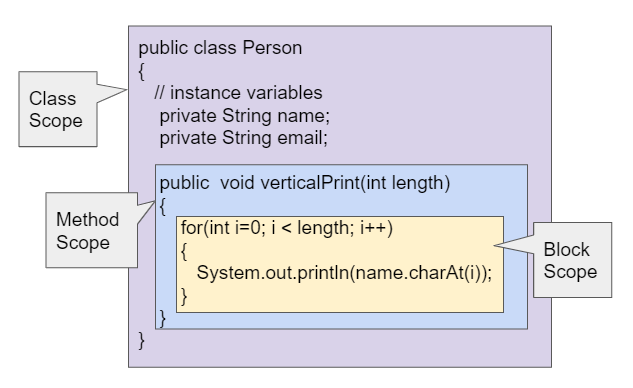
Class, Method, and Block Level Scope
Check your understanding: Click on all the variable declarations that are at Class Level Scope.
public class Name
{
    private String first;
    public String last;

    public Name(String theFirst, String theLast)
    {
        String firstName = theFirst;
        first = firstName;
        last = theLast;
    }
}
Answer it on CS Awesome: https://runestone.academy/ns/books/published/csawesome2/topic-3-8-scope-access.html#name_class_scope
Check your understanding: Click on all the variable declarations that are at Method Level Scope.
public class Name
{
    private String first;
    public String last;

    public Name(String theFirst, String theLast)
    {
        String firstName = theFirst;
        first = firstName;
        last = theLast;
    }
}
Answer it on CS Awesome: https://runestone.academy/ns/books/published/csawesome2/topic-3-8-scope-access.html#name_method_scope
Local Variables
Local variables are variables declared in the headers or bodies of blocks of code. Local variables can only be accessed in the block in which they are declared. Local variables that are declared inside a method are usually declared at the top of the method. These variables can only be used within the method and do not exist outside of the method.
Parameter variables are also considered local variables that only exist for that method or constructor. These variables may only be used within the constructor or method and cannot be declared to be public or private.It’s good practice to declare any variables that are used by just one method as local variables in that method.
Instance variables at class scope are shared by all the methods in the class and can be marked as public or private with respect to their access outside of the class. They have class scope regardless of whether they are public or private.
Another way to look at scope is that a variable’s scope is where it lives and exists. You cannot use the variable in code outside of its scope. The variable does not exist outside of its scope.
Exercise 1
Try the code to see that you cannot access the variables outside of their scope levels in the toString() method. Explain to someone sitting next to you why you can’t access these. Try to fix the errors by either using variables that are in scope or moving the variable declarations so that the variables have larger scope.
Open the
01-PersonScopefolder and editPerson.java. Press Run to try it; Run Tests checks it (2 tests). Its tests check your code, not what it prints: “returning instance variables”, “declaration and initialization of id to 0”.
If there is a local variable with the same name as an instance variable, the variable name will refer to the local variable instead of the instance variable, as seen below. We’ll see in the next lesson, that we can distinguish between the local variable and the instance variable using the keyword this to refer to this object’s instance variables.
Exercise 2
In this example, the local variable is used instead of the instance variable of the same name. What will the code print out? Try it. Then fix the code so that the instance variable is used instead of the local variable by commenting out the local variable declaration.
Open the
02-PersonLocalVarfolder and editPerson.java. This one is not graded, so check it yourself.
Coding Challenge: Debugging
Exercise 3
Debug the following program that has scope violations. You may need to add methods or use methods that are in the class Fraction appropriately. Then, add comments that label the variable declarations as class, method, or block scope.
Open the
03-challenge-scope-debugfolder and editTesterClass.java. Press Run to try it; Run Tests checks it (3 tests).
Summary
- Scope is defined as where a variable is accessible or can be used.
- (AP 3.8.A.1) Local variables are variables declared in the headers or bodies of blocks of code. Local variables can only be accessed in the block in which they are declared.
- (AP 3.8.A.1) Parameters to constructors or methods are also considered local variables. These variables may only be used within the constructor or method and cannot be declared to be
publicorprivate. - (AP 3.8.A.2) When there is a local variable or parameter with the same name as an instance variable, the variable name will refer to the local variable instead of the instance variable within the body of the constructor or method.
AP Practice
Check your understanding: Consider the following class definitions. Which of the following best explains why the class will not compile?
public class Party
{
    private int boxesOfFood;
    private int numOfPeople;

    public Party(int people, int foodBoxes)
    {
        numOfPeople = people;
        boxesOfFood = foodBoxes;
    }

    public void orderMoreFood(int additionalFoodBoxes)
    {
        int updatedAmountOfFood = boxesOfFood + additionalFoodBoxes;
        boxesOfFood = updatedAmountOfFood;
    }

    public void eatFoodBoxes(int eatenBoxes)
    {
        boxesOfFood = updatedAmountOfFood - eatenBoxes;
    }
}
Answer it on CS Awesome: https://runestone.academy/ns/books/published/csawesome2/topic-3-8-scope-access.html#AP5-8-1
Check your understanding: Consider the following class definition.
public class Movie
{
    private int currentPrice;
    private int movieRating;

    public Movie(int p, int r)
    {
        currentPrice = p;
        movieRating = r;
    }

    public int getCurrentPrice()
    {
        int currentPrice = 16;
        return currentPrice;
    }

    public void printPrice()
    {
        System.out.println(getCurrentPrice());
    }
}
Which of the following reasons explains why the printPrice method is “broken” and only ever prints out a value of 16?
Answer it on CS Awesome: https://runestone.academy/ns/books/published/csawesome2/topic-3-8-scope-access.html#AP5-8-2
For teachers
3.8 Scope and Access
Students read CSAwesome2's “Scope and Access” in CS Room and work through its 3 Java coding exercises (2 graded, 1 ungraded).
- Time: 1 class period
- Tests: 5 in 2 graded exercises, set up for you when you import the lesson
Goals
- (AP 3.8.A.1) Local variables are variables declared in the headers or bodies of blocks of code. Local variables can only be accessed in the block in which they are declared.
- (AP 3.8.A.1) Parameters to constructors or methods are also considered local variables. These variables may only be used within the constructor or method and cannot be declared to be
publicorprivate. - (AP 3.8.A.2) When there is a local variable or parameter with the same name as an instance variable, the variable name will refer to the local variable instead of the instance variable within the body of the constructor or method.
Before class
- Import the lesson into your class from the Lessons page, or with New assignment → Use a lesson. It arrives as a draft with its tests already set up.
- Publish it.
- The original page, with its click-the-answer and multiple-choice questions, is on CS Awesome: https://runestone.academy/ns/books/published/csawesome2/topic-3-8-scope-access.html
- CS Awesome's own teacher materials: the CS Awesome teacher site
In class
- Students read
README.md. Questions that need CS Awesome's interactive widgets link back to it. - Students do exercises 01–03, each in its own folder, pressing Run to try their code.
- Run Tests checks every graded exercise at once; scores appear in the Gradebook. Grading uses your copy of the tests, so a student who edits theirs does not change the grade.
Exercises
| Folder | File | Grading | Tests |
|---|---|---|---|
01-PersonScope | Person.java | Checks code text only | 2 |
02-PersonLocalVar | Person.java | Not graded; students check it themselves | 0 |
03-challenge-scope-debug | TesterClass.java | Autograded | 3 |
Teachers can download a reference solution after signing in.