3.7 Class (static) Variables and Methods
From CS Awesome 2CC BY-NC-SA 4.0Original page
Java1 class period5 exercises9 graded tests
Files
3.7 Class (static) Variables and Methods
Each coding exercise has its own folder. Open its .java file and press Run to try it. Run Tests checks every graded exercise in this lesson at once.
In Unit 1, we learned about methods by using the Math class and its many static methods like Math.random(), and we wrote our own main methods and other methods that were static. These are called class methods because they belong to the class and not to any object of the class. In this lesson, you will learn to write your own class variables and methods using the keyword static and compare them to instance variables and methods.
Class Methods
Class methods belong to the class and not to any object of the class. They are called with the class name and the dot operator, like ClassName.methodName();, for example the Math methods like Math.random();. There is only one copy of a class variable or method for the whole class. For example, the main method is a class (static) method because there should only be 1 main method. If the method is in the same class, you can call it with or without the class name from other static methods in the class: Classname.methodName(); or staticMethodName(); or even with an object of the class: objectName.methodName();.
// Calling class methods
// ClassName.methodName();
double x = Math.sqrt(9);

 // If the method is in the same class,
 // you can call it with or without the class name
 // from other static methods in the class
 ClassName.methodName();
 methodName();
Let’s revisit the following flowchart to compare three different ways of calling methods. Class (static) methods are called using the class name. Instance methods can only be called using an object of the class. If you are calling the instance method from the main method or from another class, you must first create an object of that class and then call its methods using object.methodName(). If you are calling the method from within the same class, you can just call the method using methodName() which will refer to the current object.
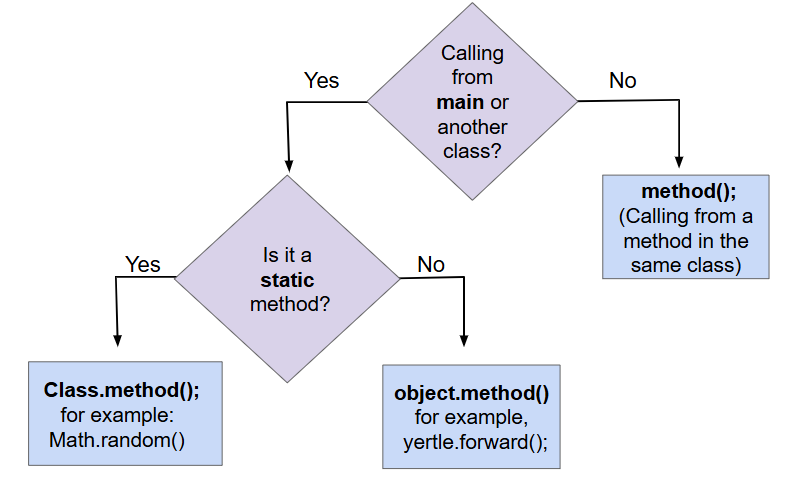
Comparing Method Calls to Static and Instance Methods
When writing class methods, they can be public or private. The static keyword is placed right after the public/private modifier and right before the type of variables and methods in their declarations.
public class ClassName
{
  // static class variable
  public static type variableName;

  // static class method
  public static returnType methodName(parameters)
  {
        // implementation not shown
  }
}
Class (static) methods can access or change the values of class (static) variables and can call other class (static) methods. However, they cannot access or change the values of (non-static) instance variables or call (nont-static) instance methods without being passed an instance of the class via a parameter. For example, the main method which is static can call other static methods directly with or without the classname, but it cannot call instance methods without first creating an object. Try this below to see “non-static variable or method cannot be referenced from a static context” errors.
Exercise 1
Note that the static method printStatic has errors in it because it cannot access the instance variables and methods. Fix the printStatic method by giving it the Person object as a parameter and using this object to call its instance variables and methods. Also fix the method call to printStatic in main to pass in the object as an argument.
Open the
01-staticmethodsfolder and editPerson.java. Press Run to try it; Run Tests checks it (2 tests). Its tests check your code, not what it prints: “Code containsprintStatic(p)”, “Code containsprintStatic(Person”.
This example also shows how instance methods easily share data variables without the need for parameters. Whereas, static methods cannot directly access the instance methods. They are often used for utility methods, like Math operations, that do not need access to the instance variables of an object.
Class Variables
Class variables belong to the class, with all objects of a class sharing a single copy of the class variable. Class variables are designated with the static keyword before the variable type. Class variables that are designated public are accessed outside of the class by using the class name and the dot operator, since they are associated with a class, not objects of a class.
In the following class Person, there is a static variable called personCounter that is incremented each time the Person constructor is called to initialize a new Person object. The static method printCounter prints out its value. You can also watch how it works in the Java visualizer.
Exercise 2
What will the code print out? Try adding another Person object and see what happens.
Open the
02-PersonClassStaticCounterfolder and editPerson.java. This one is not graded, so check it yourself.
Another common use for static variables is to keep track of a minimum or maximum value or an average of the values in a collection of objects.
Check your understanding: Consider the class Temperature below which has a static variable. What is the output of the main method below?
public class Temperature
{
    private double temperature;
    public static double maxTemp = 0;

    public Temperature(double t)
    {
        temperature = t;
        if (t > maxTemp)
        {
             maxTemp = t;
        }
    }

    public static void main(String[] args)
    {
        Temperature t1 = new Temperature(75);
        Temperature t2 = new Temperature(100);
        Temperature t3 = new Temperature(65);
        System.out.println("Max Temp: " + Temperature.maxTemp);
    }
}
Answer it on CS Awesome: https://runestone.academy/ns/books/published/csawesome2/topic-3-7-static-vars-methods.html#staticTrace
You can see this code in action in the Java visualizer.
Exercise 3
Fix the bugs in the code. Static methods should only access static variables.
Open the
03-TemperatureBugsfolder and editTemperature.java. Press Run to try it; Run Tests checks it (2 tests). Its tests check your code, not what it prints: “static printMax() header”, “printMax method returns the right value”.
final keyword
The keyword final can be used in front of a variable declaration to make it a constant value that cannot be modified. Constants are traditionally capitalized.
final double PI = 3.14;
Exercise 4
Try the code and notice the syntax error when we try to change the constant PI. Put the comment symbols // in front of that line to remove the error and run it again.
Open the
04-finalPifolder and editTestFinal.java. This one is not graded, so check it yourself.
Coding Challenge: Static Song and counter
In Unit 1, we wrote a class with methods to print out the song The Ants Go Marching. Here’s the song with 3 verses, where the chorus is the last 2 lines of each verse:
Verse 1:
The ants go marching one by one, hurrah, hurrah
The ants go marching one by one, hurrah, hurrah
The ants go marching one by one
The little one stops to suck a thumb
And they all go marching down to the ground
To get out of the rain, BOOM! BOOM! BOOM! BOOM!

Verse 2:
The ants go marching two by two, hurrah, hurrah
The ants go marching two by two, hurrah, hurrah
The ants go marching two by two
The little one stops to tie a shoe
And they all go marching down to the ground
To get out of the rain, BOOM! BOOM! BOOM! BOOM!

Verse 3:
The ants go marching three by three, hurrah, hurrah
The ants go marching three by three, hurrah, hurrah
The ants go marching three by three
The little one stops to climb a tree
And they all go marching down to the ground
To get out of the rain, BOOM! BOOM! BOOM! BOOM!
Let’s create a class to print out the song with 2 methods chorus() and verse, where the verse takes 2 parameters for the numbers and the action. Notice that this is a class where there are no instance variables and we don’t really need to generate multiple objects. With students or pets, it makes sense to have multiple objects. With a class printing out a song, we can just make the methods static and have just 1 copy of them.
- Create a class called
Songwith two static methods:chorus()andverse(). The chorus method prints out the last two lines of each verse. The verse method takes two parameters, a number and an action, and prints out the verse with the number and action. - Add a public static variable called numVerses to the class that keeps track of the number of verses. Increment this variable in the method verse and print it out at the beginning of the verse.
Exercise 5
This class should print out the The Ants Go Marching Song using two static methods: chorus() and verse(). The chorus method should print out the last two lines of each verse. The verse method should take two parameters, a number and an action, and print out the verse with the number and action. Add a public static variable called numVerses that keeps track of the number of verses. Increment this variable in the method verse and print it out at the beginning of the verse.
Open the
05-antsong-static-challengefolder and editSong.java. Press Run to try it; Run Tests checks it (5 tests).
Summary
- (AP 3.7.A.1) Class methods cannot access or change the values of instance variables or call instance methods without being passed an instance of the class via a parameter.
- (AP 3.7.A.2) Class methods can access or change the values of class variables and can call other class methods.
- (AP 3.7.B.1) Class variables belong to the class, with all objects of a class sharing a single copy of the class variable. Class variables are designated with the static keyword before the variable type.
- (AP 3.7.B.2) Class variables that are designated
publicare accessed outside of the class by using the class name and the dot operator, since they are associated with a class, not objects of a class. - (AP 3.7.B.3) When a variable is declared
final, its value cannot be modified.
For teachers
3.7 Class (static) Variables and Methods
Students read CSAwesome2's “Class (static) Variables and Methods” in CS Room and work through its 5 Java coding exercises (3 graded, 2 ungraded).
- Time: 1 class period
- Tests: 9 in 3 graded exercises, set up for you when you import the lesson
Goals
- (AP 3.7.A.1) Class methods cannot access or change the values of instance variables or call instance methods without being passed an instance of the class via a parameter.
- (AP 3.7.A.2) Class methods can access or change the values of class variables and can call other class methods.
- (AP 3.7.B.1) Class variables belong to the class, with all objects of a class sharing a single copy of the class variable. Class variables are designated with the static keyword before the variable type.
- (AP 3.7.B.2) Class variables that are designated
publicare accessed outside of the class by using the class name and the dot operator, since they are associated with a class, not objects of a class. - (AP 3.7.B.3) When a variable is declared
final, its value cannot be modified.
Before class
- Import the lesson into your class from the Lessons page, or with New assignment → Use a lesson. It arrives as a draft with its tests already set up.
- Publish it.
- The original page, with its multiple-choice questions, is on CS Awesome: https://runestone.academy/ns/books/published/csawesome2/topic-3-7-static-vars-methods.html
- CS Awesome's own teacher materials: the CS Awesome teacher site
In class
- Students read
README.md. Questions that need CS Awesome's interactive widgets link back to it. - Students do exercises 01–05, each in its own folder, pressing Run to try their code.
- Run Tests checks every graded exercise at once; scores appear in the Gradebook. Grading uses your copy of the tests, so a student who edits theirs does not change the grade.
Exercises
| Folder | File | Grading | Tests |
|---|---|---|---|
01-staticmethods | Person.java | Checks code text only | 2 |
02-PersonClassStaticCounter | Person.java | Not graded; students check it themselves | 0 |
03-TemperatureBugs | Temperature.java | Checks code text only | 2 |
04-finalPi | TestFinal.java | Not graded; students check it themselves | 0 |
05-antsong-static-challenge | Song.java | Autograded | 5 |
Teachers can download a reference solution after signing in.