2.12 Informal Runtime Analysis of Loops
From CS Awesome 2CC BY-NC-SA 4.0Original page
Java1 class period3 exercisesNot autograded
Files
2.12 Informal Runtime Analysis of Loops
Each coding exercise has its own folder. Open its .java file and press Run to try it.
In this lesson, you will practice tracing through code with loops and analyzing loops to determine how many times they run.
Tracing Loops
Let’s practice tracing through loops with many variables. Remember to make a tracing table to keep track of all the variables, the iterations, and the output.
Here is a complex loop. See if you can trace the code on paper by making a tracing table to predict what the code will do when you run it.
Exercise 1
Can you trace through this code? Add in output statements System.out.println("var1: " + var1 + " var2: " + var2); before the loop and inside the loop at the end to keep track of the variables and run.
Open the
01-example-trace-loopfolder and editTrace.java. This one is not graded, so check it yourself.
Did your trace table look like the following?
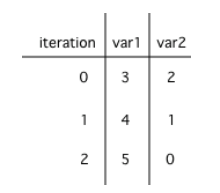
A table showing the values of all of the variables each time through the loop. The 0 means before the first loop.
Check your understanding: What are the values of var1 and var2 when the code finishes executing?
int var1 = 0;
int var2 = 2;

while ((var2 != 0) && ((var1 / var2) >= 0))
{
   var1 = var1 + 1;
   var2 = var2 -1;
}
Answer it on CS Awesome: https://runestone.academy/ns/books/published/csawesome2/topic-2-12-loop-analysis.html#loop-trace-count
Check your understanding: What are the values of x and y when the code finishes executing?
int x = 2;
int y = 5;

while (y > 2 && x < y)
{
   x = x + 1;
   y = y - 1;
}
Answer it on CS Awesome: https://runestone.academy/ns/books/published/csawesome2/topic-2-12-loop-analysis.html#loop-trace-count2
Counting Loop Iterations
Loops can be also analyzed to determine how many times they run. This is called run-time analysis or a statement execution count. A statement execution count indicates the number of times a statement is executed by the program. Statement execution counts are often calculated informally through tracing and analysis of the iterative statements.
Exercise 2
How many stars are printed out in this loop? How many times does the loop run? Figure it out on paper before you run the code.
Open the
02-countstars1folder and runCountLoop.java. It is an example, so it has no tests.
If you made a trace table, you would know that the loop runs when i = 3, 4, 5, 6 but finishes as soon as i becomes 7 since that is not less than 7. So, the loop runs 4 times. Or you can use the shortcut formula in the note below.
The number of times a loop executes can be calculated by (largestValue - smallestValue + 1).
- If the loop uses counter <= limit, limit is the largest value.
- If the loop uses counter < limit, limit-1 is the largest value that allows the loop to run.
In the code above the largest value that allows the loop to run is 6 (which is the largest value < 7) and the smallest value that allows the loop to execute is 3 so this loop executes (6 - 3 + 1 = 4 times).
Nested loops are loops within loops. The number of times a nested loop runs is the number of times the outer loop runs times the number of times the inner loop runs. Here is an example of a nested loop that prints a rectangle of stars.
Exercise 3
How many stars are printed out by the following loops? How many times do the loops run? Calculate on paper before you run the code.
Open the
03-countstarsfolder and runNestedLoops.java. It is an example, so it has no tests.
The number of times a nested for loop body is executed is the number of times the outer loop runs multiplied by the number of times the inner loop runs (outer loop runs * inner loop runs).
For the example above, the outer loop executes 4 - 0 + 1 = 5 times and the inner 9 - 0 + 1 = 10 times so the total is 5 * 10 = 50.
Coding Challenge: POGIL Analyzing Loops
We encourage you to do this activity as a POGIL (Process Oriented Guided Inquiry Learning) group activity. POGIL groups are self-managed teams of up to 4 students where everyone has a POGIL role and works together to solve the problems, making sure that everyone in the team participates and learns.
Do the following exercises in your group. Make sure you draw the trace tables keeping track of all the variables in the loops. Use the formulas to determine how many times the loops run. If your group finishes early, do some of the multiple-choice problems in the Practice and Summary section of this unit.
Check your understanding: How many times does the following code print a
*?for (int i = 3; i < 8; i++) { for (int y = 1; y < 5; y++) { System.out.print("*"); } System.out.println(); }Answer it on CS Awesome: https://runestone.academy/ns/books/published/csawesome2/topic-2-12-loop-analysis.html#qln1
Check your understanding: What does the following code print?
for (int i = 2; i < 8; i++)
{
    for (int y = 1; y <= 5; y++)
    {
        System.out.print("*");
    }
    System.out.println();
}
Answer it on CS Awesome: https://runestone.academy/ns/books/published/csawesome2/topic-2-12-loop-analysis.html#qln2
Check your understanding: What does the following print?
for (int i = 3; i <= 9; i++)
{
   for (int j = 6; j > 0; j--)
   {
       System.out.print("*");
   }
   System.out.println();
}
Answer it on CS Awesome: https://runestone.academy/ns/books/published/csawesome2/topic-2-12-loop-analysis.html#qln3
Check your understanding: Consider the following code segment. How many times is the string “Hi!” printed as a result of executing the code segment?
int i = 0;
while (i <= 4)
{
  for (int j = 0; j < 3; j++)
  {
    System.out.println("Hi!");
  }
  i++;
}
Answer it on CS Awesome: https://runestone.academy/ns/books/published/csawesome2/topic-2-12-loop-analysis.html#qln4
Summary
- (AP 2.12.A.1) A statement execution count indicates the number of times a statement is executed by the program. Statement execution counts are often calculated informally through tracing and analysis of the iterative statements.
- A trace table can be used to keep track of the variables and their values throughout each iteration of the loop.
- The number of times a loop executes can be calculated by
largestValue - smallestValue + 1where these are the largest and smallest values of the loop counter variable possible in the body of the loop. - The number of times a nested for-loop runs is the number of times the outer loop runs times the number of times the inner loop runs.
- In non-rectangular loops, the number of times the inner loop runs can be calculated with the sum of natural numbers formula
n(n+1)/2where n is the number of times the outer loop runs or the maximum number of times the inner loop runs.
Loop Analysis Game
Try the game below to practice loop analysis. Click on Loops and click on the number of times the loop runs. For an added challenge, try the check boxes for Backwards, Do While, and Nested. We encourage you to work in pairs and see how high a score you can get.
Play the game on CS Awesome: https://runestone.academy/ns/books/published/csawesome2/topic-2-12-loop-analysis.html
Review/Practice for Loops
This lesson ends the unit and the section on loops. You can now do the following review and practice lessons at the end of the unit.
For teachers
2.12 Informal Runtime Analysis of Loops
Students read CSAwesome2's “Informal Runtime Analysis of Loops” in CS Room and work through its 3 Java coding exercises (not graded).
- Time: 1 class period
- Tests: none
Goals
- (AP 2.12.A.1) A statement execution count indicates the number of times a statement is executed by the program. Statement execution counts are often calculated informally through tracing and analysis of the iterative statements.
Before class
- Import the lesson into your class from the Lessons page, or with New assignment → Use a lesson. It arrives as a draft.
- Publish it.
- The original page, with its multiple-choice questions, is on CS Awesome: https://runestone.academy/ns/books/published/csawesome2/topic-2-12-loop-analysis.html
- CS Awesome's own teacher materials: the CS Awesome teacher site
In class
- Students read
README.md. Questions that need CS Awesome's interactive widgets link back to it. - Students run the examples in exercises 01–03, each in its own folder.
Exercises
| Folder | File | Grading | Tests |
|---|---|---|---|
01-example-trace-loop | Trace.java | Not graded; students check it themselves | 0 |
02-countstars1 | CountLoop.java | Example, not graded | 0 |
03-countstars | NestedLoops.java | Example, not graded | 0 |