2.11 Nested Iteration
From CS Awesome 2CC BY-NC-SA 4.0Original page
Java2 class periods3 exercises7 graded tests
Files
2.11 Nested Iteration
Each coding exercise has its own folder. Open its .java file and press Run to try it. Run Tests checks every graded exercise in this lesson at once.
Nested iteration statements (or nested loops) are iteration statements that appear in the body of another iteration statement. Or in simpler terms, a loop inside of another loop. Nested loops are typically used for working with two dimensions, for example printing a rectangle of stars in rows and columns as shown below. When a loop is nested inside another loop, the inner loop runs many times inside the outer loop. In each iteration of the outer loop, the inner loop will be re-started. The inner loop must finish all of its iterations before the outer loop can continue to its next iteration.
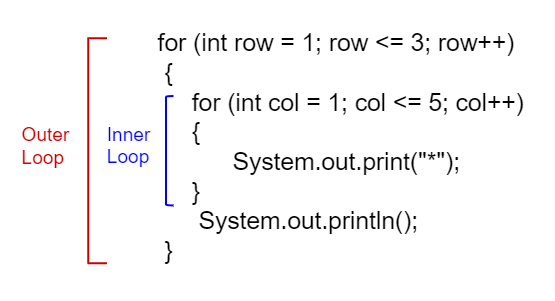
Nested Loops
What does the following code print out? Watch the code run in the Java visualizer and then forward. Notice how the inner loop is started over for each row. Can you predict how many rows and columns of stars there will be?
Exercise 1
Can you change the code to print a rectangle with 10 rows and 8 columns of stars? You can also try replacing line 10 with this print statement to see the rows and columns: System.out.print(row + "-" + col + " ");
Open the
01-lcfcnl1folder and editNestedLoops.java. Press Run to try it; Run Tests checks it (1 test). Its test checks your code, not what it prints: “10 rows”.
Check your understanding: What does the following code print?
for (int i = 1; i < 7; i++)
{
    for (int y = 1; y <= 5; y++)
    {
        System.out.print("*");
    }
    System.out.println();
}
Answer it on CS Awesome: https://runestone.academy/ns/books/published/csawesome2/topic-2-11-nested-loops.html#nested1
Check your understanding: What does the following code print?
for (int i = 0; i < 5; i++)
{
    for (int j = 3; j >= 1; j--)
    {
        System.out.print("*");
    }
    System.out.println();
}
Answer it on CS Awesome: https://runestone.academy/ns/books/published/csawesome2/topic-2-11-nested-loops.html#nested2
Check your understanding: The main method in the following class should print 10 rows with 5 *s in each row. But, the blocks have been mixed up and include one extra block that isn’t needed in the solution. — answer it on CS Awesome: https://runestone.academy/ns/books/published/csawesome2/topic-2-11-nested-loops.html#nestedParsons1
Nested Loops with Turtles
Try nested loops with turtles to create a snowflake design!
Exercise 2
The turtle below is trying to draw a square many times to create a snowflake pattern. Can you change the outer loop so that the pattern completes all the way around? Try different ending values for the counter i to find the smallest number that works between 5 and 15.
To make the drawing faster, you can call the World or Turtle object’s setSpeed method with a 0-100 delay value where 0 is the fastest.
Open the
02-TurtleNestedLoopfolder and editTurtleDrawSnowflake.java. Press Run to try it; Run Tests checks it (1 test). Its test checks your code, not what it prints: “Iterations complete drawing”. It draws pictures: Run saves the drawing as an image in its folder, and Run Tests checks the code without the drawing.
Coding Challenge: Turtle Snowflakes
In the last exercise, you used nested for-loops to have the turtle draw a square repeatedly to make a snowflake. Use the exercise below to have yertle draw the following shapes using nested loops. We encourage you to work in pairs on this.
- Complete the code in the exercise below to draw a snowflake of triangles. Remember that triangles have 3 sides and you will need to turn 120 degrees (external angle) 3 times to draw the triangle. Use the
turnAmountvariable for the single turn after drawing a triangle. How many times did you need to run the outer loop to go all the way around? Try changing theturnAmountvariable to 40 to see how many times you need to loop with a wider distance between the triangles. - In the exercise above, you figured out how many times to run the outer loop to finish the snowflake. You may have noticed that the number of times the loop needs to run is related to the angle you turn before drawing the next triangle. These turns have to add up to 360 degrees to go all the way around. Change the outer loop so that it runs the number of times needed by using a formula with the
turnAmountvariable and 360. Can you draw a snowflake using more or less triangles than before by just changing theturnAmountvalue? - Create another variable called
nfor the number of sides in the polygon the inner loop draws. Change the angle in the inner loop to also use a formula with 360 and this new variable. Can you change your snowflake to draw squares or pentagons instead? (Note if this overwhelms the exercise server and times out, try a largerturnAmount.) - Let’s add some more color! Add an
if/elsestatement that changes the Color of the pen before the inner loop depending on whether the outer loop variable is odd or even. Remember that even numbers have no remainder when divided by 2. - Be creative and design a unique snowflake!
Exercise 3
Use nested for-loops to have the turtle draw a snowflake of polygons. Use the variable turnAmount to turn after each shape and the variable n for the sides of the polygon.
To make the drawing faster, you can call the World or Turtle object’s setSpeed method with a 0-100 delay value where 0 is the fastest.
Open the
03-challenge-Turtle-Nested-Loop-Snowflakesfolder and editTurtleSnowflakes.java. Press Run to try it; Run Tests checks it (5 tests). Its tests check your code, not what it prints: “2 For loops (nested)”, “if statement to change colors”, “Should only need forward() once”, “Should only need turn(...) twice”, “Calculates number of iterations using turnAmount”. It draws pictures: Run saves the drawing as an image in its folder, and Run Tests checks the code without the drawing.
Summary
- Nested iteration statements are iteration statements that appear in the body of another iteration statement.
- When a loop is nested inside another loop, the inner loop must complete all its iterations before the outer loop can continue.
For teachers
2.11 Nested Iteration
Students read CSAwesome2's “Nested Iteration” in CS Room and work through its 3 Java coding exercises.
- Time: 2 class periods
- Tests: 7 in 3 graded exercises, set up for you when you import the lesson
Goals
- Nested iteration statements are iteration statements that appear in the body of another iteration statement.
- When a loop is nested inside another loop, the inner loop must complete all its iterations before the outer loop can continue.
Before class
- Import the lesson into your class from the Lessons page, or with New assignment → Use a lesson. It arrives as a draft with its tests already set up.
- Publish it.
- The original page, with its mixed-up code and multiple-choice questions, is on CS Awesome: https://runestone.academy/ns/books/published/csawesome2/topic-2-11-nested-loops.html
- CS Awesome's own teacher materials: the CS Awesome teacher site
In class
- Students read
README.md. Questions that need CS Awesome's interactive widgets link back to it. - Students do exercises 01–03, each in its own folder, pressing Run to try their code.
- Run Tests checks every graded exercise at once; scores appear in the Gradebook. Grading uses your copy of the tests, so a student who edits theirs does not change the grade.
Exercises
| Folder | File | Grading | Tests |
|---|---|---|---|
01-lcfcnl1 | NestedLoops.java | Checks code text only | 1 |
02-TurtleNestedLoop | TurtleDrawSnowflake.java | Checks code text only (draws pictures; graded without the drawing) | 1 |
03-challenge-Turtle-Nested-Loop-Snowflakes | TurtleSnowflakes.java | Checks code text only (draws pictures; graded without the drawing) | 5 |
Teachers can download a reference solution after signing in.