1.7 APIs and Libraries
From CS Awesome 2CC BY-NC-SA 4.0Original page
Java1 class period3 exercises4 graded tests
Files
1.7 APIs and Libraries
Each coding exercise has its own folder. Open its .java file and press Run to try it. Run Tests checks every graded exercise in this lesson at once.
Earlier in this book, we used code like System.out.println("hello, world!") to print to the screen. When we include that code in a program, we don’t have to worry about exactly how it works; we just need to know what it does. Namely, it causes the text “hello, world!” to appear on the screen.
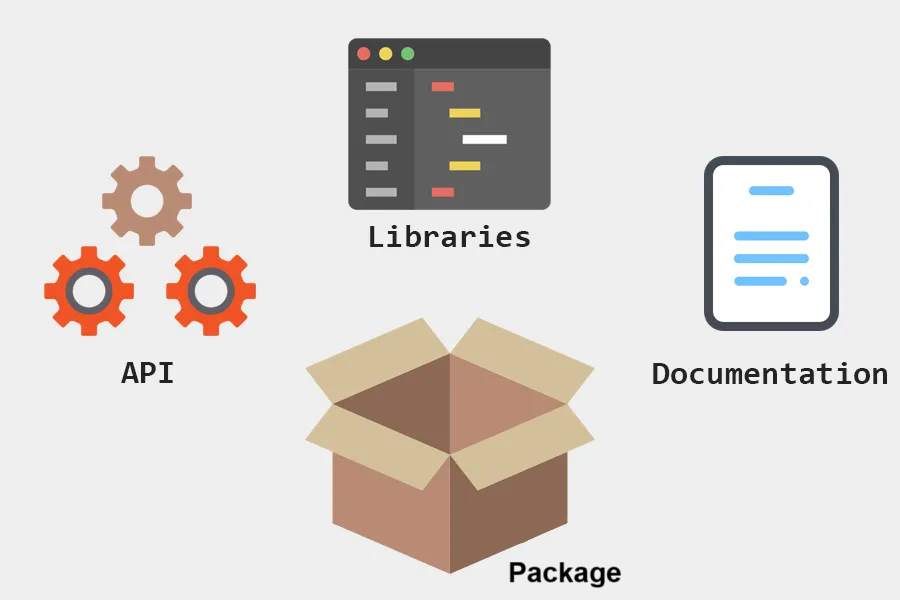
A collection of code written by other programmers that we can use is called a library and the details of how to use a library are described in its Application Programming Interface, or API for short. System.out.println() is part of the Java API, a large set of code that comes with Java.
APIs and libraries are essential to programming because they allow us to focus on the specific task we are trying to accomplish without having to rewrite the same bits of functionality over and over.
Library and API
The Turtle Library: Classes, Attributes, and Behaviors
One of the great things about Java is the number of libraries written by other programmers that we can use. One such library is the Turtle Java library, written by one of the author’s of this book, Dr. Barbara Ericson and included with this lesson. It allows us to create drawings using animated turtles that move around the screen. Try pressing Run below to see a turtle in action.
Exercise 1
Open the
01-demo-turtle-codefolder and runTurtleTest.java. It is an example, so it has no tests. It draws pictures: Run saves the drawing as an image in its folder.
The Turtle library is named after its main class, Turtle. A class defines a specific reference type and is the building block of object-oriented programming. You'll write your own classes in Unit 3, but in this unit, we just want to focus on using classes that other programmers have written.
Each class defines a new kind of value similar to how each primitive type like int or double define a particular kind of value, such as a 32-bit integer quantity for an int or a 64-bit floating point value for a double. These new kinds of values, defined by classes, are called objects which is where object-oriented programming gets its name. Existing classes like Turtle can be utilized to create Turtle objects like yertle that can move around the screen, drawing lines. We will learn more about classes and objects in lesson 1.12.
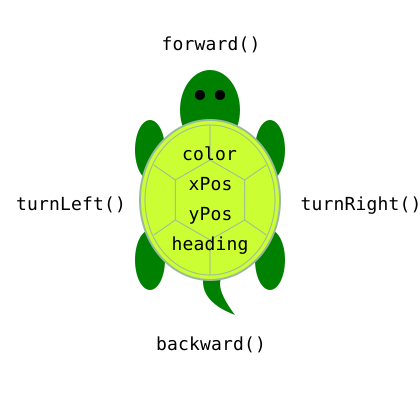
Classes define the structure of objects in terms of attributes and behaviors. Attributes refer to the data related to the class and are stored in variables. Behaviors refer to what instances of the class can do (or what can be done with them) and are defined by methods. The following picture of a turtle shows some of the attributes every Turtle object has, such as a color, xPos, yPos, and heading as well as behaviors implemented as methods like forward(), backward(), turnLeft(), and turnRight() shown in the picture written around the turtle.
Turtle Attributes and Behaviors
The Java program in the exercise above creates a Turtle object and stores a reference to it in the variable yertle. The following two lines of code are used to tell the turtle to move forward and then turn right.
yertle.forward();
yertle.turnRight();
The period (.) after yertle in both those lines is called the dot operator and it allows us to access the attributes and methods of an object. In the first line the dot says get the method named forward() defined in the Turtle class and call it on the turtle object named by the variable yertle. The exact behavior of the method will depend on the current values of yertle’s attributes such as its color, its x and y position, and its heading. For instance, calling forward() will cause the turtle to draw a line from its current x and y position to a new position 100 pixels away in whatever direction the turtle is facing and the color of the line will be determined by the turtle’s color.
Documentation found in API specifications and libraries is essential to understanding the attributes and behaviors of a class defined by the API. Here’s the API documentation that lists all of the Turtle methods found in the Turtle Javadocs.
Exercise 2
Try pressing Run to see what the following program does. Then add 1 more line of code on line 16 to make yertle go forward again.
Open the
02-TurtleAPIfolder and editTurtleTest.java. Press Run to try it; Run Tests checks it (1 test). Its test checks your code, not what it prints: “yertle.forward() count”. It draws pictures: Run saves the drawing as an image in its folder, and Run Tests checks the code without the drawing.
Check your understanding: Which way does a turtle face when it is first created? — answer it on CS Awesome: https://runestone.academy/ns/books/published/csawesome2/topic-1-7-APIs-and-libraries.html#turtle_dir
Check your understanding: What does
Turtlerefer to in the program above? — answer it on CS Awesome: https://runestone.academy/ns/books/published/csawesome2/topic-1-7-APIs-and-libraries.html#turtle_type
Check your understanding: What does
turnRightrefer to in the program above? — answer it on CS Awesome: https://runestone.academy/ns/books/published/csawesome2/topic-1-7-APIs-and-libraries.html#type_turn_right
Check your understanding: Every turtle has a position. What kind of program element stores information like a turtle’s position? — answer it on CS Awesome: https://runestone.academy/ns/books/published/csawesome2/topic-1-7-APIs-and-libraries.html#type_position
Check your understanding: What are attributes of a class? — answer it on CS Awesome: https://runestone.academy/ns/books/published/csawesome2/topic-1-7-APIs-and-libraries.html#attributes_class
Check your understanding: The following program uses a turtle to draw a sideways capital L as seen in the image, but the lines are mixed up. The program should do all necessary set-up. — answer it on CS Awesome: https://runestone.academy/ns/books/published/csawesome2/topic-1-7-APIs-and-libraries.html#parsons_TurtleL
Packages
While classes are the main building blocks of Java programs, most programs and libraries are made up of multiple classes that need to be used together. In Java, related classes can be grouped together into a package. You can think of a package like a folder where you store related documents. Classes that work together will likely be grouped into a single package just to keep things organized. But more importantly, when we want to use a class defined in a package in our own program, we can import it and then use it as if we had written it in our own program.
Because related classes are usually collected into the same package, Java programmers tend to use the terms library, API, and package somewhat interchangeably. But to be precise, a library is a collection of classes written by other programmers that you can use, the library’s API describes how you use it, and the classes in the library are probably organized into one or more Java packages.
Later on, we will learn to import classes from Java packages to use in our code, but first let’s talk about a package whose classes are always available in any Java program: java.lang.
The java.lang package contains key classes that are fundamental to the Java programming language, such as String and System. Like all packages that are part of Java, java.lang is documented in Javadocs, Java’s version of online API documentation. Learning to read and navigate Javadocs is a key part of being a Java programmer.
The Javadocs for a class will document all the publicly available attributes (called fields in Javadocs) and behaviors (called methods). How can you tell fields and methods apart when you look at library documentation? Well, for one thing, they’re in different sections. And another easy way is that methods will always have parentheses after them, for example forward() or println(). Sometimes there’s nothing between the parentheses, but they are still necessary. Other times they contain data that the method needs to do its job, for example what to print. Since attributes, a.k.a. fields, are just variables they will not have parentheses after the name.
Check your understanding: Now let’s practice reading Javadocs to better understand the code we’ve been using to print to the screen:
System.out.println. Take a look at the Javadocs for thejava.langpackage. Can you find the documentation for theSystemclass? — answer it on CS Awesome: https://runestone.academy/ns/books/published/csawesome2/topic-1-7-APIs-and-libraries.html#count-println
Check your understanding: Drag the definition from the left and drop it on the correct concept on the right. — answer it on CS Awesome: https://runestone.academy/ns/books/published/csawesome2/topic-1-7-APIs-and-libraries.html#API_vocab_match
Check your understanding: What is the purpose of APIs and libraries in programming? — answer it on CS Awesome: https://runestone.academy/ns/books/published/csawesome2/topic-1-7-APIs-and-libraries.html#purpose_apis
Coding Challenge: Turtle Drawing
Make yertle the Turtle draw a shape. For example, have it draw a square or a zigzag shape or a block letter by calling the forward method and a turn method multiple times. We encourage you to work in pairs for this challenge. In the next lessons, we will draw more complicated shapes. Here are some simple turtle methods that you could use or look at the Turtle Javadocs for the complete list.
yertle.forward();yertle.turnLeft();yertle.turnRight();yertle.backward();yertle.penUp();yertle.penDown();
Exercise 3
Have yertle draw a shape, for example a square or a zigzag shape or a block letter by calling the forward method and a turn method multiple times.
Open the
03-challenge1-7-TurtleShapefolder and editTurtleShape.java. Press Run to try it; Run Tests checks it (3 tests). Its tests check your code, not what it prints: “3+ turnRight() or turnLeft()”, “forward or backward”, “More than 24 lines of code”. It draws pictures: Run saves the drawing as an image in its folder, and Run Tests checks the code without the drawing.
Summary
- (AP 1.7.A.1) Libraries are collections of classes written by other programmers.
- (AP 1.7.A.1) An Application Programming Interface (API) specification informs the programmer how to use classes in a library.
- (AP 1.7.A.1) Documentation found in API specifications and libraries is essential to understanding the attributes and behaviors of a class defined by the API.
- (AP 1.7.A.1) Classes in the APIs and libraries are grouped into packages that can be imported into a program.
- (AP 1.7.A.1) A class defines a specific reference type and is the building block of object-oriented programming. Existing classes and class libraries can be utilized to create objects.
- (AP 1.7.A.2) Attributes refer to the data related to the class and are stored in variables.
- (AP 1.7.A.2) Behaviors refer to what instances of the class can do (or what can be done with them) and are defined by methods.
AP Practice
Try these AP practice questions that will help to prepare you for the AP Classroom progress checks.
Check your understanding: The following is an excerpt from a class specification for the API for a
Turtleclass.
- An int variable called
xPosto represent the x-coordinate of the turtle- An int variable called
yPosto represent the y-coordinate of the turtle- A method called
forward()that moves the turtle forward by 100 pixels- A method called
turnRight()that turns the turtle 90 degrees to the rightBased on the
TurtleAPI above, which of the following descriptions is accurate?Answer it on CS Awesome: https://runestone.academy/ns/books/published/csawesome2/topic-1-7-APIs-and-libraries.html#AP-API1
Check your understanding: The following is an excerpt from a class specification for the API for a
Turtleclass.
- An int variable called
xPosto represent the x-coordinate of the turtle- An int variable called
yPosto represent the y-coordinate of the turtle- A method called
forward()that moves the turtle forward by 100 pixels- A method called
turnRight()that turns the turtle 90 degrees to the rightBased on the
TurtleAPI above, which of the following descriptions is accurate?Answer it on CS Awesome: https://runestone.academy/ns/books/published/csawesome2/topic-1-7-APIs-and-libraries.html#AP-API2
For teachers
1.7 APIs and Libraries
Students read CSAwesome2's “APIs and Libraries” in CS Room and work through its 3 Java coding exercises (2 graded, 1 example).
- Time: 1 class period
- Tests: 4 in 2 graded exercises, set up for you when you import the lesson
Goals
- (AP 1.7.A.1) Libraries are collections of classes written by other programmers.
- (AP 1.7.A.1) An Application Programming Interface (API) specification informs the programmer how to use classes in a library.
- (AP 1.7.A.1) Documentation found in API specifications and libraries is essential to understanding the attributes and behaviors of a class defined by the API.
- (AP 1.7.A.1) Classes in the APIs and libraries are grouped into packages that can be imported into a program.
- (AP 1.7.A.1) A class defines a specific reference type and is the building block of object-oriented programming. Existing classes and class libraries can be utilized to create objects.
- (AP 1.7.A.2) Attributes refer to the data related to the class and are stored in variables.
- (AP 1.7.A.2) Behaviors refer to what instances of the class can do (or what can be done with them) and are defined by methods.
Before class
- Import the lesson into your class from the Lessons page, or with New assignment → Use a lesson. It arrives as a draft with its tests already set up.
- Publish it.
- The original page, with its fill-in, matching, mixed-up code and multiple-choice questions, is on CS Awesome: https://runestone.academy/ns/books/published/csawesome2/topic-1-7-APIs-and-libraries.html
- CS Awesome's own teacher materials: the CS Awesome teacher site
In class
- Students read
README.md. Questions that need CS Awesome's interactive widgets link back to it. - Students do exercises 01–03, each in its own folder, pressing Run to try their code.
- Run Tests checks every graded exercise at once; scores appear in the Gradebook. Grading uses your copy of the tests, so a student who edits theirs does not change the grade.
Exercises
| Folder | File | Grading | Tests |
|---|---|---|---|
01-demo-turtle-code | TurtleTest.java | Example, not graded (draws pictures) | 0 |
02-TurtleAPI | TurtleTest.java | Checks code text only (draws pictures; graded without the drawing) | 1 |
03-challenge1-7-TurtleShape | TurtleShape.java | Checks code text only (draws pictures; graded without the drawing) | 3 |
Teachers can download a reference solution after signing in.