1.6 Compound Assignment Operators
From CS Awesome 2CC BY-NC-SA 4.0Original page
Java1 class period1 exercise2 graded tests
Files
1.6 Compound Assignment Operators
Each coding exercise has its own folder. Open its .java file and press Run to try it. Run Tests checks every graded exercise in this lesson at once.
Compound assignment operators +=, -=, *=, /=, and %= are shortcuts that do a math operation and assignment in one step. For example, x += 1 adds 1 to the current value of x and assigns the result back to x. It is the same as x = x + 1. This pattern is possible with any operator put in front of the = sign, as seen below.
If you need a way to remember the order of the two characters in the compound operators, think about the order things happen: first we use the math operator, such as +, to get the new value and then the value is assigned back to the variable with =. So it’s operator then equals sign: +=.
Since changing the value of a variable by one is especially common, there are two extra concise operators ++ and --, also called the plus-plus or increment operator and minus-minus or decrement operator that set a variable to one greater or less than its current value.
Thus x++ is even more concise way to write x = x + 1 than the compound operator x += 1. You’ll see this shortcut used a lot in loops when we get to them. Similarly, y-- is a more concise way to write y = y - 1. These shortcuts only exist for + and - as they don’t really make sense for other operators.
If you’ve heard of the programming language C++, the name is an inside joke that C, an earlier language which C++ is based on, had been incremented or improved to create C++.
Here’s a table of all the compound arithmetic operators and the extra concise increment and decrement operators and how they relate to fully written out assignment expressions. You can run the code below the table to see these shortcut operators in action!
Arithmetic operators
| Operator | + | - | * | / | % |
|---|---|---|---|---|---|
| Written out | x = x + 1 | x = x - 1 | x = x * 2 | x = x / 2 | x = x % 2 |
| Compound | x += 1 | x -= 1 | x *= 2 | x /= 2 | x %= 2 |
| Extra concise | x++ | x-- |
If you look at real-world Java code, you may occassionally see the
++and--operators used before the name of the variable, like++xrather thanx++. That is legal but not something that you will see on the AP exam.If the operator is after the variable name (called the postfix operator), the value of the variable is changed after evaluating the variable to get its value. And if the operator is before the variable (the prefix operator), the value of the variable is incremented before the variable is evaluated to get the value of the expression. For example, if
xis 10 and we write,System.out.println(x++)it will print 10 but afterwardsxwill be 11. On the other hand if we write,System.out.println(++x), it will print 11 and afterwards the value will be 11.The AP exam will never use the prefix form of these operators nor will it use the postfix operators in a context where the value of the expression matters.
Exercise 1
Run the code to see what the ++ and shorcut operators do. Create more compound assignment statements with shortcut operators as described below and work with a partner to guess what they would print out before running the code.
Open the
01-compound-opsfolder and editTest2.java. Press Run to try it; Run Tests checks it (2 tests). Its tests check your code, not what it prints: “Code contains+=”, “Code contains/=”.
Check your understanding: What are the values of x, y, and z after the following code executes?
int x = 0;
int y = 1;
int z = 2;
x--;
y++;
z+=y;
Answer it on CS Awesome: https://runestone.academy/ns/books/published/csawesome2/topic-1-6-compound-operators.html#q_trace_increment
Check your understanding: What are the values of x, y, and z after the following code executes?
int x = 3;
int y = 5;
int z = 2;
x = z * 2;
y = y / 2;
z++;
Answer it on CS Awesome: https://runestone.academy/ns/books/published/csawesome2/topic-1-6-compound-operators.html#q_trace_increment2
Code Tracing Challenge and Operators Maze
Use paper and pencil or the question response area below to trace through the following program to determine the values of the variables at the end.
Code Tracing is a technique used to simulate a dry run through the code or pseudocode line by line by hand as if you are the computer executing the code. Tracing can be used for debugging or proving that your program runs correctly or for figuring out what the code actually does.
Trace tables can be used to track the values of variables as they change throughout a program. To trace through code, write down a variable in each column or row in a table and keep track of its value throughout the program. Some trace tables also keep track of the output and the line number you are currently tracing.
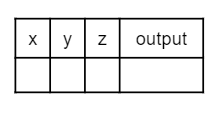
or
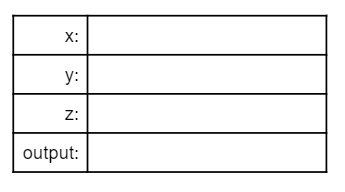
Trace through the following code:
int x = 0;
int y = 5;
int z = 1;
x++;
y -= 3;
z = x + z;
x = y * z;
y %= 2;
z--;
Write your trace table for x, y, and z here showing their results after each line of code.
Discuss this with your class, or answer it on CS Awesome: https://runestone.academy/ns/books/published/csawesome2/topic-1-6-compound-operators.html#challenge1-6
After doing this challenge, play the Operators Maze game. See if you and your partner can get the highest score!
Summary
- (AP 1.6.A.1) Compound assignment operators (
+=,-=,*=,/=,%=) can be used in place of the assignment operator in numeric expressions. A compound assignment operator performs the indicated arithmetic operation between the current value of the variable on the left and the value on the right and then assigns the resulting value to the variable on the left. - (AP 1.6.A.2) The increment operator (
++) and decrement operator (--) are used to add 1 or subtract 1 from the stored value of a numeric variable. The new value is assigned to the variable.
Review/Practice for Unit 1 Part A
You can now do the following review and practice lessons at the end of the unit.
For teachers
1.6 Compound Assignment Operators
Students read CSAwesome2's “Compound Assignment Operators” in CS Room and work through its 1 Java coding exercise.
- Time: 1 class period
- Tests: 2 in 1 graded exercise, set up for you when you import the lesson
Goals
- (AP 1.6.A.1) Compound assignment operators (
+=,-=,*=,/=,%=) can be used in place of the assignment operator in numeric expressions. A compound assignment operator performs the indicated arithmetic operation between the current value of the variable on the left and the value on the right and then assigns the resulting value to the variable on the left. - (AP 1.6.A.2) The increment operator (
++) and decrement operator (--) are used to add 1 or subtract 1 from the stored value of a numeric variable. The new value is assigned to the variable.
Before class
- Import the lesson into your class from the Lessons page, or with New assignment → Use a lesson. It arrives as a draft with its tests already set up.
- Publish it.
- The original page, with its free-response and multiple-choice questions, is on CS Awesome: https://runestone.academy/ns/books/published/csawesome2/topic-1-6-compound-operators.html
- CS Awesome's own teacher materials: the CS Awesome teacher site
In class
- Students read
README.md. Questions that need CS Awesome's interactive widgets link back to it. - Students do exercise 01 in its folder, pressing Run to try their code.
- Run Tests checks every graded exercise at once; scores appear in the Gradebook. Grading uses your copy of the tests, so a student who edits theirs does not change the grade.
Exercises
| Folder | File | Grading | Tests |
|---|---|---|---|
01-compound-ops | Test2.java | Checks code text only | 2 |
Teachers can download a reference solution after signing in.