1.15 Strings
From CS Awesome 2CC BY-NC-SA 4.0Original page
Java2 class periods10 exercises8 graded tests
Files
1.15 Strings
Each coding exercise has its own folder. Open its .java file and press Run to try it. Run Tests checks every graded exercise in this lesson at once.
Strings in Java are objects of the String class. Strings represent sequences of characters and are used to store text like names, addresses, or messages. The String class is part of the java.lang package which is available by default in all Java programs.
Class names in Java, like
String, begin with a capital letter. All primitive types:int,double, andboolean, begin with a lowercase letter. This is one easy way to tell the difference between primitive types and class types.
String References
Exercise 1
Run the code. What does it print?
Open the
01-lcsb1folder and runTest1.java. It is an example, so it has no tests.
The code above declares an object variable named greeting and sets the value of greeting to the Java keyword null to show that it doesn’t refer to any object yet. So System.out.println(greeting); will print null.
Object variables refer to objects in memory. A reference is a way to find the actual object, like adding a contact to your phone lets you reach someone without knowing exactly where they are. The value of greeting is null since the string object has not been created yet.

Initial value for an object reference
In Java there are two ways to create an object of the String class. You can use the new keyword followed by a space and then the class constructor and then in parentheses you can include values used to initialize the fields of the object. This is the standard way to create a new object of a class in Java.
String greeting = new String("Hello");
In Java you can also use just a string literal, which is a set of characters enclosed in double quotes ("), to create a String object.
String greeting = "Hello";
In both cases an object of the String class will be created in memory and the value of the variable greeting will be set to an object reference, a way to find that object.
Exercise 2
The code creates two greeting strings: one using a string literal and the other using new and the String constructor. Change the code to add 2 new strings called firstName and lastName, one using a string literal and the other using new, and print them out with the greetings.
Open the
02-lcsbnewfolder and editStringTest.java. Press Run to try it; Run Tests checks it (1 test). Its test checks your code, not what it prints: “Code has been changed”.
Exercise 3
Now that greeting refers to an actual object we can ask the object what class created it. Try the following. What does it print?
Open the
03-lcsb2folder and runTest2.java. It is an example, so it has no tests.
The code above will first print class java.lang.String since greeting was created by the String class. The full name for the String class is java.lang.String. The java.lang part is the package name. Every class in the Java language is in a package and the standard classes like String are in the java.lang package. Every object in Java knows the class that created it. Also, every class knows its parent class. Yes, a class can have a parent class, just as people have parents. But, in Java a class can only have one parent. A class can inherit object fields and methods from a parent class, just like you might inherit musical ability from a parent. The last print statement will print class java.lang.Object because the parent class (superclass) of the String class is the Object class. All classes in Java inherit from the Object class at some point in their ancestry.
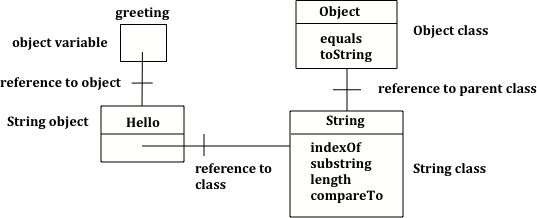
Object variable of type String with a reference to a String object which has a reference to the String class which has a reference to the Object class.
String Operators - Concatenation
Strings can be added to each other to create a new string using the + or += operator . This is also called concatenation. You can also add any other kind of value to a String with + or += and the other value will be converted to a String automatically.
A String object is immutable, meaning once a String object is created, its attributes cannot be changed. So when we add two Strings (or a String and another value converted to a String) we get a new String without making any change to the values being added together just like when we add the ints 1 + 2 the original 1 and 2 aren’t changed. When we use += we are making a new String by adding something to the current value of a variable and then assigning that new value back into the variable, again just like with numbers.
Exercise 4
Try the code. Add another variable for a lastname that is “Hernandez”. Use += or + to add the lastname variable after name to the result. Use += or + to add 2 more exclamation points (!) to the end of the happy birthday greeting in result.
Open the
04-lcso1folder and editTest1.java. Press Run to try it; Run Tests checks it (1 test).
Note that spaces are not added between strings automatically. If you want a space between two strings then add one using + ” ” +. If you forget to add spaces, you will get smushed output like “HiJose” instead of “Hi Jose”. And remember that variables are never put inside the quotes (“”) since this would print the variable name out letter by letter instead of its value.
Check your understanding: Given the following code segment, what is in the string referenced by s1?
String s1 = "xy";
String s2 = s1;
s1 = s1 + s2 + "z";
Answer it on CS Awesome: https://runestone.academy/ns/books/published/csawesome2/topic-1-15-strings.html#qse_1
You can even add other items to a String using the + operator. Primitive values like int and boolean will be converted to a String automatically when concatenated with a String. Any other objects concatenated with a String will be converted to String using their toString method. All objects inherit a toString method from the Object class that returns a String representation of the object and many classes override it to produce a useful human-readable value. Method overriding occurs when a public method in a subclass has the same method signature as a public method in the superclass, but the behavior of the method is specific to the subclass (overriding toString is no longer covered on the AP CSA exam).
Exercise 5
What do you think the following will print? Guess before you hit run. If you want the addition to take place before the numbers are turned into a string what should you do? Try to modify the code so that it adds 4 + 3 before appending the value to the string. Hint: you used this to do addition before multiplication in arithmetic expressions.
Open the
05-lcso2folder and editTest2.java. Press Run to try it; Run Tests checks it (2 tests).
If you are appending a number to a string it will be converted to a string first before being appended.
Since the same operators are processed from left to right this will print 1243. First 4 will be turned into a string and appended to 12 and then 3 will be turned into a string and appended to 124. If you want to do addition instead, try using parentheses!
String Index and Length
A string holds characters in a sequence. Each character is at a position or index which starts with 0 as shown below. An index is a number associated with a position in a string. The length of a string is the number of characters in it including any spaces or special characters. The string below has a length of 14.

A string with the position (index) shown above each character
The first character in a string is at index 0 and the last characters is at length -1. Attempting to access indices outside this range will result in an IndexOutOfBoundsException.
String Methods
The String class includes many methods to process strings. For the AP CSA exam, you only need to know how to use the following String methods. Their descriptions are included in the AP CSA Java Quick Reference Sheet that you get during the exam so you don’t have to memorize these.
- int length() method returns the number of characters in the string, including spaces and special characters like punctuation.
- String substring(int from, int to) method returns a new string with the characters in the current string starting with the character at the
fromindex and ending at the character before thetoindex (if thetoindex is specified, and if not specified it will contain the rest of the string).- int indexOf(String str) method searches for the string
strin the current string and returns the index of the beginning ofstrin the current string or -1 if it isn’t found.- int compareTo(String other) returns a negative value if the current string is less than the
otherstring alphabetically, 0 if they have the same characters in the same order, and a positive value if the current string is greater than theotherstring alphabetically.- boolean equals(Object other) returns true when the characters in the current string are the same as the ones in the
otherstring. This method is inherited from the Object class, but is overridden which means that the String class has its own version of that method.
String Methods: length, substring, indexOf
Run the code below to see the output from the String methods length, substring, and indexOf. The length method returns the number of characters in the string, not the last index which is length -1. The str.substring(from,to) method returns the substring from the from index up to (but not including) the to index. The method str.indexOf(substring) searches for the substring in str and returns the index of where it finds substring in str or -1 if it is not there.
Exercise 6
This code shows the output from String methods length, substring, and indexOf. How many letters does substring(0,3) return? What does indexOf return when its argument is not found?
Open the
06-lcsm1folder and runTest1.java. It is an example, so it has no tests.
Remember that substring(from,to) does not include the character at the
toindex! To return a single character at index i, usestr.substring(i, i + 1).
Exercise 7
The code breaks the preconditions of the substring method and throws an IndexOutOfBoundsException. Can you fix the code by changing the arguments for the substring method to print out the substring “o”?
Open the
07-substring-preconditionsfolder and runSubstringPreconditions.java. It is an example, so it has no tests.
Check your understanding: What is the value of pos after the following code executes?
String s1 = "abccba";
int pos = s1.indexOf("b");
Answer it on CS Awesome: https://runestone.academy/ns/books/published/csawesome2/topic-1-15-strings.html#qsb_3
Check your understanding: What is the value of len after the following code executes?
String s1 = "baby";
int len = s1.length();
Answer it on CS Awesome: https://runestone.academy/ns/books/published/csawesome2/topic-1-15-strings.html#qsb_3b
Check your understanding: What is the value of s2 after the following code executes?
String s1 = "baby";
String s2 = s1.substring(0,3);
Answer it on CS Awesome: https://runestone.academy/ns/books/published/csawesome2/topic-1-15-strings.html#qsb_3c
Check your understanding: What is the value of s2 after the following code executes?
String s1 = "baby";
String s2 = s1.substring(2);
Answer it on CS Awesome: https://runestone.academy/ns/books/published/csawesome2/topic-1-15-strings.html#qsb_4b
CompareTo and Equals
We can compare primitive types like int and double using operators like == and < or >, which you will learn about in the next unit. However, with reference types like String, you must use the methods equals and compareTo, not == or < or >.
The method compareTo compares two strings character by character. If they are equal, it returns 0. If the first string is alphabetically ordered before the second string (which is the argument of compareTo), it returns a negative number. And if the first string is alphabetically ordered after the second string, it returns a positive number. (The actual number that it returns does not matter, but it is the distance in the first letter that is different, e.g. A is 7 letters away from H.)
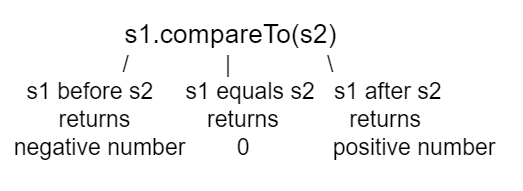
compareTo returns a negative or positive value or 0 based on alphabetical order
The equals method compares the two strings character by character and returns true or false. Both compareTo and equals are case-sensitive. There are case-insensitive versions of these methods, compareToIgnoreCase and equalsIgnoreCase, which are not on the AP exam.
Run the example below to see the output from compareTo and equals. Since "Hello!" would be alphabetically ordered after "And", compareTo returns a positive number. Since "Hello!" would be alphabetically ordered before "Zoo", compareTo returns a negative number. Notice that equals is case-sensitive.
Exercise 8
Run the code to see how the String methods equals and compareTo work. Is equals case-sensitive? When does compareTo return a negative number?
Open the
08-lcsm2folder and runTest2.java. It is an example, so it has no tests.
There are lots of other methods in the String class. You can look through the Java documentation for the String class online. You don’t have to know all of these for the exam, but you can use them if you want to on the exam.
Check your understanding: Drag the definition from the left and drop it on the correct concept on the right. — answer it on CS Awesome: https://runestone.academy/ns/books/published/csawesome2/topic-1-15-strings.html#ch4_str1
Check your understanding: Drag the definition from the left and drop it on the correct method on the right. — answer it on CS Awesome: https://runestone.academy/ns/books/published/csawesome2/topic-1-15-strings.html#ch4_str2
Check your understanding: What is the value of answer after the following code executes?
String s1 = "Hi";
String s2 = "Bye";
int answer = s1.compareTo(s2);
Answer it on CS Awesome: https://runestone.academy/ns/books/published/csawesome2/topic-1-15-strings.html#qsb_8-new
Common Mistakes with Strings
The following code shows some common mistakes with strings.
Exercise 9
This code contains some common mistakes with strings. Fix the code to use the string methods correctly.
Open the
09-stringMistakesfolder and editStringMistakes.java. Press Run to try it; Run Tests checks it (1 test).
Here is a list of common mistakes made with Strings.
- Thinking that substrings include the character at the last index when they don’t.
- Thinking that strings can change when they can’t. They are immutable.
- Trying to access part of a string that is not between index 0 and length -1. This will throw an IndexOutOfBoundsException.
- Trying to call a method like
indexOfon a string reference that is null. You will get a null pointer exception.- Using
==to test if two strings are equal. This is actually a test to see if they refer to the same object. Usually you only want to know if they have the same characters in the same order. In that case you should useequalsorcompareToinstead.- Treating upper and lower case characters the same in Java. If
s1 = "Hi"ands2 = "hi"thens1.equals(s2)is false.
Coding Challenge: Pig Latin

Can you speak Pig Latin? In Pig Latin, you take the first letter and put it at the end of the word and add the letters “ay” to the end. For example, “pig” becomes “igpay”.
Create a program that takes a word and transforms it to Pig Latin using String methods. You may need the word's length, a substring that does not include the first letter, and a substring that is just the first letter (you can get the ith letter of a string using substring(i,i+1) so for example the letter at index 3 would be substring(3,4)).
Exercise 10
Write code in the pigLatin method to use the substring method to transform a word given as its argument into Pig Latin where the first letter is put at the end and “ay” is added. The word pig is igpay in Pig Latin. Change the input below to try it on other words.
Open the
10-challenge-PigLatinfolder and editPigLatin.java. Press Run to try it; Run Tests checks it (3 tests). Run feeds it the input ininput.txt; change that file to try other input.
Summary
- (AP 1.15.A.1) A
Stringobject represents a sequence of characters and can be created by using a string literal. - (AP 1.15.A.2) The
Stringclass is part of thejava.langpackage. Classes in thejava.langpackage are available by default. - String objects can be created by using string literals (String s = “hi”;) or by calling the String class constructor (String t = new String(“bye”);).
- (AP 1.15.A.3) A String object is immutable, meaning once a String object is created, its attributes cannot be changed. Methods called on a String object do not change the content of the String object.
- (AP 1.15.A.4) Two String objects can be concatenated together or combined using the + or += operator, resulting in a new String object.
- (AP 1.15.A.4) A primitive value can be concatenated with a String object. This causes the implicit conversion of the primitive value to a String object.
- (AP 1.15.A.5) A String object can be concatenated with any object, which implicitly calls the object’s
toStringmethod (a behavior which is guaranteed to exist by the inheritance relationship every class has with the Object class). An object’stoStringmethod returns a string value representing the object. Subclasses of Object often override the toString method with class-specific implementation. Method overriding occurs when a public method in a subclass has the same method signature as a public method in the superclass, but the behavior of the method is specific to the subclass. Overriding thetoStringmethod of a class is outside the scope of the AP CSA exam. - index - A number that represents the position of a character in a string. The first character in a string is at index 0.
- length - The number of characters in a string.
- substring - A new string that contains a copy of part of the original string.
- (AP 1.15.B.1) A String object has index values from 0 to one less than the length of the string. Attempting to access indices outside this range will result in an
IndexOutOfBoundsException. - (AP 1.15.B.2) The following String methods and constructors, including what they do and when they are used, are part of the AP CSA Java Quick Reference Sheet that you can use during the exam:
- String(String str) : Constructs a new String object that represents the same sequence of characters as str.
- int length() : returns the number of characters in a String object.
- String substring(int from, int to) : returns the substring beginning at index from and ending at index (to -1).
- String substring(int from) : returns substring(from, length()).
- int indexOf(String str) : searches for str in the current string and returns the index of the first occurrence of str; returns -1 if not found.
- boolean equals(Object other) : returns true if this (the calling object) is equal to other; returns false otherwise. Using the equals method to compare one String object with an object of a type other than String is outside the scope of the AP CSA exam.
- int compareTo(String other) : returns a value < 0 if this is less than other; returns zero if this is equal to other; returns a value > 0 if this is greater than other. Strings are ordered based upon the alphabet.
str.substring(index, index + 1)returns a single character at index in stringstr.
AP Practice
Check your understanding: What is the value of s2 after the following code executes?
String s1 = new String("hi there");
int pos = s1.indexOf("e");
String s2 = s1.substring(0,pos);
Answer it on CS Awesome: https://runestone.academy/ns/books/published/csawesome2/topic-1-15-strings.html#AP-substring
Check your understanding: What is the value of s1 after the following code executes?
String s1 = "Hi";
String s2 = s1.substring(0,1);
String s3 = s2.toLowerCase();
Answer it on CS Awesome: https://runestone.academy/ns/books/published/csawesome2/topic-1-15-strings.html#AP-immutable
Strings are immutable which means that they can’t change. Anything that you do to modify a string (like creating a substring or appending strings) returns a new string. The original string is not changed.
String Methods Game
Try the game below written by AP CSA teacher Chandan Sarkar. Click on Strings and then on the letters that would be the result of the string method calls. We encourage you to work in pairs and see how high a score you can get.
Play the game on CS Awesome: https://runestone.academy/ns/books/published/csawesome2/topic-1-15-strings.html
For teachers
1.15 Strings
Students read CSAwesome2's “Strings” in CS Room and work through its 10 Java coding exercises (5 graded, 5 examples).
- Time: 2 class periods
- Tests: 8 in 5 graded exercises, set up for you when you import the lesson
Goals
- (AP 1.15.A.1) A
Stringobject represents a sequence of characters and can be created by using a string literal. - (AP 1.15.A.2) The
Stringclass is part of thejava.langpackage. Classes in thejava.langpackage are available by default. - (AP 1.15.A.3) A String object is immutable, meaning once a String object is created, its attributes cannot be changed. Methods called on a String object do not change the content of the String object.
- (AP 1.15.A.4) Two String objects can be concatenated together or combined using the + or += operator, resulting in a new String object.
- (AP 1.15.A.4) A primitive value can be concatenated with a String object. This causes the implicit conversion of the primitive value to a String object.
- (AP 1.15.A.5) A String object can be concatenated with any object, which implicitly calls the object’s
toStringmethod (a behavior which is guaranteed to exist by the inheritance relationship every class has with the Object class). An object’stoStringmethod returns a string value representing the object. Subclasses of Object often override the toString method with class-specific implementation. Method overriding occurs when a public method in a subclass has the same method signature as a public method in the superclass, but the behavior of the method is specific to the subclass. Overriding thetoStringmethod of a class is outside the scope of the AP CSA exam. - (AP 1.15.B.1) A String object has index values from 0 to one less than the length of the string. Attempting to access indices outside this range will result in an
IndexOutOfBoundsException. - (AP 1.15.B.2) The following String methods and constructors, including what they do and when they are used, are part of the AP CSA Java Quick Reference Sheet that you can use during the exam:
- String(String str) : Constructs a new String object that represents the same sequence of characters as str.
- int length() : returns the number of characters in a String object.
- String substring(int from, int to) : returns the substring beginning at index from and ending at index (to -1).
- String substring(int from) : returns substring(from, length()).
- int indexOf(String str) : searches for str in the current string and returns the index of the first occurrence of str; returns -1 if not found.
- boolean equals(Object other) : returns true if this (the calling object) is equal to other; returns false otherwise. Using the equals method to compare one String object with an object of a type other than String is outside the scope of the AP CSA exam.
- int compareTo(String other) : returns a value < 0 if this is less than other; returns zero if this is equal to other; returns a value > 0 if this is greater than other. Strings are ordered based upon the alphabet.
Before class
- Import the lesson into your class from the Lessons page, or with New assignment → Use a lesson. It arrives as a draft with its tests already set up.
- Publish it.
- The original page, with its matching and multiple-choice questions, is on CS Awesome: https://runestone.academy/ns/books/published/csawesome2/topic-1-15-strings.html
- CS Awesome's own teacher materials: the CS Awesome teacher site
In class
- Students read
README.md. Questions that need CS Awesome's interactive widgets link back to it. - Students do exercises 01–10, each in its own folder, pressing Run to try their code.
- Run Tests checks every graded exercise at once; scores appear in the Gradebook. Grading uses your copy of the tests, so a student who edits theirs does not change the grade.
After class
This lesson ends Unit 1 and the second half of the unit on using objects. You can now do the following review and practice lessons at the end of the unit. Please do the practice test on objects and the FRQ practice below. - Unit 1b Summary
- Unit 1b Practice Toggle Code
- Unit 1b Practice Coding
- Exercises on Objects
- Practice Test on Objects
- Optional Java Swing GUIs
- Unit 1 FRQ Practice
Exercises
| Folder | File | Grading | Tests |
|---|---|---|---|
01-lcsb1 | Test1.java | Example, not graded | 0 |
02-lcsbnew | StringTest.java | Checks code text only | 1 |
03-lcsb2 | Test2.java | Example, not graded | 0 |
04-lcso1 | Test1.java | Autograded | 1 |
05-lcso2 | Test2.java | Autograded | 2 |
06-lcsm1 | Test1.java | Example, not graded | 0 |
07-substring-preconditions | SubstringPreconditions.java | Example, not graded | 0 |
08-lcsm2 | Test2.java | Example, not graded | 0 |
09-stringMistakes | StringMistakes.java | Autograded | 1 |
10-challenge-PigLatin | PigLatin.java | Autograded | 3 |
Teachers can download a reference solution after signing in.