1.14 Calling Instance Methods
From CS Awesome 2CC BY-NC-SA 4.0Original page
Java2 class periods7 exercises23 graded tests
Files
1.14 Calling Instance Methods
Each coding exercise has its own folder. Open its .java file and press Run to try it. Run Tests checks every graded exercise in this lesson at once.
In object-oriented programming, methods define the behavior and actions that an object can perform. For example, Turtle objects can go forward or turn left using method calls like yertle.forward() and yertle.turnRight() to change its position. These methods are sometimes called instance methods or object methods because they are called using an instance or object of the class, in this case a specific Turtle object like yertle.
Class Methods vs. Instance Methods
In lessons 1.9 and 1.10, we learned how to call class methods (also called static methods). Class methods are called using the class name followed by the dot (.) operator and the method name, example, Math.sqrt(25); calls the sqrt method in the Math class to find the square root of 25. Class methods use the keyword static in their method signature. They do not access or change the attributes of an object.
In this lesson, we will learn more about instance methods which are always called using an object of the class. They are not static methods. They access and change the attributes of the object they are called on, for example yertle.forward() changes the Turtle object yertle’s position.
The following flowchart shows the difference between calling class (static) methods and instance methods. Static methods are called using the class name, for example, Math.sqrt(25);. Instance methods are called using an object of the class, for example, yertle.forward();. Traditionally, class names are capitalized, and object variables are lowercase.
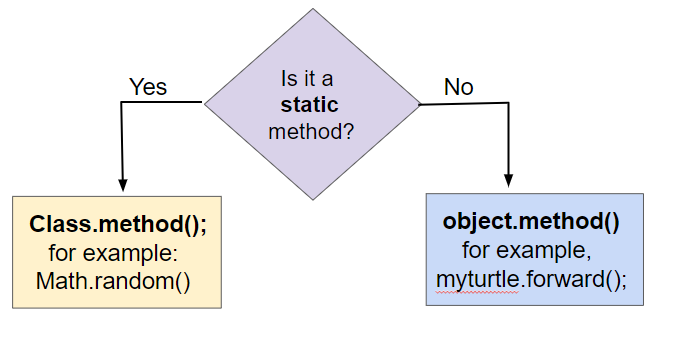
Calling static vs. instance methods
Method Signatures
The method signature defines the method’s name and the number and types of parameters it takes. In a class definition or in documentation of a library, instance methods are usually defined after the instance variables (attributes) and constructors in a class. For example, see the Student class below. Notice that the methods do not use the keyword static. They are instance methods that are called using an object of the class and can access and change the object’s attributes.
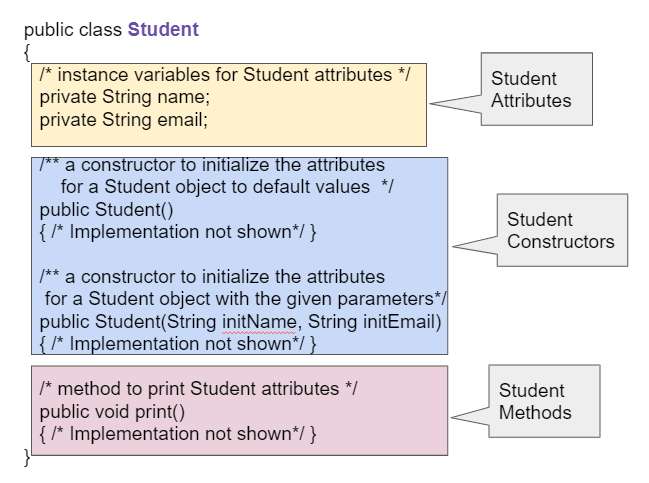
A Student class showing instance variables, constructors, and methods
Check your understanding: Click on the method headers (signatures) in the following class. Do not click on the constructors.
public class Student {

    private String name;
    private String email;

    public Student(String initName, String initEmail)
    {
        name = initName;
        email = initEmail;
    }

    public String getName()
    {
        return name;
    }

    public void print()
    {
        System.out.println(name + ":" + email);
    }
}
Answer it on CS Awesome: https://runestone.academy/ns/books/published/csawesome2/topic-1-14-calling-instance-methods.html#student_methods
Method Calls
To use an object’s method, you must use the object name and the dot (.) operator followed by the method name, for example, yertle.forward(); calls yertle’s forward method to move a turtle object forward 100 pixels. Object methods work with the attributes of the object, such as the direction the turtle is heading or its position.
Methods inside the same class can call each other using just methodName(), but to call instance methods in another class or from a main method, you must first create an object of that class and then call its methods using object.methodName().
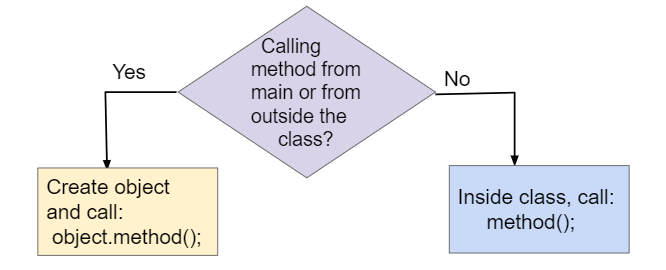
Calling instance methods from main() or from other methods inside the same class.
method();is used to call a method within the same class, butobject.method();is necessary if you are calling the method from the main method or from a different class.
Before you call a method from main or from outside of the current class, you must make sure that you have created and initialized an object. However, if you just declare an object reference without setting it to refer to a new object, the value will be null, meaning that it doesn’t reference an object. If you call a method on a variable whose value is null, you will get a NullPointerException error, where a pointer is another name for a reference.
Exercise 1
Run the code to see a NullPointerException. Fix the code by using new Turtle(habitat) to create a new Turtle object before calling its methods.
Open the
01-nullPointerTestfolder and editNullPointerTest.java. Press Run to try it; Run Tests checks it (1 test). Its test checks your code, not what it prints: “Code containsnew Turtle(habitat)”. It draws pictures: Run saves the drawing as an image in its folder, and Run Tests checks the code without the drawing.
The following flowchart can be used to compare three different ways of calling methods. Class (static) methods are called using the class name. Instance methods are called using an object of the class. If you are calling the instance method from the main method or from another class, you must first create an object of that class and then call its methods using object.methodName(). If you are calling the method from within the same class, you can just call the method using methodName() which will refer to the current object.
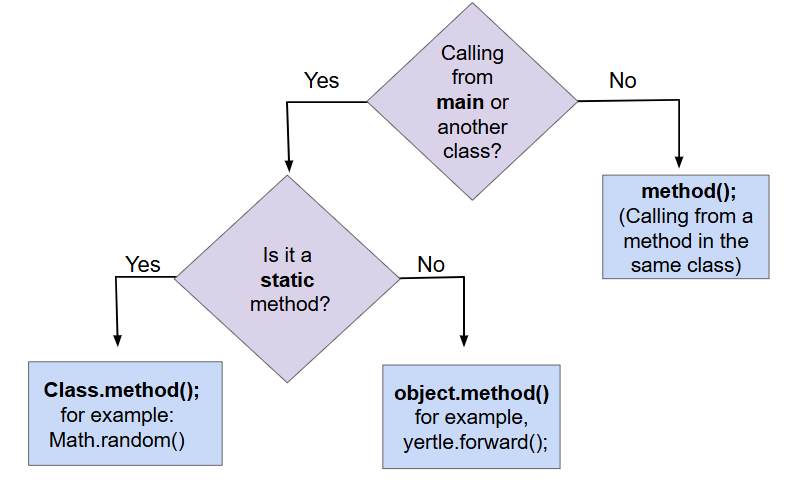
Comparing Method Calls to Static and Instance Methods
Method Calls with Arguments
In the last lessons, we used simple methods like forward and turnRight to make the turtle draw lines. You may have noticed that forward() and backward() always move the same number of pixels (100 pixels), and turnRight() and turnLeft() always turn at right angles (90 degrees). This is a little limiting. What if we wanted to draw a triangle or the letter A? These require smaller angles to draw diagonal lines and different length lines. Luckily, there are more complex methods in the Turtle class that let you specify the number of pixels to move forward or the number of degrees to turn. These values that you can give to methods to help them do their job are called arguments or parameters. For example, we can give the argument 200 in forward(200) to make the turtle go forward 200 pixels instead of the default of 100 or the argument 30 in turn(30) to make the turtle turn 30 degrees instead of 90 degrees.
object.method(arguments);is used to call an object’s method and give it some argument values that it will need to do its job.
When you create your own method, the variables you define for it are called parameters. When you call the method to do its job, you give or pass in arguments to it that are then saved in the parameter variables. So, in the definition of the forward method, it has a parameter variable called pixels, and in the call to forward(200), the argument is the value 200 which will get saved in the parameter variable pixels. You will learn to write your own methods in Unit 3. In this unit, you will learn to call methods that are already written for you.
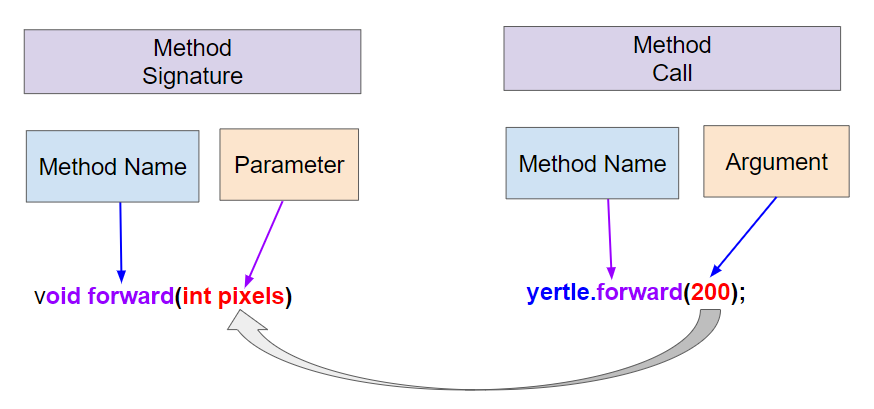
Method signatures with parameters and method calls arguments
Check your understanding: Drag the definition from the left and drop it on the correct word on the right. — answer it on CS Awesome: https://runestone.academy/ns/books/published/csawesome2/topic-1-14-calling-instance-methods.html#methodVocab
Here is the Turtle class diagram again that shows some of the variables and methods inherited from the SimpleTurtle class in the class Turtle that are written for you.
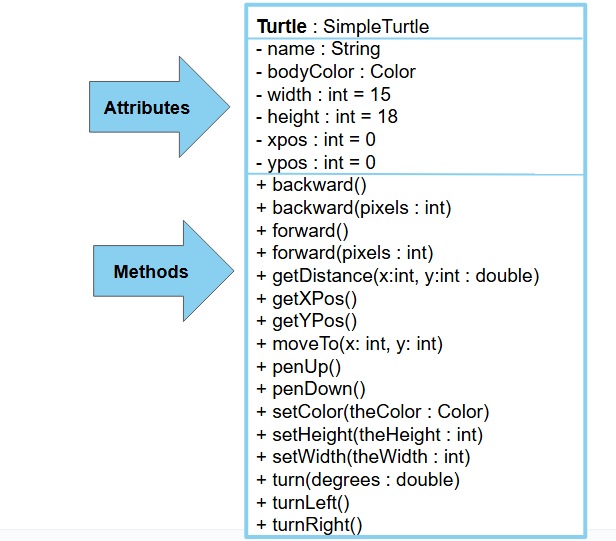
Turtle Class Diagram
Methods are said to be overloaded when there are multiple methods with the same name but a different method signature, where it requires a different number or type of parameters. For example, we have two different forward methods, forward() with no arguments and forward(100) which has an argument that tells it how much to move forward. The arguments given to the method need to correspond to the order and types of the parameters in the method signature.
Exercise 2
- Can you make yertle draw a square and change the pen color for each side of the square? Try something like: yertle.setColor(Color.red); This uses the Color class in Java which has some colors predefined like red, yellow, blue, magenta, cyan. You can also use more specific methods like setPenColor, setBodyColor, and setShellColor.
- Can you draw a triangle? The turnRight() method always does 90 degree turns, but you’ll need external angles of 120 degree for an equilateral triangle. Use the turn method which has a parameter for the angle of the turn in degrees. For example, turn(90) is the same as turnRight(). Try drawing a triangle with different colors.
Open the
02-TurtleTestMethods1folder and editTurtleTestMethods1.java. Press Run to try it; Run Tests checks it (5 tests). Its tests check your code, not what it prints: “Code has been changed”, “Changes color at least 3 times”, “Turns at least 3 times”, “Calls to turn(...)”, “Calls to forward()”. It draws pictures: Run saves the drawing as an image in its folder, and Run Tests checks the code without the drawing.
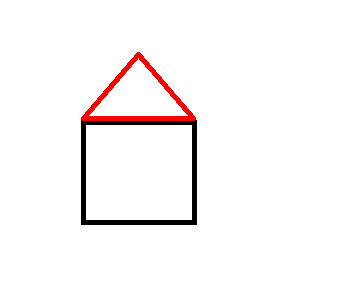
Try the following mixed up code to draw a simple house made of a square and a triangle roof.
Check your understanding: The following code uses a turtle to draw a simple house, but the lines are mixed up. You can type this code in the exercise above to see it in action. — answer it on CS Awesome: https://runestone.academy/ns/books/published/csawesome2/topic-1-14-calling-instance-methods.html#DrawAHouse
Methods that Return Values
All the methods on Turtle that we’ve discussed so far are void methods with void return type. This means they don’t return anything. Because a void method doesn’t return any value, the only point of calling one is because it does something that can be observed by the user or by other code—it changes the state of the object or maybe causes something to happen like drawing a line on the screen. Or both. These things they do are sometimes called “effects”.
In contrast, methods with a return type of anything other than void are called non-void methods. These methods return a value that the code calling the method can use. And because methods are called on an object, these methods can be used to return values that tell us things about an object’s internal state. In well-designed programs, non-void methods typically don’t have effects; they just compute and return a value. To put it another way, void methods do things while non-void methods produce values.
A simple kind of method that returns a value is what is formally called an accessor because it accesses a value in an object. In the real world everyone calls them getters. A getter is a method that takes no arguments and has a non-void return type. In Java they are almost always named something that starts with get, and they usually just return the value of one of the object’s instance variables. For example, the Turtle class has several getters, getWidth and getHeight which return the width and the height of a Turtle object and getXPos and getYPos which return the x and y values of the Turtle’s position.
Note that when you use a getter, you need to do something with the value it returns. You might assign it to a variable, use it in an expression, or print it out. If you don’t, you’re just getting a value and doing nothing with it—you might as well not have bothered to call the getter in the first place.
Here are some examples of using getters on the Turtle object yertle.
Turtle yertle = new Turtle(world);
int width = yertle.getWidth();
int height = yertle.getHeight();
System.out.println("Yertle's width is: " + width);
System.out.println("Yertle's height is: " + height);
System.out.println("Yertle's x position is: " + yertle.getXPos() );
System.out.println("Yertle's y position is: " + yertle.getYPos() );
A common error is forgetting to do something with the value returned from a method. When you call a method that returns a value, you should do something with that value like assigning it to a variable or printing it out.
Exercise 3
Try the code that prints out the turtle’s current position using getXPos() and getYPos(). Can you make it go to position (0,0) or as close to it as possible?
Open the
03-TurtleTestGetSetfolder and editTurtleTestGetSet.java. Press Run to try it; Run Tests checks it (1 test). Its test checks your code, not what it prints: “Code has been changed”. It draws pictures: Run saves the drawing as an image in its folder, and Run Tests checks the code without the drawing.
Exercise 4
Fix the errors in the code so that it prints out the area of the space that the turtle occupies by multiplying its width and height. Remember that you have to do something with the values that the get methods return.
Open the
04-TurtleAreafolder and editTurtleArea.java. Press Run to try it; Run Tests checks it (3 tests). It draws pictures: Run saves the drawing as an image in its folder, and Run Tests checks the code without the drawing.
We will save a deeper discussion of actually writing getters and other methods until Unit 3, but for the AP progress checks for this unit, you should be able to trace through method calls like the ones below. Notice that the return statement in a method returns the value, and it must match declared return type of the method. The calling method must then do something useful with that value.
Check your understanding: Consider the following class definition.
public class Circle
{
    private double radius;

    public Circle(double r)
    {
        radius = r;
    }

    public double getArea()
    {
        return 3.14159 * radius * radius;
    }
}
Assume that the following code segment appears in a main method.
Circle c = new Circle(10);
System.out.println(c.getArea());
What is printed as a result of executing the code segment? (If you get stuck, try this visualization to see this code in action.)
Answer it on CS Awesome: https://runestone.academy/ns/books/published/csawesome2/topic-1-14-calling-instance-methods.html#traceCircleArea
Check your understanding: Consider the following class definition.
public class Rectangle
{
    private int width;
    private int height;

    public Rectangle(int w, int h)
    {
        width = w;
        height = h;
    }

    public void resize(int amt)
    {
        width += amt;
    }

    public int getArea()
    {
        return width * height;
    }
}
Assume that the following code segment appears in a main method.
Rectangle r = new Rectangle(10, 15);
r.resize(5);
System.out.println(r.getArea());
What is printed as a result of executing the code segment? (If you get stuck, try this visualization to see this code in action.)
Answer it on CS Awesome: https://runestone.academy/ns/books/published/csawesome2/topic-1-14-calling-instance-methods.html#traceRectangleArea
Let's try calling the constructor and methods of this Rectangle class in an exercise below.
Exercise 5
Given the Rectangle class, use its constructor to create a 5x10 rectangle, then call its resize method to add 10 to its width, and then print out its area using its getArea method.
Open the
05-rectangleMethodsfolder and editRectangle.java. Press Run to try it; Run Tests checks it (4 tests).
Check your understanding: What does the following code print out? (If you get stuck, try this visualization to see this code in action.)
public class MethodTrace
{
    public int square(int x)
    {
        return x * x;
    }

    public int divide(int x, int y)
    {
        return x / y;
    }

    public static void main(String[] args)
    {
        MethodTrace traceObj = new MethodTrace();
        System.out.println(traceObj.square(2) + traceObj.divide(6, 2));
    }
}
Answer it on CS Awesome: https://runestone.academy/ns/books/published/csawesome2/topic-1-14-calling-instance-methods.html#traceReturnMethods
The Turtle class has a method called getDistance(x,y) which will return the turtle’s distance from a point (x,y). Can you find yertle’s distance from the point (0,0)? In the exercise below, add another turtle and make both turtles move. Then find the distance between them. You must use the getXPos and getYPos methods as well as the getDistance method.
Exercise 6
Use the getXPos, getYPos, and getDistance(x,y) methods to find yertle’s distance from the point (0,0). Add another turtle, move both turtles to different positions, and find the distance between the two turtles.
Open the
06-TurtleDistancefolder and editTurtleTestDistance.java. Press Run to try it; Run Tests checks it (4 tests). Its tests check your code, not what it prints: “Calls to getXPos()”, “Calls to getYPos()”, “Calls to getDistance(...)”, “Calls getDistance(0,0)”. It draws pictures: Run saves the drawing as an image in its folder, and Run Tests checks the code without the drawing.
Coding Challenge: Turtle House

This creative challenge is fun to do collaboratively in pairs. Design a house and have the turtle draw it with different colors below. Can you add windows and a door? Come up with your own house design as a team.
To draw a window, you will need to call penUp and moveTo to walk the turtle into position without drawing, for example:
t.penUp();
t.moveTo(120,200);
t.penDown();
It may help to act out the code pretending you are the turtle. Remember that the angles you turn depend on which direction you are facing, and the turtle begins facing up. When planning your coordinates for the house, remember that the turtle starts at the center of the screen (150,150) and the top left corner is (0,0).
Exercise 7
Draw a Turtle House! Make sure you use forward, turn, penUp, penDown, moveTo methods as well as different colors. Have fun!
Open the
07-challenge-TurtleHousefolder and editTurtleHouse.java. Press Run to try it; Run Tests checks it (5 tests). Its tests check your code, not what it prints: “Calls moveTo(...)”, “Calls penUp()”, “Calls penDown()”, “turns”, “Calls to forward()”. It draws pictures: Run saves the drawing as an image in its folder, and Run Tests checks the code without the drawing.
Summary
- Instance methods define the behavior and actions that an object can perform.
- (AP 1.14.A.1) Instance methods are called on objects of the class.
- (AP 1.14.A.1) The dot operator is used along with the object name to call instance methods, for example object.method();
- (AP 1.14.A.2) A method call on a
nullreference will result in aNullPointerException. - Some methods take arguments that are placed inside the parentheses object.method(arguments).
- A method signature is the method name followed by the parameter list which gives the type and name for each parameter. Note that methods do not have to take any parameters, but you still need the parentheses after the method name.
- The method call arguments must match the method signature in number, order, and type.
- A method call interrupts the sequential execution of statements, causing the program to first execute the statements in the method or constructor before continuing. Once the last statement in the method or constructor has executed or a
returnstatement is executed, the flow of control is returned to the point immediately following the method or constructor call. - Non-void methods are methods that return values. You should do something with the return value, such as assigning it to a variable, using it in an expression, or printing it.
AP Practice
Check your understanding: Consider the following class definition.
public class Party
{
    private int numInvited;
    private boolean partyCancelled;

    public Party()
    {
        numInvited = 1;
        partyCancelled = false;
    }

    public void inviteFriend()
    {
        numInvited++;
    }

    public void cancelParty()
    {
        partyCancelled = true;
    }
}
Assume that a Party object called myParty has been properly declared and initialized in a class other than Party. Which of the following statements are valid?
Answer it on CS Awesome: https://runestone.academy/ns/books/published/csawesome2/topic-1-14-calling-instance-methods.html#AP-Party-Methods
Check your understanding: Consider the following class definition.
public class Cat
{
    public void meow()
    {
        System.out.print("Meow ");
    }

    public void purr()
    {
        System.out.print("purr");
    }

    public void welcomeHome()
    {
        purr();
        meow();
    }
    /* Constructors not shown */
}
Which of the following code segments, if located in a method in a class other than Cat, will cause the message “Meow purr” to be printed?
Answer it on CS Awesome: https://runestone.academy/ns/books/published/csawesome2/topic-1-14-calling-instance-methods.html#AP-Cat-trace
Check your understanding: Consider the following class definition.
public class Liquid
{
    private double boilingPoint;
    private double freezingPoint;
    private double currentTemp;

    public Liquid()
    {
        currentTemp = 50;
    }

    public void lowerTemp()
    {
        currentTemp -= 10;
    }

    public double getTemp()
    {
        return currentTemp;
    }
}
Assume that the following code segment appears in a class other than Liquid.
Liquid water = new Liquid();
water.lowerTemp();
System.out.println(water.getTemp());
What is printed as a result of executing the code segment? (If you get stuck, try this visualization to see this code in action.)
Answer it on CS Awesome: https://runestone.academy/ns/books/published/csawesome2/topic-1-14-calling-instance-methods.html#AP-Liquid-return
Check your understanding: Consider the following methods, which appear in the same class.
public void splitPizza(int numOfPeople)
{
    int slicesPerPerson = 8/numOfPeople;
    /* INSERT CODE HERE */
}

public void printSlices(int slices)
{
    System.out.println("Each person gets " + slices + " slices each");
}
Which of the following lines would go into
/* INSERT CODE HERE */in the method splitPizza in order to call theprintSlicesmethod to print the number of slices per person correctly?Answer it on CS Awesome: https://runestone.academy/ns/books/published/csawesome2/topic-1-14-calling-instance-methods.html#AP-Pizza-trace-args
For teachers
1.14 Calling Instance Methods
Students read CSAwesome2's “Calling Instance Methods” in CS Room and work through its 7 Java coding exercises.
- Time: 2 class periods
- Tests: 23 in 7 graded exercises, set up for you when you import the lesson
Goals
- (AP 1.14.A.1) Instance methods are called on objects of the class.
- (AP 1.14.A.1) The dot operator is used along with the object name to call instance methods, for example object.method();
- (AP 1.14.A.2) A method call on a
nullreference will result in aNullPointerException.
Before class
- Import the lesson into your class from the Lessons page, or with New assignment → Use a lesson. It arrives as a draft with its tests already set up.
- Publish it.
- The original page, with its click-the-answer, matching, mixed-up code and multiple-choice questions, is on CS Awesome: https://runestone.academy/ns/books/published/csawesome2/topic-1-14-calling-instance-methods.html
- CS Awesome's own teacher materials: the CS Awesome teacher site
In class
- Students read
README.md. Questions that need CS Awesome's interactive widgets link back to it. - Students do exercises 01–07, each in its own folder, pressing Run to try their code.
- Run Tests checks every graded exercise at once; scores appear in the Gradebook. Grading uses your copy of the tests, so a student who edits theirs does not change the grade.
Exercises
| Folder | File | Grading | Tests |
|---|---|---|---|
01-nullPointerTest | NullPointerTest.java | Checks code text only (draws pictures; graded without the drawing) | 1 |
02-TurtleTestMethods1 | TurtleTestMethods1.java | Checks code text only (draws pictures; graded without the drawing) | 5 |
03-TurtleTestGetSet | TurtleTestGetSet.java | Checks code text only (draws pictures; graded without the drawing) | 1 |
04-TurtleArea | TurtleArea.java | Autograded (draws pictures; graded without the drawing) | 3 |
05-rectangleMethods | Rectangle.java | Autograded | 4 |
06-TurtleDistance | TurtleTestDistance.java | Checks code text only (draws pictures; graded without the drawing) | 4 |
07-challenge-TurtleHouse | TurtleHouse.java | Checks code text only (draws pictures; graded without the drawing) | 5 |
Teachers can download a reference solution after signing in.