12.5 Returning a value from a function
From Foundations of Python ProgrammingGNU FDL 1.3Original pagePython2 class periods7 exercises7 graded tests
12.5 Returning a value from a function
Read first in the book: 12.1 Introduction to Functions, 12.2 Function Definition, 12.3 Function Invocation, 12.4 Function Parameters.

Not only can you pass a parameter value into a function, a function can also produce a value. You have already
seen this in some previous functions that you have used. For example, len takes a list or string as a parameter
value and returns a number, the length of that list or string. range takes an integer as a parameter value and
returns a list containing all the numbers from 0 up to that parameter value.
Functions that return values are sometimes called fruitful functions. In many other languages, a function that doesn't return a value is called a procedure, but we will stick here with the Python way of also calling it a function, or if we want to stress it, a non-fruitful function.
Video: watch it on YouTube.
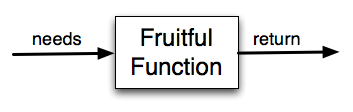
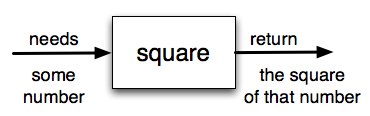
How do we write our own fruitful function? Let's start by creating a very simple mathematical function that we will
call square. The square function will take one number as a parameter and return the result of squaring that
number. Here is the black-box diagram with the Python code following.
def square(x):
    y = x * x
    return y

toSquare = 10
result = square(toSquare)
print("The result of {} squared is {}.".format(toSquare, result))
The return statement is followed by an expression which is evaluated. Its result is returned to the caller as the
"fruit" of calling this function. Because the return statement can contain any Python expression we could have
avoided creating the temporary variable y and simply used return x*x. Try modifying the square function
above to see that this works just the same. On the other hand, using temporary variables like y in the program
above makes debugging easier. These temporary variables are referred to as local variables.
Notice something important here. The name of the variable we pass as an argument --- toSquare --- has nothing to
do with the name of the formal parameter --- x. It is as if x = toSquare is executed when square is
called. It doesn't matter what the value was named in the caller (the place where the function was invoked). Inside
square, it's name is x. You can see this very clearly in codelens, where the global variables and the local
variables for the square function are in separate boxes.
def square(x):
    y = x * x
    return y

toSquare = 10
squareResult = square(toSquare)
Step through this code in the book.
There is one more aspect of function return values that should be noted. All Python functions return the special value
None unless there is an explicit return statement with a value other than None. Consider the following common
mistake made by beginning Python programmers. As you step through this example, pay very close attention to the return
value in the local variables listing. Then look at what is printed when the function is over.
def square(x):
    y = x * x
    print(y)   # Bad! This is confusing! Should use return instead!

toSquare = 10
squareResult = square(toSquare)
print("The result of {} squared is {}.".format(toSquare, squareResult))
Step through this code in the book.
The problem with this function is that even though it prints the value of the squared input, that value will not be
returned to the place where the call was done. Instead, the value None will be returned. Since line 6 uses the
return value as the right hand side of an assignment statement, squareResult will have None as its value and
the result printed in line 7 is incorrect. Typically, functions will return values that can be printed or processed in
some other way by the caller.
A return statement, once executed, immediately terminates execution of a function, even if it is not the last statement in the function. In the following code, when line 3 executes, the value 5 is returned and assigned to the variable x, then printed. Lines 4 and 5 never execute. Run the following code and try making some modifications of it to make sure you understand why "there" and 10 never print out.
def weird():
    print("here")
    return 5
    print("there")
    return 10

x = weird()
print(x)
The fact that a return statement immediately ends execution of the code block inside a function is important to understand for writing complex programs, and it can also be very useful. The following example is a situation where you can use this to your advantage -- and understanding this will help you understand other people's code better, and be able to walk through code more confidently.
Consider a situation where you want to write a function to find out, from a class attendance list, whether anyone's
first name is longer than five letters, called longer_than_five. If there is anyone in class whose first name is
longer than 5 letters, the function should return True. Otherwise, it should return False.
In this case, you'll be using conditional statements in the code that exists in the function body, the code block
indented underneath the function definition statement (just like the code that starts with the line print("here")
in the example above -- that's the body of the function weird, above).
Bonus challenge for studying: After you look at the explanation below, stop looking at the code -- just the description of the function above it, and try to write the code yourself! Then test it on different lists and make sure that it works. But read the explanation first, so you can be sure you have a solid grasp on these function mechanics.
First, an English plan for this new function to define called longer_than_five:
- You'll want to pass in a list of strings (representing people's first names) to the function.
- You'll want to iterate over all the items in the list, each of the strings.
- As soon as you get to one name that is longer than five letters, you know the function should return
True-- yes, there is at least one name longer than five letters! - And if you go through the whole list and there was no name longer than five letters, then the function should return
False.
Now, the code:
def longer_than_five(list_of_names):
    for name in list_of_names: # iterate over the list to look at each name
        if len(name) > 5: # as soon as you see a name longer than 5 letters,
            return True # then return True!
            # If Python executes that return statement, the function is over and the rest of the code will not run -- you already have your answer!
    return False # You will only get to this line if you
    # iterated over the whole list and did not get a name where
    # the if expression evaluated to True, so at this point, it's correct to return False!

# Here are a couple sample calls to the function with different lists of names. Try running this code in Codelens a few times and make sure you understand exactly what is happening.

list1 = ["Sam","Tera","Sal","Amita"]
list2 = ["Rey","Ayo","Lauren","Natalie"]

print(longer_than_five(list1))
print(longer_than_five(list2))
So far, we have just seen return values being assigned to variables. For example, we had the line
squareResult = square(toSquare). As with all assignment statements, the right hand side is executed first. It
invokes the square function, passing in a parameter value 10 (the current value of toSquare). That returns a
value 100, which completes the evaluation of the right-hand side of the assignment. 100 is then assigned to the
variable squareResult. In this case, the function invocation was the entire expression that was evaluated.
Function invocations, however, can also be used as part of more complicated expressions. For example,
squareResult = 2 * square(toSquare). In this case, the value 100 is returned and is then multiplied by 2 to
produce the value 200. When python evaluates an expression like x * 3, it substitutes the current value of x into
the expression and then does the multiplication. When python evaluates an expression like 2 * square(toSquare), it
substitutes the return value 100 for entire function invocation and then does the multiplication.
To reiterate, when executing a line of code squareResult = 2 * square(toSquare), the python
interpreter does these steps:
- It's an assignment statement, so evaluate the right-hand side expression
2 * square(toSquare). - Look up the values of the variables square and toSquare: square is a function object and toSquare is 10
- Pass 10 as a parameter value to the function, get back the return value 100
- Substitute 100 for square(toSquare), so that the expression now reads
2 * 100 - Assign 200 to variable
squareResult
Check your understanding
Check your understanding: a multiple-choice question in the book.
Check your understanding: a multiple-choice question in the book.
Check your understanding: a multiple-choice question in the book.
Check your understanding: a multiple-choice question in the book.
Check your understanding: a multiple-choice question in the book.
Check your understanding: a multiple-choice question in the book.
Check your understanding: a multiple-choice question in the book.
Exercise 1
8. Write a function named same that takes a string as input, and simply returns that string.
Open the
01folder and editmain.py. Run Tests checks it.
Exercise 2
9. Write a function called same_thing that returns the parameter, unchanged.
Open the
02folder and editmain.py. Run Tests checks it.
Exercise 3
10. Write a function called subtract_three that takes an integer or any number as input, and returns that number minus three.
Open the
03folder and editmain.py. Run Tests checks it.
Exercise 4
11. Write a function called change that takes one number as its input and returns that number, plus 7.
Open the
04folder and editmain.py. Run Tests checks it.
Exercise 5
12. Write a function named intro that takes a string as input. This string ist intended to be a person's name and the output is a standardized greeting. For example, given the string "Becky" as input, the function should return: "Hello, my name is Becky and I love SI 106."
Open the
05folder and editmain.py. Run Tests checks it.
Exercise 6
13. Write a function called s_change that takes one string as input and returns that string, concatenated with the string " for fun.".
Open the
06folder and editmain.py. Run Tests checks it.
Exercise 7
14. Write a function called decision that takes a string as input, and then checks the number of characters. If it has over 17 characters, return "This is a long string", if it is shorter or has 17 characters, return "This is a short string".
Open the
07folder and editmain.py. Run Tests checks it.
For teachers
12.5 Returning a value from a function
Students read Foundations of Python Programming's “Returning a value from a function” in CS Room and work through its 7 Python coding exercises (7 graded).
- Time: 2 class periods
- Tests: 7 in 7 graded exercises, set up for you when you import the lesson
Reading first
- 12.1 Introduction to Functions
- 12.2 Function Definition
- 12.3 Function Invocation
- 12.4 Function Parameters
Exercises
| Folder | Grading | Tests |
|---|---|---|
01 | Autograded | 1 |
02 | Autograded | 1 |
03 | Autograded | 1 |
04 | Autograded | 1 |
05 | Autograded | 1 |
06 | Autograded | 1 |
07 | Autograded | 1 |