FRQ 2 - Class Design - Part 2
From CS Awesome 2CC BY-NC-SA 4.0Original page
Java1 class period2 exercises18 graded tests
Files
FRQ 2 - Class Design - Part 2
Each coding exercise has its own folder. Open its .java file and press Run to try it. Run Tests checks every graded exercise in this lesson at once.
From the 2025 Course and Exam Description:
Free-Response Question 2: Class Design. Students will be instructed to design and implement a class based on provided specifications and examples. A second class might also be included. Students will be provided with a scenario and specifications in the form of a table demonstrating ways to interact with the class and the results. The class must include a class header, instance variables, a constructor, a method, and implementation of the constructor and required method.
FRQ 2 requires the following skills:
- Create a class header
- Determine what private instance variables are needed by the class
- Write a constructor with appropriate parameters
- Implement a method according to the behavior specified in the table
Teacher Insights
- You do not need to include import statements. You can assume that any standard Java class is already imported.
- You will NEVER print. If you think you need to print, you probably need to return something.
- You will NOT need to write a main. In this question, they are giving you the main.
2025 FRQ2 - Signed Text
This question involves the SignedText class, which contains methods that are used to include a signature as part of a string of text. You will write the complete SignedText class, which contains a constructor and two methods.
The SignedText constructor takes two String parameters. The first parameter is a first name and the second parameter is a last name. The length of the second parameter is always greater than or equal to 1.
The getSignature method takes no parameters and returns a formatted signature string constructed from the first and last names according to the following rules.
- If the first name is an empty string, the returned signature string contains just the last name.
- If the first name is not an empty string, the returned signature string is the first letter of the first name, a dash ("-"), and the last name, in that order.
The addSignature method returns a possibly revised copy of its String parameter. The parameter will contain at most one occurrence of the object’s signature, at either the beginning or the end of the parameter. The returned string is created from the parameter according to the following rules.
- If the object’s signature does not occur in the String parameter of the method, the returned String is the value of the parameter with the signature added to the end.
- If the object’s signature occurs at the end of the String parameter, the returned String is the unchanged value of the parameter.
- If the object’s signature occurs at the beginning of the String parameter, the returned String is the value of the original parameter with the signature removed from the beginning and appended to the end of the parameter.
The following table contains a sample code execution sequence and the corresponding results. The code execution sequence appears in a class other than SignedText.
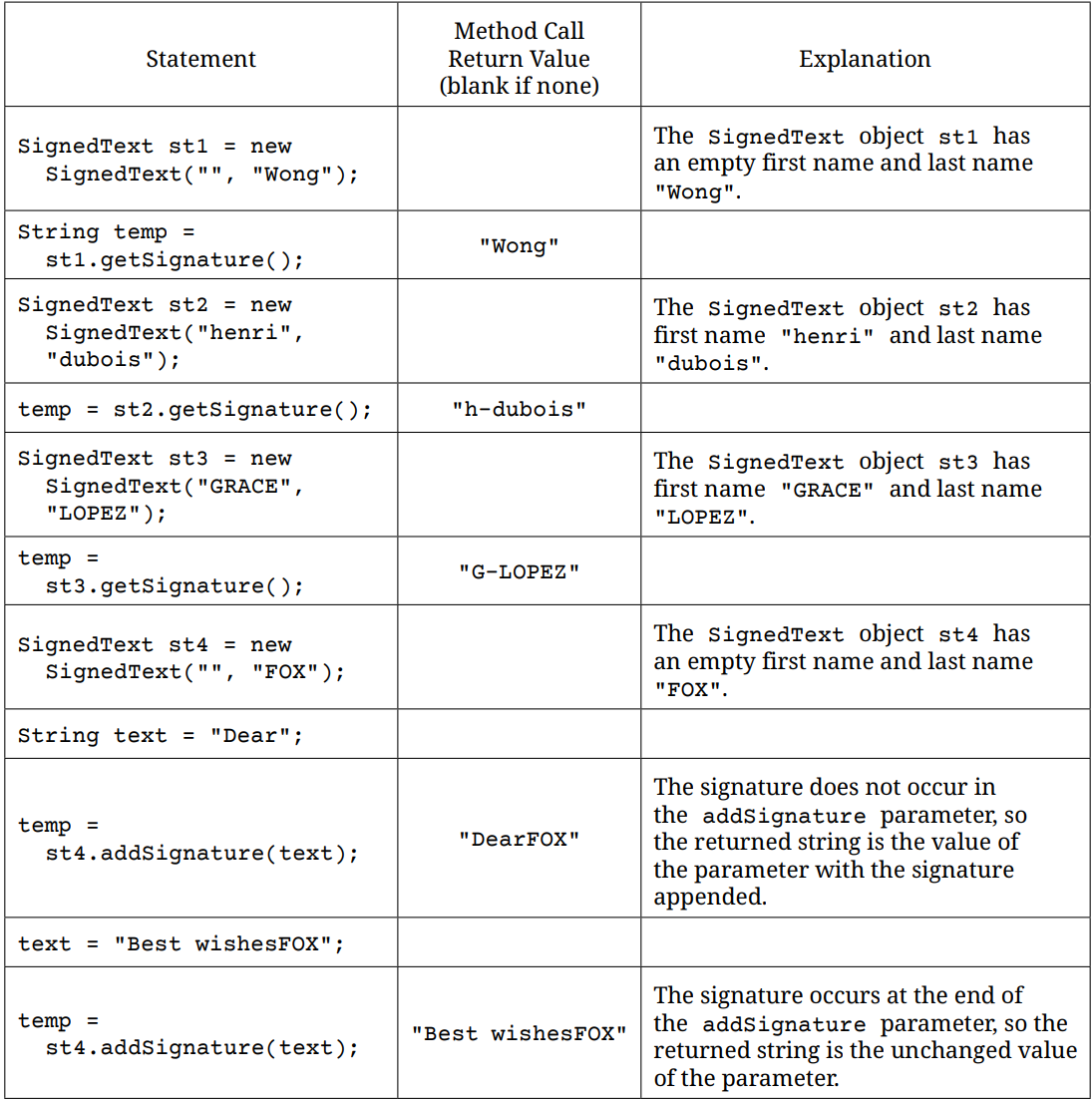
Part 1 of SignedText Table
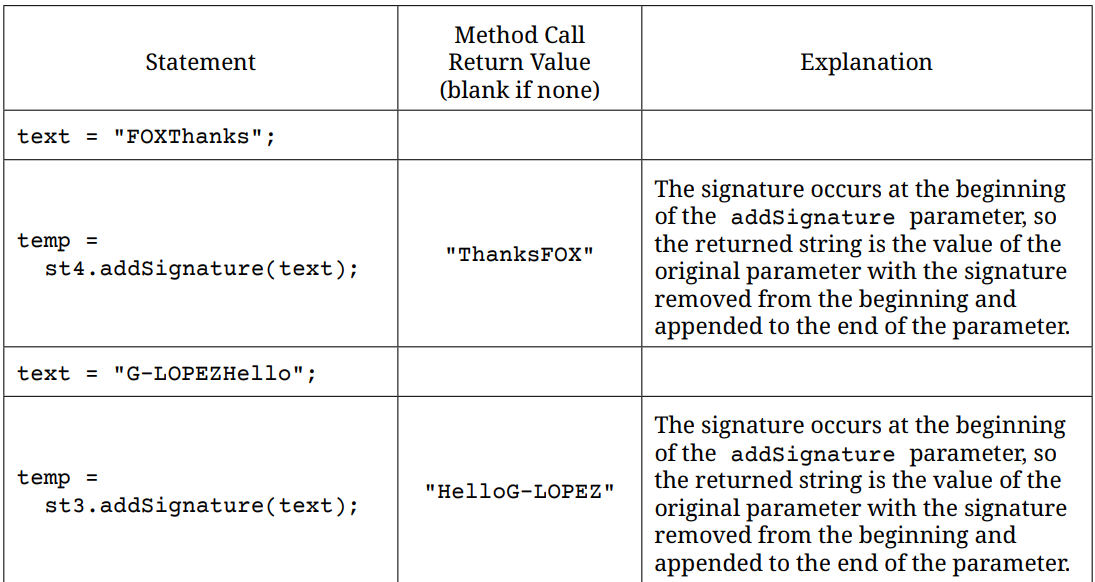
Part 2 of SignedText Table
Exercise 1
Write the complete SignedText class. Your implementation must meet all specifications and conform to the examples in the table.
Open the
01-FRQ2-2025-SignedTextfolder and editMain.java. Press Run to try it; Run Tests checks it (8 tests). Name the class, then rename the file to match.
2023 FRQ 2 - Sign
This question involves methods that distribute text across lines of an electronic sign. The electronic sign and the text to be displayed on it are represented by the Sign class. You will write the complete Sign class, which contains a constructor and two methods.
The Sign class constructor has two parameters. The first parameter is a String that contains the message to be displayed on the sign. The second parameter is an int that contains the width of each line of the sign. The width is the positive maximum number of characters that can be displayed on a single line of the sign.
A sign contains as many lines as are necessary to display the entire message. The message is split among the lines of the sign without regard to spaces or punctuation. Only the last line of the sign may contain fewer characters than the width indicated by the constructor parameter.
The following are examples of a message displayed on signs of different widths. Assume that in each example, the sign is declared with the width specified in the first column of the table and with the message "Everything on sale, please come in", which contains 34 characters.
The following table contains a sample code execution sequence and the corresponding results. The code execution sequence appears in a class other than Sign.
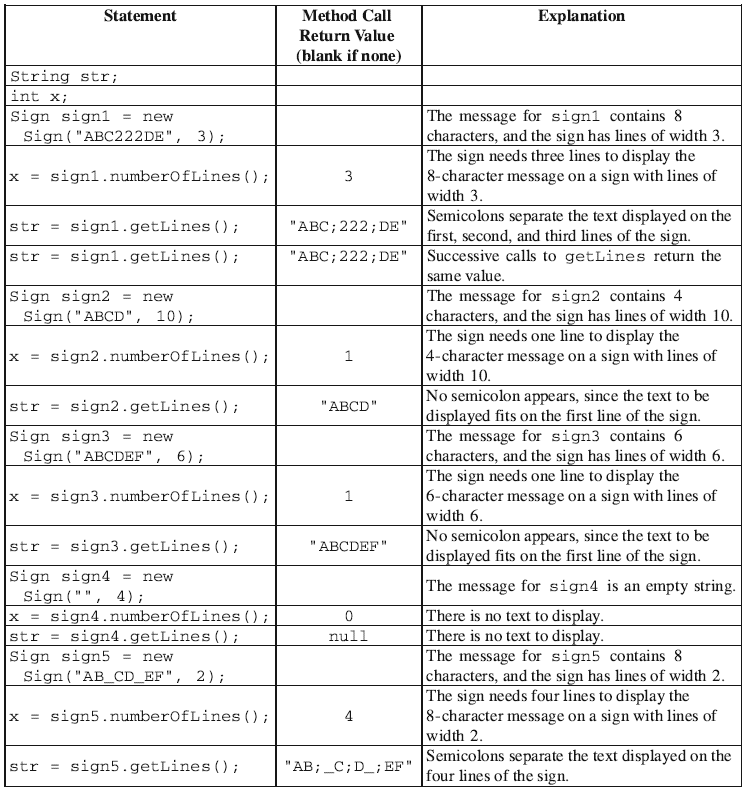
Exercise 2
Write the complete Sign class. Your implementation must meet all specifications and conform to the examples shown in the preceding table.
Open the
02-frq2-2023-signfolder and editMain.java. Press Run to try it; Run Tests checks it (10 tests). Name the class, then rename the file to match.
For teachers
FRQ 2 - Class Design - Part 2
Students read CSAwesome2's “FRQ 2 - Class Design - Part 2” in CS Room and work through its 2 Java coding exercises.
- Time: 1 class period
- Tests: 18 in 2 graded exercises, set up for you when you import the lesson
Goals
- Practice for the AP exam's free-response questions.
Before class
- Import the lesson into your class from the Lessons page, or with New assignment → Use a lesson. It arrives as a draft with its tests already set up.
- Publish it.
- The original page is on CS Awesome: https://runestone.academy/ns/books/published/csawesome2/FRQ2-Part2.html
- CS Awesome's own teacher materials: the CS Awesome teacher site
In class
- Students read
README.md. - Students do exercises 01–02, each in its own folder, pressing Run to try their code.
- Run Tests checks every graded exercise at once; scores appear in the Gradebook. Grading uses your copy of the tests, so a student who edits theirs does not change the grade.
Exercises
| Folder | File | Grading | Tests |
|---|---|---|---|
01-FRQ2-2025-SignedText | Main.java | Autograded | 8 |
02-frq2-2023-sign | Main.java | Autograded | 10 |
Teachers can download a reference solution after signing in.