FRQ 1B - Strings - Part 1
From CS Awesome 2CC BY-NC-SA 4.0Original page
Java1 class period6 exercises30 graded tests
Files
FRQ 1B - Strings - Part 1
Each coding exercise has its own folder. Open its .java file and press Run to try it. Run Tests checks every graded exercise in this lesson at once.
From the 2025 Course and Exam Description:
Free-Response Question 1: Methods and Control Structures. Students will write two methods or one constructor and one method of a given class based on the provided specifications and examples. In Part A (4 points), the method or constructor will require students to write iterative or conditional statements, or both, as well as statements that call methods in the specified class.
In Part B (3 points)****, the method or constructor will require calling String methods.
FRQ 1B requires the following skills:
- Complete a method or a constructor
- Call String methods
- Use if statements
- Use a for loop or a while loop
Teacher Insights
- You do not need to include import statements. You can assume that any standard Java class is already imported.
- You will NEVER print. If you think you need to print, you probably need to return something.
- You will NOT need to write a main.
String Methods
The following methods are on the quick reference, which you can view on the College Board Website.
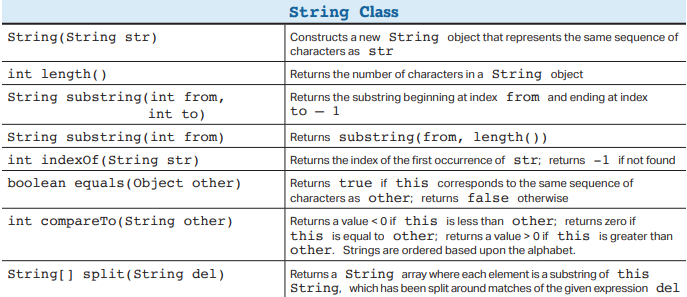
There are other methods in the String class that may also be helpful while writing FRQs, but it is important to remember that all FRQs can be solved using just the methods in the Quick Reference. If you use a method that is not on the Quick Reference, you must use it correctly to earn points.
The following activities can all be solved with just the methods in the Quick Reference.
String Method - EmailParser
Exercise 1
Write the getDomain method for the EmailParser class. This method is intended to isolate the server information from a full email address.
The getDomain method takes one parameter, a String called email. The method should identify the location of the "at-symbol" (@) and return only the portion of the string that appears after that symbol.
Open the
01-frq1b1-emailparserfolder and editEmailParser.java. Press Run to try it; Run Tests checks it (5 tests).
String Method - Phone Processor
Exercise 2
Write a method called getAreaCode that extracts the 3-digit area code from a formatted phone number. The area code will be the three digits between the parentheses.
Open the
02-frq1b1-phoneprocessorfolder and editPhoneProcessor.java. Press Run to try it; Run Tests checks it (5 tests).
String Method - Letter Identifier
Exercise 3
Write a method called isVowel that checks if a given String represents a single vowel. If the letter does not have a length of 1, the method should return false.
Open the
03-frq1b1-isvowelfolder and editLetterIdentifier.java. Press Run to try it; Run Tests checks it (5 tests).
String Method - Create User Name
Exercise 4
This class creates a username by taking the first letter of the first name and the first five letters of the last name. It uses an if statement to handle cases where the last name is shorter than five characters.
Open the
04-frq1b1-createusernamefolder and editUserProfile.java. Press Run to try it; Run Tests checks it (5 tests).
String Method - Tag Parser
Exercise 5
A common task is extracting text between two delimiters (like HTML tags). Uses indexOf to find the start and end and substring to grab what's in the middle. Return "not found" if the the tags are not found, not balanced, or backwards
Open the
05-frq1b1-tagparserfolder and editTagParser.java. Press Run to try it; Run Tests checks it (5 tests).
String Method - Swap Strings
Exercise 6
This class takes a two-word string (separated by a space) and returns a new string where the words are swapped. Use indexOf to find the pivot point and length() to ensure there is actually a second word.
Open the
06-frq1b1-swapstringsfolder and editStringScrambler.java. Press Run to try it; Run Tests checks it (5 tests).
For teachers
FRQ 1B - Strings - Part 1
Students read CSAwesome2's “FRQ 1B - Strings - Part 1” in CS Room and work through its 6 Java coding exercises.
- Time: 1 class period
- Tests: 30 in 6 graded exercises, set up for you when you import the lesson
Goals
- Practice for the AP exam's free-response questions.
Before class
- Import the lesson into your class from the Lessons page, or with New assignment → Use a lesson. It arrives as a draft with its tests already set up.
- Publish it.
- The original page is on CS Awesome: https://runestone.academy/ns/books/published/csawesome2/FRQ1B-Part1.html
- CS Awesome's own teacher materials: the CS Awesome teacher site
In class
- Students read
README.md. - Students do exercises 01–06, each in its own folder, pressing Run to try their code.
- Run Tests checks every graded exercise at once; scores appear in the Gradebook. Grading uses your copy of the tests, so a student who edits theirs does not change the grade.
Exercises
| Folder | File | Grading | Tests |
|---|---|---|---|
01-frq1b1-emailparser | EmailParser.java | Autograded | 5 |
02-frq1b1-phoneprocessor | PhoneProcessor.java | Autograded | 5 |
03-frq1b1-isvowel | LetterIdentifier.java | Autograded | 5 |
04-frq1b1-createusername | UserProfile.java | Autograded | 5 |
05-frq1b1-tagparser | TagParser.java | Autograded | 5 |
06-frq1b1-swapstrings | StringScrambler.java | Autograded | 5 |
Teachers can download a reference solution after signing in.