4.9 ArrayList Traversals
From CS Awesome 2CC BY-NC-SA 4.0Original page
Java2 class periods7 exercises16 graded tests
Files
4.9 ArrayList Traversals
Each coding exercise has its own folder. Open its .java file and press Run to try it. Run Tests checks every graded exercise in this lesson at once.
Traversing an ArrayList is when iteration (a loop) is used to access all or an ordered sequence of the elements in the ArrayList. Just like with arrays, we can use while loops, indexed for loops, or enhanced for loops to traverse an ArrayList. In a later lesson, we’ll also talk about recursion which is when a method calls itself over again which is another way you can traverse an array or ArrayList. In this lesson, we’ll focus on using loops.
Enhanced For Loop
You can use an enhanced for loop to traverse all of the items in an ArrayList, just like you do with an array when you only care about the values in the list and not their indices. An example is shown in the main method below.
Note however that you can’t use the enhanced for loop if you want to add or remove elements while traversing an ArrayList. If the size of an ArrayList is modified, such as by calling the add or remove methods, while it is being looped over, it will cause the loop to throw a ConcurrentModificationException. If you need to modify an ArrayList while looping over it, you’ll need to use a regular while or for loop.
Exercise 1
What does the code do? Guess before you run it. Then, add another enhanced for each loop that computes the product of all the elements in myList by multiplying them. Print out the product after the new loop.
Open the
01-listForEachLoopfolder and editTest1.java. Press Run to try it; Run Tests checks it (3 tests).
Check your understanding: The following has the correct code for the method getScore plus at least one extra unneeded code statement. This method will calculate and return the score for a word game. — answer it on CS Awesome: https://runestone.academy/ns/books/published/csawesome2/topic-4-9-arraylist-traversal.html#list_1
For Loops and IndexOutOfBounds Exception
You can also use a regular indexed for loop to process list elements accessed using an index. ArrayList indices starts at 0 just like array indices, but instead of using the index operator [] to access elements, you use the get(index) method to get the value at the index and set(index,value) to set the element at an index to a new value.
If you try to use an index that is outside of the range of 0 to the number of elements − 1 in an ArrayList, your code will throw an IndexOutOfBoundsException, similar to the ArrayIndexOutOfBoundsException thrown if you use the index operator on an array with an index out of bounds for that array.
Exercise 2
The code will throw an IndexOutOfBoundsException. Can you fix it?
Open the
02-listForLoopfolder and editTestForLoop.java. Press Run to try it; Run Tests checks it (2 tests).
While Loop
The example below demonstrates a while loop and an object-oriented approach where the list is a field of the current object and an instance method rather than a class (static) method loops through the list.
Exercise 3
The code removes a name from a list. Set the found variable to the appropriate true or false values at line 13 and line 20 to make the code work.
Open the
03-listForEachLoopObjfolder and editListWorker.java. Press Run to try it; Run Tests checks it (1 test).
Be careful when you remove items from a list as you loop through it. Notice how the method above only increments the index if an item was not removed from the list. This is because removing an item from a list will shift the remaining items to the left and if you increment the index in all cases you will skip the elements immediately after each element you remove. To see why, consider that those elements will be shifted into the position of the just removed element and if you increment the index, it will move to the next position, skipping the element that used to be at that position. Leaving the index unchanged after a remove allows the shifted-down element to be processed on the next time through the loop.
Check your understanding: Assume that
numshas been created as anArrayListobject and it initially contains the followingIntegervalues [0, 0, 4, 2, 5, 0, 3, 0]. What willnumscontain as a result of executingnumQuest?ArrayList<Integer> list1 = new ArrayList<Integer>(); private ArrayList<Integer> nums; // precondition: nums.size() > 0; // nums contains Integer objects public void numQuest() { int k = 0; Integer zero = new Integer(0); while (k < nums.size()) { if (nums.get(k).equals(zero)) nums.remove(k); k++; } }Answer it on CS Awesome: https://runestone.academy/ns/books/published/csawesome2/topic-4-9-arraylist-traversal.html#qloopList_1
You can step through the code above by clicking on the following Example.
Check your understanding: The following has the correct code for a method called insertInOrder plus at least one extra unneeded code statement. This method should add the passed name in alphabetic order to a private list field called nameList. — answer it on CS Awesome: https://runestone.academy/ns/books/published/csawesome2/topic-4-9-arraylist-traversal.html#listInsertParsons
Reading in Files with java.nio.file
Although not covered in the AP CSA exam, the java.nio.file package (nio stands for new input/output), added in Java version 7, provides a better and easier way to read in files. The Files class in this package has a method called readAllLines that reads all of the lines in a file and returns them as a List of String objects. The readAllLines method throws an IOException if the file cannot be read. (List is an interface. Interfaces are not on the AP CSA exam but are quite common in actual Java programming. For now all you need to know is that all the methods we’ve talked about using with ArrayList you can use on any List such as the one returned by readAllLines.)
import java.nio.file.*;
...

// This connects and reads in the file in 1 line of code!
// It needs to be in a method that throws or handles IOException
List<String> lines = Files.readAllLines(Paths.get("data.txt"));
Under the covers readAllLines is almost certainly using an ArrayList which is a kind of List. The advantage of storing the lines in a dynamic data structure like an ArrayList, instead of an array, is that you do not need to know how many lines you are going to store when you create the ArrayList the way you do when you create an array. The ArrayList can then grow in size as needed. (If you absolutely need an array, you can convert the List to an array declared to be the correct size with myArray = lines.toArray(myArray);)
Exercise 4
Complete the code in the main method to reads all lines of the file using Files.readAllLines into a List<String> named lines. Add a loop that prints out the first 10 pokemon.
Open the
04-read-pokemon-file-niofolder and editReadData.java. Press Run to try it; Run Tests checks it (2 tests).
Traversing an ArrayList of Student Objects
You can put any kind of objects into an ArrayList. For example, here is an ArrayList of Students. Let's write some loops that traverse the ArrayList to print out each Student by implicitly calling its toString() method. We'll also write a method that filters the ArrayList to print out only the students who have a GPA higher than 3.5 for the honor roll.
Method calls can be chained together like the following:
// get the name of the 0's student
String name = students.get(0).getName();
// get the GPA of the student at index i
double gpa = students.get(i).getGPA();
Exercise 5
Write the methods printRoster() and honorRoll() for the ArrayList of Student objects below.
Open the
05-StudentListLoopsfolder and editRoster.java. Press Run to try it; Run Tests checks it (3 tests).
Coding Challenge: FRQ Word Pairs
This challenge is based on the 2018 Free Response Question #2 WordPair. We encourage you to work in pairs on this challenge.
You are given a class called WordPair that can store pairs of words.
class WordPair
{
    private String word1;
    private String word2;

    public WordPair(String word1, String word2)
    {
        this.word1 = word1;
        this.word2 = word2;
    }

    public String getFirst()
    {
        return word1;
    }

    public String getSecond()
    {
        return word2;
    }

    public String toString()
    {
        return "(" + word1 + ", " + word2 + ")";
    }
}
First, see if you can create an ArrayList of WordPair objects below. Look at the StudentList example above for help.
Exercise 6
Create an Arraylist of WordPair objects.
Open the
06-ArrayListWordPair1folder and editWordPairTest.java. Press Run to try it; Run Tests checks it (2 tests).
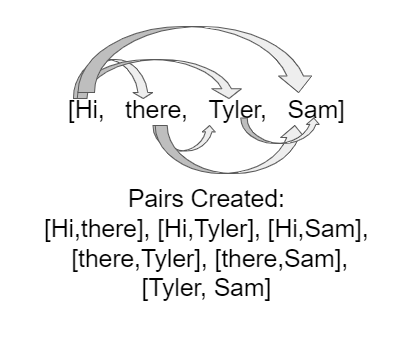
In this FRQ, you are given an array of words and you will create pairs of them by taking the first word and pairing it with all the other words, then taking the second word and pairing it with all but the first one, and so on. For example, if the word array is [“Hi”, “there”, “Tyler”, “Sam”], this figure shows how the word pairs are formed.
In the class WordPairsList below, you will write the constructor which takes the array of words and pairs them up as shown in the figure. You will need nested loops to pair each element with the rest of the elements in the list.
Here is the pseudocode for the constructor method.
- Initialize the
allPairslist to an emptyArrayListofWordPairobjects. - Loop through the
wordsarray for the first word in the word pair (for loop from indexi = 0tolength-1)- Loop through the rest of the word array starting from index
i + 1for the second word in the word pair (for loop from indexj = i + 1tolength)- Add the new
WordPairformed from theith word and thejth word to theallPairsArrayList.
- Add the new
- Loop through the rest of the word array starting from index
Exercise 7
FRQ WordPairs Challenge: Complete the constructor for WordPairsList below which will add pairs of words from a given array to the ArrayList. Then, complete the method numMatches() as described below this exercise.
Open the
07-challenge-WordPairsfolder and editWordPairsList.java. Press Run to try it; Run Tests checks it (3 tests).
In the next part of the FRQ challenge, you are asked to write a method called numMatches that counts and returns the number of pairs where the first word is the same as the second word. For example, if the word array is ["hi","bye","hi"], the pairs generated would be ["hi","bye"], ["hi","hi"], and ["bye","hi"]. In the second pair ["hi","hi"], the first word is the same as the second word, so numMatches would return 1.
For this method, you will need a loop that goes through the ArrayList allPairs and for each WordPair in allPairs, it checks to see if its first word (using the getFirst method) equals the second word (using the getSecond method). If there is a match, it increments a counter which it returns at the end of the method. To test this method, add another “there” into the words array and then uncomment the call to numMatches.
Summary
- (AP 4.9.A.1) Traversing an
ArrayListis when iteration or recursive statements are used to access all or an ordered sequence of the elements in anArrayList. ArrayLists can be traversed with an enhancedforloop, awhileloop, or a regularforloop using an index.- (AP 4.9.A.2) Deleting elements during a traversal of an
ArrayListrequires the use of special techniques to avoid skipping elements (sinceremovemoves all the elements above the removed index down.) - (AP 4.9.A.3) Attempting to access an index value outside of its range will result in an
IndexOutOfBoundsException. (The indices for anArrayListstart at 0 and end at the number of elements − 1). - (AP 4.9.A.4) Changing the size of an
ArrayListwhile traversing it using an enhancedforloop can result in aConcurrentModificationException. Therefore, when using an enhancedforloop to traverse anArrayList, you should not add or remove elements.
For teachers
4.9 ArrayList Traversals
Students read CSAwesome2's “ArrayList Traversals” in CS Room and work through its 7 Java coding exercises.
- Time: 2 class periods
- Tests: 16 in 7 graded exercises, set up for you when you import the lesson
Goals
- (AP 4.9.A.1) Traversing an
ArrayListis when iteration or recursive statements are used to access all or an ordered sequence of the elements in anArrayList. - (AP 4.9.A.2) Deleting elements during a traversal of an
ArrayListrequires the use of special techniques to avoid skipping elements (sinceremovemoves all the elements above the removed index down.) - (AP 4.9.A.3) Attempting to access an index value outside of its range will result in an
IndexOutOfBoundsException. (The indices for anArrayListstart at 0 and end at the number of elements − 1). - (AP 4.9.A.4) Changing the size of an
ArrayListwhile traversing it using an enhancedforloop can result in aConcurrentModificationException. Therefore, when using an enhancedforloop to traverse anArrayList, you should not add or remove elements.
Before class
- Import the lesson into your class from the Lessons page, or with New assignment → Use a lesson. It arrives as a draft with its tests already set up.
- Publish it.
- The original page, with its mixed-up code and multiple-choice questions, is on CS Awesome: https://runestone.academy/ns/books/published/csawesome2/topic-4-9-arraylist-traversal.html
- CS Awesome's own teacher materials: the CS Awesome teacher site
In class
- Students read
README.md. Questions that need CS Awesome's interactive widgets link back to it. - Students do exercises 01–07, each in its own folder, pressing Run to try their code.
- Run Tests checks every graded exercise at once; scores appear in the Gradebook. Grading uses your copy of the tests, so a student who edits theirs does not change the grade.
Exercises
| Folder | File | Grading | Tests |
|---|---|---|---|
01-listForEachLoop | Test1.java | Autograded | 3 |
02-listForLoop | TestForLoop.java | Autograded | 2 |
03-listForEachLoopObj | ListWorker.java | Autograded | 1 |
04-read-pokemon-file-nio | ReadData.java | Autograded | 2 |
05-StudentListLoops | Roster.java | Autograded | 3 |
06-ArrayListWordPair1 | WordPairTest.java | Autograded | 2 |
07-challenge-WordPairs | WordPairsList.java | Autograded | 3 |
Teachers can download a reference solution after signing in.