4.4 Array Traversals
From CS Awesome 2CC BY-NC-SA 4.0Original page
Java2 class periods11 exercises30 graded tests
Files
4.4 Array Traversals
Each coding exercise has its own folder. Open its .java file and press Run to try it. Run Tests checks every graded exercise in this lesson at once.
In this lesson, we will learn how to traverse an array using a loop. Traversing an array means visiting each element of the array. We can use a loop to visit each element of an array and perform some operation on it. This is a common operation when working with arrays.
Index Variables
In the last lesson, we mentioned that you can use a variable for the index of an array. You can even do math with that index and have an arithmetic expression inside the [], like below.
// highScores array declaration
int[] highScores = { 10, 9, 8, 8};
// use a variable for the index
int index = 3;
// modify array value at index
highScores[index] = 11;
// print array value at index
System.out.println(  highScores[index] );
System.out.println(  highScores[index - 1] );
What does the code above print out? You can follow the code in this visualizer and look at the image depicting the array below.
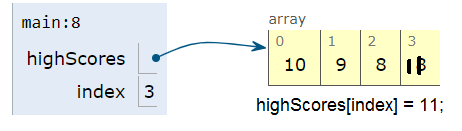
Array with index variable
Loops to Traverse Arrays
Traversing an array or iteration is when repetition statements are used to access all or an ordered sequence of elements in an array. We can traverse an array with an indexed for loop or while loop, accessing the elements using an index variable.Just start the index at 0 and loop while the index is less than the length of the array. Note that the variable i (short for index) is often used in loops as the loop counter variable and is used here to access each element of an array with its index. Since this is a simple counter-controlled loop, for loops are used more often than while loops for array traversals.
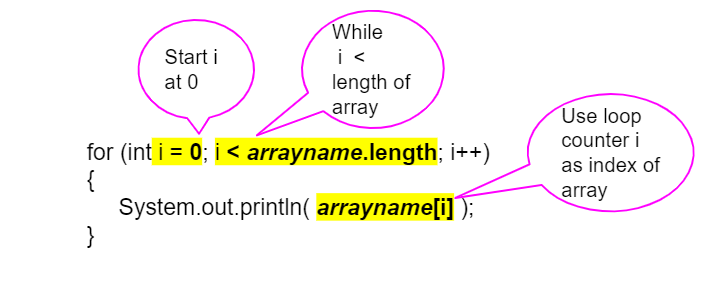
For Loop Traversing Array
For example, here is a for loop and a while loop that traverse the highScores array to print every score. Try the code for the for loop below in the visualizer.
int[] highScores = { 10, 9, 8, 11};
for (int i = 0; i < highScores.length; i++)
{
    System.out.println(  highScores[i] );
}
// Or with a while loop
int i = 0;
while (i < highScores.length)
{
    System.out.println(  highScores[i] );
    i++;
}
Using a variable as the index is a powerful data abstraction feature because it allows us to use loops with arrays where the loop counter variable is the index of the array! This allows our code to generalize to work for the whole array.
Exercise 1
What do you think the code will print out? First trace through it on paper keeping track of the array and the index variable. Then, run it to see if you were right. Then, try adding your name and a friend’s name to the array names and run the code again. Did the code work without changing the loop?
Open the
01-arraytrace2folder and editTest2.java. Press Run to try it; Run Tests checks it (2 tests).
Arrays as Objects and Parameters
The following code demonstrates a loop that changes the values in an array. In this code, the array is passed as an argument to the static methods in the class. Arrays in Java are objects. The array variables are references to an address in memory. Since arrays can be very large, we do not want to copy them when we pass them into methods. When an array is passed as an argument to a method, the name of the array refers to its address in memory. Therefore, any changes to the array in the method will affect the original array. You can also try the code in the Java visualizer.
Exercise 2
What does the code print out? Trace through it keeping track of the array values and the output. Then run it to see if you’re right. Notice that in this code, the array is passed as an argument to the methods. You can also try the code in the Java visualizer.
Open the
02-arrayMethodTracefolder and runArrayLoop.java. It is an example, so it has no tests.
Arrays in Java are objects. When arrays are passed in as arguments to methods, any changes to the array in the method will affect the original array, since the array name is a reference value refering to the address of the array in memory.
Check your understanding: The following method has the correct code to subtract amt from all the values in the array values, but the code is mixed up. You will be told if any of the blocks are in the wrong order. — answer it on CS Awesome: https://runestone.academy/ns/books/published/csawesome2/topic-4-4-array-traversal.html#patdonsArraySubtract
Looping through Part of an Array
You don’t have to loop through all of the elements of an array. You can loop through just some of the elements of an array using a for loop. The following code doubles the first five elements in an array. Notice that it uses a complex conditional (&&) on line 14 to make sure that the loop doesn’t go beyond the length of the array, because if you had an array that had less than 5 elements, you wouldn’t want the code to try to double the 5th element which doesn’t exist! Notice that in this code, the array is a private instance variable of the class ArrayWorker. It is created in the constructor and changed or accessed by the methods.
Exercise 3
What will the code print out? Can you write a similar method called tripleFirstFour() that triples the first 4 elements of the array? Make sure you test it in main.
Open the
03-tripleFirstFourfolder and editArrayWorker.java. Press Run to try it; Run Tests checks it (2 tests).
Check your understanding: Given the following values of a and the method doubleLast what will the values of a be after you execute: doubleLast()?
private int[ ] a = {-20, -15, 2, 8, 16, 33};

public void doubleLast()
{

   for (int i = a.length / 2; i < a.length; i++)
   {
      a[i] = a[i] * 2;
   }
}
Answer it on CS Awesome: https://runestone.academy/ns/books/published/csawesome2/topic-4-4-array-traversal.html#mcq_array_doublelast
Check your understanding: Given the following values of a and the method mystery what will the values of a be after you execute: mystery()?
private int[ ] a = {-20, -15, 2, 8, 16, 33};

public void mystery()
{

   for (int i = 0; i < a.length/2; i+=2)
   {
      a[i] = a[i] * 2;
   }
}
Answer it on CS Awesome: https://runestone.academy/ns/books/published/csawesome2/topic-4-4-array-traversal.html#mcq_array_mystery
Common Errors When Looping Through an Array
When processing all array elements, be careful to start at the first index which is 0 and end at the last index. Usually loops are written so that the index starts at 0 and continues while the index is less than arrayName.length since (arrayName.length - 1) is the index for the last element in the array. Make sure you do not use <= instead of <! If the index is less than 0 or greater than (arrayName.length - 1), an ArrayIndexOutOfBoundsException will be thrown. Off by one errors, where you go off the array by 1 element, are easy to make when traversing an array which result in an ArrayIndexOutOfBoundsException being thrown.
Check your understanding: Which of the following loop headers will cause an ArrayIndexOutOfBounds error while traversing the array scores? — answer it on CS Awesome: https://runestone.academy/ns/books/published/csawesome2/topic-4-4-array-traversal.html#qIndexOutOfBounds
Exercise 4
The code has an ArrayIndexOutOfBoundsException. It has 2 common off-by-one errors in the loop. Can you fix it and make the loop print out all the scores?
Open the
04-offbyonefolder and editOffByone.java. Press Run to try it; Run Tests checks it (3 tests).
Be careful not to jump out of loop too early when you are looking for a value in an array. The method below uses return statements to stop the execution of the method and return a value to the method that called this method. However, you must be careful not to stop the loop too soon.
Exercise 5
What is wrong with the code? The first time through the loop it will start with the element at index 0 and check if the item at the array index equals the passed target string. If they have the same characters in the same order it will return 0, otherwise it will return -1. But, it has only processed one element of the array. How would you fix the code to work correctly (process all array elements before returning)?
Open the
05-find-loop-early-return-errorfolder and editStringWorker.java. Press Run to try it; Run Tests checks it (3 tests).
Check your understanding: Given the following code segment, which of the following will cause an infinite loop? Assume that
tempis an int variable initialized to be greater than zero and thatais an array of integers.for ( int k = 0; k < a.length; k++ ) { while ( a[ k ] < temp ) { a[ k ] *= 2; } }Answer it on CS Awesome: https://runestone.academy/ns/books/published/csawesome2/topic-4-4-array-traversal.html#mcq_array_infinite
Enhanced For-Loop (For-Each) for Arrays
There is a special kind of loop that can be used with arrays that is called an enhanced for loop or a for each loop. This loop is much easier to write because it does not involve an index variable or the use of the []. It just sets up a variable that is set to each value in the array successively.
To set up a for-each loop, use for (type variable : arrayname) where the type is the type for elements in the array, and read it as “for each variable value in arrayname”. You may have used a similar loop in AP CSP Pseudocode or App Inventor with lists like below.

Comparing App Inventor, AP CSP, and Java for each
See the examples below in Java that loop through an int and a String array. Notice the type of the loop variable is the type of the array.
int[] highScores = { 10, 9, 8, 8};
String[] names = {"Jamal", "Emily", "Destiny", "Mateo"};
// for each loop: for each value in highScores
// for (type variable : arrayname)
for (int value : highScores)
{
    // Notice no index or [ ], just the variable value!
    System.out.println( value );
}
// for each loop with a String array to print each name
// the type for variable name is String!
for (String name : names)
{
    System.out.println(name);
}
Use the enhanced for each loop with arrays whenever you can, because it cuts down on errors. You can use it whenever you need to loop through all the elements of an array and don’t need to know their index and don’t need to change their values. It starts with the first item in the array (the one at index 0) and continues through in order to the last item in the array. This type of loop can only be used with arrays and some other collections of items like ArrayLists which we will see in the next unit.
Exercise 6
Try the code. Notice the for each loop with an int array and a String array. Add another high score and another name to the arrays and run again.
Open the
06-foreach1folder and editForEachDemo.java. Press Run to try it; Run Tests checks it (2 tests).
Code written using an enhanced for loop to traverse elements in an array can be rewritten using an indexed for loop or a while loop and vice versa. They are equivalent in terms of functionality, but the enhanced for loop is more concise and easier to read.
Exercise 7
Rewrite the following for loop which prints out the even numbers in the array as an enhanced for-each loop. Make sure it works!
Open the
07-evenLoopfolder and editEvenLoop.java. Press Run to try it; Run Tests checks it (2 tests).
Enhanced For Loop Limitations
What if we had a loop that incremented all the elements in the array. Would that work with an enhanced for-each loop? Unfortunately not! Because only the variable in the loop would change, not the real array values. Assigning a new value to the enhanced for loop variable does not change the value stored in the array. We would need an indexed loop to modify array elements. Try it in the exercise below or in the Java visualizer and step through the code to see why it doesn’t work.
Exercise 8
The for-each loop below cannot change the values in the array because only the loop variable value will change. Run it to see why this is. Then, change the loop to an indexed for loop to make it change the array values.
Open the
08-incrementLoopfolder and editIncrementLoop.java. Press Run to try it; Run Tests checks it (2 tests).
Enhanced for each loops cannot be used in all situations. Only use for-each loops when you want to loop through all the values in an array without changing their values.
- Do not use for each loops if you need the index.
- Do not use for each loops if you need to change the values in the array.
- Do not use for each loops if you want to loop through only part of an array or in a different order.
Check your understanding: What are some of the reasons you would use an enhanced for-each loop instead of a for loop?
I: If you wish to access every element of an array.
II: If you wish to modify elements of the array.
III: If you wish to refer to elements through a variable name instead of an array index.
Answer it on CS Awesome: https://runestone.academy/ns/books/published/csawesome2/topic-4-4-array-traversal.html#mcq_for_each1
Check your understanding: What is the output of the following code segment?
int[ ] numbers = {44, 33, 22, 11};
for (int num : numbers)
{
    num *= 2;
}
for (int num : numbers)
{
    System.out.print(num + " ");
}
Answer it on CS Awesome: https://runestone.academy/ns/books/published/csawesome2/topic-4-4-array-traversal.html#mcqfor-each2
Traversing Arrays of Objects
Both indexed for loops and enhanced for (for each) loops can be used to traverse an array of objects. Here is an example of a Student class and a StudentArray class that searches for a student with a specific name. In Java, when you are working with multiple classes on your own computer, each class is usually in its own file that matches the class name. When you are working with multiple classes, only the class that has the main method should be public, and the other classes should start with class instead of public class.
Exercise 9
Run the StudentArray class. Note that it uses the class Student it and creates an array of Students. Using the StudentArray print() method as a guide, write a StudentArray method called findAndPrint() which takes a String name as an argument, and uses an enhanced for-loop to traverse the array to find a Student in the array with the same name. If the argument equals the Student object’s name (using its getName() method), then print out that student’s info. Call it from the main method to test it.
Open the
09-student-arrayfolder and editStudentArray.java. Press Run to try it; Run Tests checks it (5 tests). Its tests check your code, not what it prints: “findAndPrint method header with String paramenter”, “call to roster.findAndPrint method (uncommented in main)”, “Checking that findAndPrint() contains an enhanced for loop for Student in array”, “use of equals method”, “use of getName() method”.
Remember that normally an enhanced for loop cannot be used to modify primitive values in an array because the loop variable does not refer to the real object in the array. However, when an array stores object references, the attributes can be modified by calling methods on the enhanced for loop variable. The references stored in the array are unchanged, but since loop variable is another reference to the same objects, you can change the attributes of an object in an array using the enhanced for loop using its public mutator methods.
Coding Challenge: SpellChecker

In this challenge, you will use an array of English words from a dictionary file to see if a given word is spelled correctly. We encourage you to work in pairs for this challenge.
This challenge includes a dictionary file of 10,000 English words which is read into the array dictionary for you.
- Write a
print10method that prints out the first 10 words of the dictionary array. Do not print out the whole array of 10,000 words! - Write a
spellcheckmethod that takes a word as a parameter and returns true if it is in the dictionary array. It should return false if it is not found (When can you tell that you have not found a word in the dictionary?). Test your code below by changing the word sent to the spellcheck() method in main. This algorithm is called a linear search where we step through the array one element at a time (here the dictionary one word at a time) looking for a certain element. - Optional Challenge: Write a method
printStartsWith(String)that prints out the words that start with aStringof letters in thedictionaryarray. Your method should take a parameter for thefirstLettersas aString. You could use the Java String startsWith() method here if you’d like to, or useindexOfto see if thefirstLettersis at index 0 of the string. This is not autograded.
Exercise 10
Write print10 and spellcheck methods using for loops. Spellcheck should take a word as a parameter and return true if it is in the dictionary array. Return false if it is not found.
Open the
10-challenge-spellcheckerfolder and editSpellChecker.java. Press Run to try it; Run Tests checks it (5 tests).
Design an Array of Objects for your Community
In the last unit, you came up with a class of your own choice relevant to you or your community. In the last lesson, you created an array to hold objects of your class. Copy your array of objects code from the last lesson. In this challenge, add a loop to traverse your array to print out each object.
Exercise 11
Copy your class from the last lesson below. It should create an array of 3 objects of your class and initialize them to new objects. Instead of calling their print() methods individually, write a for (indexed or enhanced) loop that traverses your array to print out each object using the index i.
Open the
11-community-challenge-array-loopfolder and editMain.java. Press Run to try it; Run Tests checks it (4 tests). Name the class, then rename the file to match.
Summary
- (AP 4.4.A.1) Traversing an array is when repetition statements are used to access all or an ordered sequence of elements in an array.
- (AP 4.4.A.2) Traversing an array with an indexed
forloop orwhileloop requires elements to be accessed using their indices. - In
forandwhileloops, make sure the index for an array starts at 0 and end at the number of elements − 1. Off by one errors are easy to make when traversing an array, resulting in an ArrayIndexOutOfBoundsException being thrown. - An enhanced for loop, also called a for each loop, can be used to loop through an array without using an index variable.
- To set up a for-each loop, use for (type variable : arrayname) where the type is the type for elements in the array, and read it as “for each variable value in arrayname”.
- (AP 4.4.A.3) An enhanced
forloop header includes a variable, referred to as the enhancedforloop variable. For each iteration of the enhancedforloop, the enhancedforloop variable is assigned a copy of an element without using its index. - (AP 4.4.A.4) Assigning a new value to the enhanced
forloop variable does not change the value stored in the array. (So, you can’t change an array using the enhanced for loop.) - (AP 4.4.A.5) When an array stores object references, the attributes can be modified by calling methods on the enhanced
forloop variable. This does not change the object references stored in the array. (So, you can change the attributes of an object in an array using the enhanced for loop.) - (AP 4.4.A.6) Code written using an enhanced
forloop to traverse elements in an array can be rewritten using an indexedforloop or awhileloop.
Arrays Game
Try the game below to practice loops with arrays. Click on Arrays and then check on Loops and click on the elements of the * array that would be printed out by the given code. If you’re stuck, check on Labels to see the indices. We encourage you to work in pairs and see how high a score you can get.
Play the game on CS Awesome: https://runestone.academy/ns/books/published/csawesome2/topic-4-4-array-traversal.html
For teachers
4.4 Array Traversals
Students read CSAwesome2's “Array Traversals” in CS Room and work through its 11 Java coding exercises (10 graded, 1 example).
- Time: 2 class periods
- Tests: 30 in 10 graded exercises, set up for you when you import the lesson
Goals
- (AP 4.4.A.1) Traversing an array is when repetition statements are used to access all or an ordered sequence of elements in an array.
- (AP 4.4.A.2) Traversing an array with an indexed
forloop orwhileloop requires elements to be accessed using their indices. - (AP 4.4.A.3) An enhanced
forloop header includes a variable, referred to as the enhancedforloop variable. For each iteration of the enhancedforloop, the enhancedforloop variable is assigned a copy of an element without using its index. - (AP 4.4.A.4) Assigning a new value to the enhanced
forloop variable does not change the value stored in the array. (So, you can’t change an array using the enhanced for loop.) - (AP 4.4.A.5) When an array stores object references, the attributes can be modified by calling methods on the enhanced
forloop variable. This does not change the object references stored in the array. (So, you can change the attributes of an object in an array using the enhanced for loop.) - (AP 4.4.A.6) Code written using an enhanced
forloop to traverse elements in an array can be rewritten using an indexedforloop or awhileloop.
Before class
- Import the lesson into your class from the Lessons page, or with New assignment → Use a lesson. It arrives as a draft with its tests already set up.
- Publish it.
- The original page, with its mixed-up code and multiple-choice questions, is on CS Awesome: https://runestone.academy/ns/books/published/csawesome2/topic-4-4-array-traversal.html
- CS Awesome's own teacher materials: the CS Awesome teacher site
In class
- Students read
README.md. Questions that need CS Awesome's interactive widgets link back to it. - Students do exercises 01–11, each in its own folder, pressing Run to try their code.
- Run Tests checks every graded exercise at once; scores appear in the Gradebook. Grading uses your copy of the tests, so a student who edits theirs does not change the grade.
Exercises
| Folder | File | Grading | Tests |
|---|---|---|---|
01-arraytrace2 | Test2.java | Autograded | 2 |
02-arrayMethodTrace | ArrayLoop.java | Example, not graded | 0 |
03-tripleFirstFour | ArrayWorker.java | Autograded | 2 |
04-offbyone | OffByone.java | Autograded | 3 |
05-find-loop-early-return-error | StringWorker.java | Autograded | 3 |
06-foreach1 | ForEachDemo.java | Autograded | 2 |
07-evenLoop | EvenLoop.java | Autograded | 2 |
08-incrementLoop | IncrementLoop.java | Autograded | 2 |
09-student-array | StudentArray.java | Checks code text only | 5 |
10-challenge-spellchecker | SpellChecker.java | Autograded | 5 |
11-community-challenge-array-loop | Main.java | Autograded | 4 |
Teachers can download a reference solution after signing in.