Picture Lab A9: Simple Edge Detection
From CS Awesome 2CC BY-NC-SA 4.0Original page
Java1 class period3 exercises6 graded tests
Files
Picture Lab A9: Simple Edge Detection
Each coding exercise has its own folder. Open its .java file and press Run to try it. Run Tests checks every graded exercise in this lesson at once.
Edge Detection
Detecting edges is a common image processing problem. For example, digital cameras often feature face detection. Some robotic competitions require the robots to find a ball using a digital camera, so the robot needs to be able to “see” a ball. One way to look for an edge in a picture is to compare the color at the current pixel with the pixel in the next column to the right. If the colors differ by more than some specified amount, this indicates that an edge has been detected and the current pixel color should be set to black. Otherwise, the current pixel is not part of an edge and its color should be set to white (Figure 1).
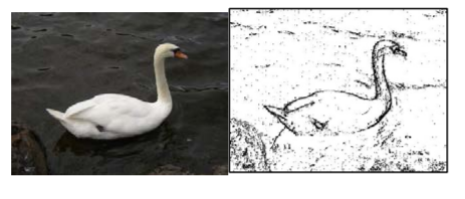
Original picture and after edge detection
How do you calculate the difference between two colors? The formula for the difference between two points (x1,y1) and (x2,y2) is \sqrt{(x2 - x1)^{2} + (y2 - y1)^{2}} Similarly, the difference between two colors (red1,green1,blue1) and (red2,green2,blue2) is \sqrt{(red2 - red1)^{2} +(green2 - green1)^{2} +(blue2 - blue1)^{2}}
The colorDistance method in the Pixel class uses this calculation to return the difference between the current pixel color and a passed color.
The following method implements this simple algorithm. Notice that the nested for loop stops earlier than when it reaches the number of columns. That is because in the nested loop the current color is compared to the color at the pixel in the next column. If the loop continued to the last column this would cause an out-of-bounds error.
public void edgeDetection(int edgeDist)
{
     Pixel leftPixel = null;
     Pixel rightPixel = null;
     Pixel[][] pixels = this.getPixels2D();
     Color rightColor = null;
     for (int row = 0; row < pixels.length; row++)
     {
          for (int col = 0; col < pixels[0].length-1; col++)
          {
               leftPixel = pixels[row][col];
               rightPixel = pixels[row][col+1];
               rightColor = rightPixel.getColor();
               if (leftPixel.colorDistance(rightColor) > edgeDist)
                   leftPixel.setColor(Color.BLACK);
               else
                   leftPixel.setColor(Color.WHITE);
          }
     }
}
You can test this with the edgeDetection method below.
Exercise 1
Picture Lab A9: Run to see edgeDetection working.
Open the
01-picture-lab-A9-edgeDetectionfolder and runPicture.java. It is an example, so it has no tests. It draws pictures: Run saves the drawing as an image in its folder.
- Notice that the current edge detection method works best when there are big color changes from left to right but not when the changes are from top to bottom. Add another nested loop that compares the current pixel with the pixel below it and sets the current pixel color to black as well when the color distance is greater than the specified edge distance.
Exercise 2
Picture Lab A9: Improve the edgeDetection method by adding another nested loop that compares the current pixel with the pixel below it and sets the current pixel color to black as well, when the color distance is greater than the specified edge distance.
Open the
02-picture-lab-A9-edgeDetection2folder and editPicture.java. Press Run to try it; Run Tests checks it (3 tests). Its tests check your code, not what it prints: “edgeDetection method”, “Checking that edgeDetection contains 4 (2 nested) for loops”, “Checking that edgeDetection calls colorDistance twice”. It draws pictures: Run saves the drawing as an image in its folder, and Run Tests checks the code without the drawing.
- Work in groups to come up with another algorithm for edge detection and test it below.
Exercise 3
Picture Lab A9: Come up with another algorithm for edgeDetection in a method called myEdgeDetection.
Open the
03-picture-lab-A9-myEdgeDetectionfolder and editPicture.java. Press Run to try it; Run Tests checks it (3 tests). Its tests check your code, not what it prints: “myEdgeDetection( method”, “Checking that myEdgeDetection contains at least 2 for loops”, “Checking that myEdgeDetection calls colorDistance at least once”. It draws pictures: Run saves the drawing as an image in its folder, and Run Tests checks the code without the drawing.
For teachers
Picture Lab A9: Simple Edge Detection
Students read CSAwesome2's “Picture Lab A9: Simple Edge Detection” in CS Room and work through its 3 Java coding exercises (2 graded, 1 example).
- Time: 1 class period
- Tests: 6 in 2 graded exercises, set up for you when you import the lesson
Goals
- Practice for Unit 4: Data Collections.
Before class
- Import the lesson into your class from the Lessons page, or with New assignment → Use a lesson. It arrives as a draft with its tests already set up.
- Publish it.
- The original page is on CS Awesome: https://runestone.academy/ns/books/published/csawesome2/pictureLabA9.html
- CS Awesome's own teacher materials: the CS Awesome teacher site
In class
- Students read
README.md. - Students do exercises 01–03, each in its own folder, pressing Run to try their code.
- Run Tests checks every graded exercise at once; scores appear in the Gradebook. Grading uses your copy of the tests, so a student who edits theirs does not change the grade.
Exercises
| Folder | File | Grading | Tests |
|---|---|---|---|
01-picture-lab-A9-edgeDetection | Picture.java | Example, not graded (draws pictures) | 0 |
02-picture-lab-A9-edgeDetection2 | Picture.java | Checks code text only (draws pictures; graded without the drawing) | 3 |
03-picture-lab-A9-myEdgeDetection | Picture.java | Checks code text only (draws pictures; graded without the drawing) | 3 |
Teachers can download a reference solution after signing in.