Unit 4B - Free Response - StringFormatter A
From CS Awesome 2CC BY-NC-SA 4.0Original page
Java1 class period1 exercise2 graded tests
Files
Unit 4B - Free Response - StringFormatter A
Each coding exercise has its own folder. Open its .java file and press Run to try it. Run Tests checks every graded exercise in this lesson at once.
The following is a free response question from 2016. It was question 4 part A on the exam. You can see all the free response questions from past exams at Past AP CSA Exams .
This question involves the process of taking a list of words, called wordList, and producing a formatted string of a specified length. The list wordList contains at least two words, consisting of letters only. When the formatted string is constructed, spaces are placed in the gaps between words so that as many spaces as possible are evenly distributed to each gap. The equal number of spaces inserted into each gap is referred to as the basic gap width. Any leftover spaces are inserted one at a time into the gaps from left to right until there are no more leftover spaces.
The following three examples illustrate these concepts. In each example, the list of words is to be placed into a formatted string of length 20.
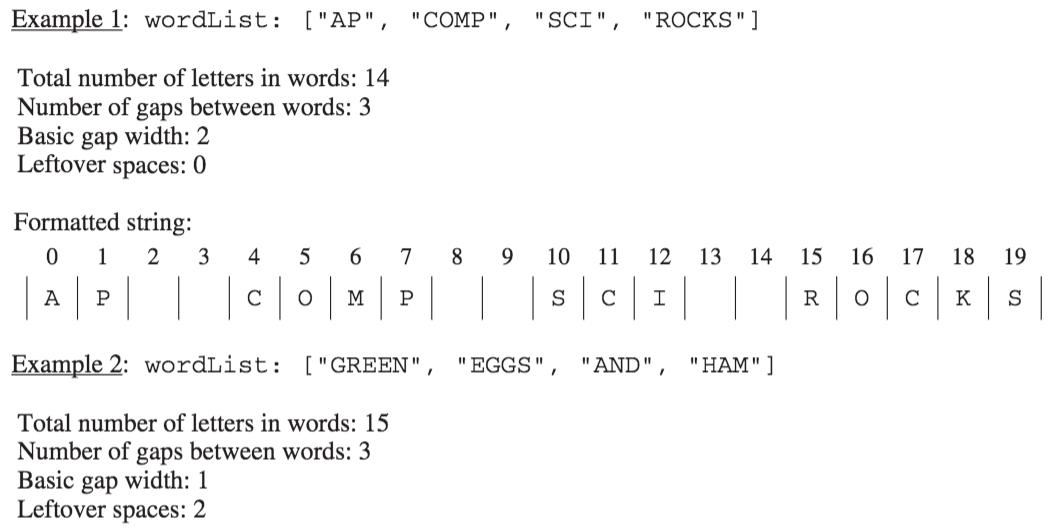
The leftover spaces are inserted one at a time between the words from left to right until there are no more leftover spaces. In this example, the first two gaps get an extra space.
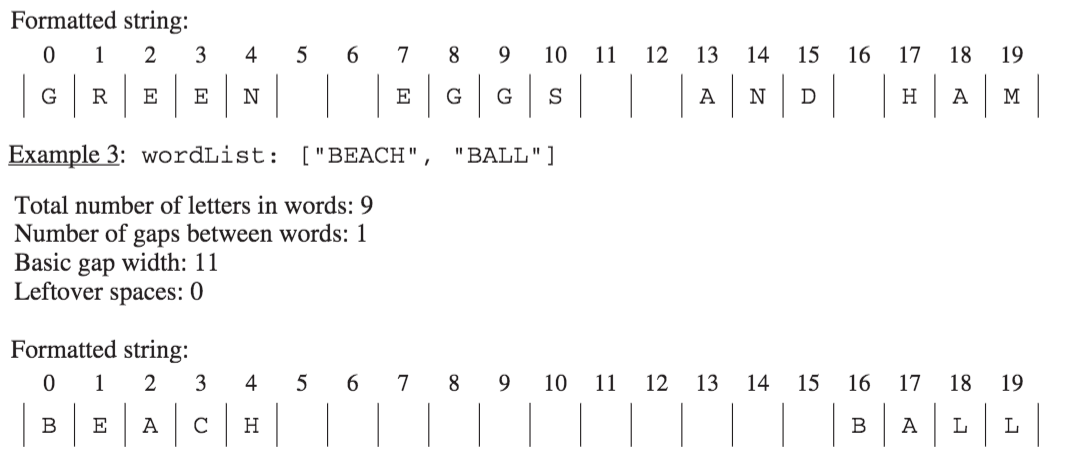
You will implement three static methods in a class named StringFormatter that is not shown.
Part A
(a) Write the StringFormatter method totalLetters, which returns the total number of letters in the words in its parameter wordList. For example, if the variableList<String> words is [“A”, “frog”, “is”],then the call StringFormatter.totalLetters(words) returns 7. You may assume that all words in wordList consist of one or more letters.
Complete method totalLetters below.
/** Returns the total number of letters in wordList.
*  Precondition: wordList contains at least two words, consisting of letters only.
*/
public static int totalLetters(List<String> wordList)
How to Solve Part A
We need to return the total number of letters for all of the strings in wordList. We will need to create an integer variable to keep track of the number of letters and initialize it to 0. Then we will loop through all of the strings in wordList and add the length of the current string to the number of letters. When the loop is finished we will return the number of letters.
Check your understanding: Which loop would be best for this problem? — answer it on CS Awesome: https://runestone.academy/ns/books/published/csawesome2/stringFormatterA.html#fr_formatter_1
Check your understanding: What is the correct way to access the length of a String str? — answer it on CS Awesome: https://runestone.academy/ns/books/published/csawesome2/stringFormatterA.html#fr_formatter_2
Put the Code in Order
Check your understanding: The following has the correct code to solve this problem, but also contains extra code that isn’t needed in a correct solution. — answer it on CS Awesome: https://runestone.academy/ns/books/published/csawesome2/stringFormatterA.html#stringFormatterA
Write the Code
Exercise 1
Finish writing the totalLetters method so that it returns the number of letters for all the strings in wordList. The main method will test your code to check that you solved it correctly.
Open the
01-lcfrsTotalLettersfolder and editStringFormatter.java. Press Run to try it; Run Tests checks it (2 tests).
For teachers
Unit 4B - Free Response - StringFormatter A
Students read CSAwesome2's “Unit 4B - Free Response - StringFormatter A” in CS Room and work through its 1 Java coding exercise.
- Time: 1 class period
- Tests: 2 in 1 graded exercise, set up for you when you import the lesson
Goals
- Practice for Unit 4: Data Collections.
Before class
- Import the lesson into your class from the Lessons page, or with New assignment → Use a lesson. It arrives as a draft with its tests already set up.
- Publish it.
- The original page, with its mixed-up code and multiple-choice questions, is on CS Awesome: https://runestone.academy/ns/books/published/csawesome2/stringFormatterA.html
- CS Awesome's own teacher materials: the CS Awesome teacher site
In class
- Students read
README.md. Questions that need CS Awesome's interactive widgets link back to it. - Students do exercise 01 in its folder, pressing Run to try their code.
- Run Tests checks every graded exercise at once; scores appear in the Gradebook. Grading uses your copy of the tests, so a student who edits theirs does not change the grade.
Exercises
| Folder | File | Grading | Tests |
|---|---|---|---|
01-lcfrsTotalLetters | StringFormatter.java | Autograded | 2 |
Teachers can download a reference solution after signing in.