2.6 Comparing Boolean Expressions (De Morgan’s Laws)
From CS Awesome 2CC BY-NC-SA 4.0Original page
Java2 class periods5 exercises10 graded tests
Files
2.6 Comparing Boolean Expressions (De Morgan’s Laws)
Each coding exercise has its own folder. Open its .java file and press Run to try it. Run Tests checks every graded exercise in this lesson at once.
What if you heard a rumor about a senior at your high school? And then you heard that the rumor wasn’t true - it wasn’t a senior at your high school. Which part of “a senior at your high school” wasn’t true? Maybe they weren’t a senior? Or maybe they didn’t go to your high school? You could write this as a logic statement like below using negation (!) and the and (&&) operator since both parts have to be true for the whole statement to be true. (Thank you to Kevin Saxton from Kent School, CT for this example.)
!(a && b)

a = "senior"
b = "at our high school"

// This means it is not true that (a) it is a senior
// and (b) someone at our high school.
In this lesson, you will learn about De Morgan’s Laws which simplify statements like this. We know that !(a senior at our high school) could mean !(a senior) or !(at our high school). Let’s learn more about De Morgan’s Laws.
De Morgan’s Laws
De Morgan’s Laws were developed by Augustus De Morgan in the 1800s. They show how to simplify the negation of a complex boolean expression, which is when there are multiple expressions joined by an and (&&) or or (||), such as (x < 3) && (y > 2). When you negate one of these complex expressions, you can simplify it by flipping the operators and end up with an equivalent expression. De Morgan’s Laws state the following equivalencies. Here’s an easy way to remember De Morgan’s Laws: move the NOT inside, AND becomes OR and move the NOT inside, OR becomes AND.
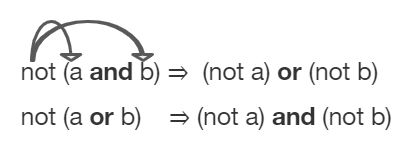
De Morgan’s Laws to simplify complex expressions
In Java, De Morgan’s Laws are written with the following operators:
!(a && b)is equivalent to!a || !b!(a || b)is equivalent to!a && !b
Going back to our example above, !(a senior && at our high school) is equivalent to !(a senior) or !(at our high school) using De Morgan’s Laws:
!(a && b) is equivalent to !a || !b

a = "senior"
b = "at our high school"
You can also simplify negated boolean expressions that have relational operators like <, >, ==. You can move the negation inside the parentheses by flipping the relational operator to its opposite sign. For example, not (c equals d) is the same as saying c does not equal d. An easy way to remember this is To move the NOT, flip the sign. Notice that == becomes !=, but < becomes >=, > becomes <=, <= becomes >, and >= becomes < where the sign is flipped and an equal sign may also be added or removed.
!(c == d)is equivalent toc != d!(c != d)is equivalent toc == d!(c < d)is equivalent toc >= d!(c > d)is equivalent toc <= d!(c <= d)is equivalent toc > d!(c >= d)is equivalent toc < d
Truth Tables
Although you do not have to memorize De Morgan’s Laws for the CSA Exam, you should be able to show that two boolean expressions are equivalent. One way to do this is by using truth tables. For example, we can show that !(a && b) is equivalent to !a || !b by constructing the truth table below and seeing that they give identical results for the 2 expressions (the last 2 columns in the table below are identical!).
| a | b | !(a && b) | !a || !b |
|---|---|---|---|
| true | true | false | false |
| false | true | true | true |
| true | false | true | true |
| false | false | true | true |
Simplifying Boolean Expressions
Often, you can simplify boolean expressions to create equivalent expressions. For example, applying De Morgan’s Laws to !(x < 3 && y > 2) yields !(x < 3) || !(y > 2) as seen in the figure below. This can then be simplified further by flipping the relational operators to remove the not. So, !(x < 3) || !(y > 2) is simplified to (x >= 3 || y <= 2) where the relational operators are flipped and the negation is removed. These two simplification steps are seen below.
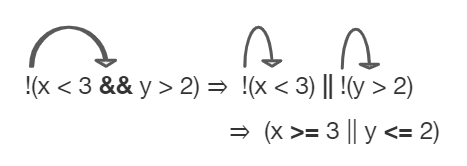
An example boolean expression simplified
Exercise 1
For what values of x and y will the code print true? Try out different values of x and y to check your answer.
Open the
01-lcdmtestfolder and editTest1.java. Press Run to try it; Run Tests checks it (1 test). Its test checks your code, not what it prints: “Code has been changed”.
Check your understanding: What is printed when the following code executes and x equals 4 and y equals 3?
int x = 4, y = 3;
if (!(x < 3 || y > 2))
{
   System.out.println("first case");
}
else
{
   System.out.println("second case");
}
Answer it on CS Awesome: https://runestone.academy/ns/books/published/csawesome2/topic-2-6-comparing-booleans.html#compareBool1
Check your understanding: What is printed when the following code executes and x equals 4 and y equals 3?
int x = 4, y = 3;
if (!(x < 3 && y > 2))
{
   System.out.println("first case");
}
else
{
   System.out.println("second case");
}
Answer it on CS Awesome: https://runestone.academy/ns/books/published/csawesome2/topic-2-6-comparing-booleans.html#compareBool2
Comparing Objects
Comparing objects is a little different than comparing primitive typed values like numbers. Objects can be very complex and have many attribute values or instance variables inside them. For example, the Turtle objects have many instance variables like name, width, height, xPos, yPos, etc. When comparing two Turtle objects, we need a specially written equals method to compare all of these values. In the next sections, we will take a look at String objects and the difference between comparing them with == vs. the equals method.
String Equality
The equals method for Strings compares two strings letter by letter. s1.equals(s2) is true if s1 and s2 have all the same characters in the same order. With Strings and other objects, you almost always use equals instead of == to check their equality.
When the operator == or != is used to compare object variables, it returns true when the two variables refer to the same object. These variables are called object references and aliases for the same object. With strings this happens when one string variable is set to another.
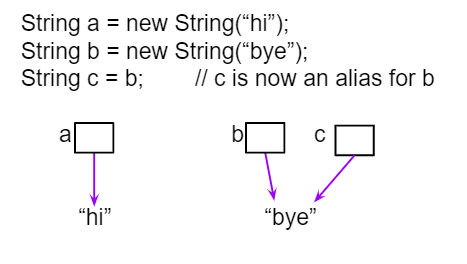
String aliases
Exercise 2
If you run the following, what will be printed?
Open the
02-lcse1folder and runTest1.java. It is an example, so it has no tests.
The following video traces through the code above and shows how == and equals work with String objects in memory.
Here’s the representation of memory where s2 and s3 refer to the same String object.
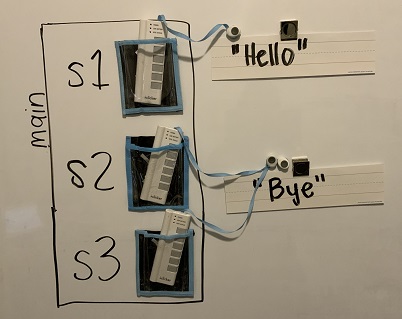
s2 and s3 are aliases referring to the same String object
Equality with New Strings
If you use the new keyword to create a string, it will always create a new string object. So, even if we create two string objects with new that contain all the same characters in the same order, they will not refer to the same object.
Exercise 3
What will the following print? Run the code to see the difference between == and equals with new Strings that are both “Hello”. Then, write the if statements described below to test the equality of s1 and s3 to see if capitalization matters.
Open the
03-strEqualsfolder and editTest2.java. Press Run to try it; Run Tests checks it (3 tests).
Watch the video below to see how this code works in memory. Since we used the new keyword, two different String objects will be created that each have the characters Hello in them. So s1 == s2 will be false since they don’t refer to the same object, but s1.equals(s2) is true since the two different objects contain the same characters in the same order.
Here is the representation of these String objects in memory.
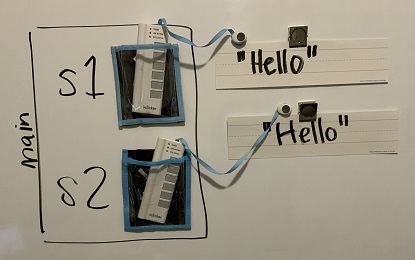
Two strings that are equal with equals but not with ==.
Note that you can also create Strings using string literals instead of new, like String s = "Hello". String literals behave a little differently because they are re-used if they already exist instead of creating a new object. But you should not see questions with string literals and == on the AP exam.
Only use
==and!=with primitive types likeintor to test if two strings (or objects) refer to the same object. Useequals, not==or!=, with strings to test if they are equal letter by letter, and with other objects to see if all of their relevant attributes are equal.
Check your understanding: Which of the following is true after the code executes?
String s1 = new String("hi");
String s2 = new String("bye");
String s3 = new String("hi");
s2 = s1;
Answer it on CS Awesome: https://runestone.academy/ns/books/published/csawesome2/topic-2-6-comparing-booleans.html#qsbeq_1
Check your understanding: Which of the following is true after the code executes?
String s1 = new String("hi");
String s2 = new String("bye");
String s3 = new String("hi");
Answer it on CS Awesome: https://runestone.academy/ns/books/published/csawesome2/topic-2-6-comparing-booleans.html#qsbeq_2
Check your understanding: Which of the following is true after the code executes?
String s1 = new String("hi");
String s2 = new String("bye");
String s3 = new String("hi");
Answer it on CS Awesome: https://runestone.academy/ns/books/published/csawesome2/topic-2-6-comparing-booleans.html#qsbeq_3
Comparing with null
One common place to use == or != with objects is to compare them to null to see if they really exist. Sometimes short-circuit evaluation is used to avoid an error if the object doesn’t exist. Remember that short-circuit evaluation is used with && in Java meaning that if the first part of the if condition is false, it doesn’t even have to check the second condition and it knows the whole && test is false.
Exercise 4
Try the code to see a NullPointerException. Since s is null, trying to access indexOf on s throws an NullPointerException. Comment out the first if statement and run the program again. The second if statement avoids the error with shortcircuit evaluation. Because s != null is false, the rest of the Boolean expression is not evaluated. Now, change s to set it to "apple" instead of null in the first line and run the code again to see that the if statements can print out that “apple contains an a”.
Open the
04-nullTestfolder and editNullTest.java. Press Run to try it; Run Tests checks it (3 tests).
The following video shows how the null string reference works in memory.
Coding Challenge: Truth and Tracing Tables POGIL
We encourage you to do this activity as a POGIL (Process Oriented Guided Inquiry Learning) group activity. POGIL groups are self-managed teams of up to 4 students where everyone has a POGIL role and works together to solve the problems, making sure that everyone in the team participates and learns.
Explore the following problems with your group. You may use this worksheet to complete your truth tables. Assume that x is an integer value, for example -1, 0, or 1.
- Complete a truth table for the boolean expression:
!(x == 0 || x >= 1). Is this the set of positive or negative numbers? Is the expression true whenxis positive? Or is it true whenxis negative? You can try out the values whenxis 1 or -1 or 0. Note that 0 is not positive or negative. You can try running the code below to check your answer. - Complete a truth table for the boolean expression:
!(x == 0) && !(x >= 1). Is this the set of positive or negative numbers? - Complete a truth table for the boolean expression:
(x != 0) && (x < 1). Is this the set of positive or negative numbers? - Are the 3 boolean expressions equivalent? Why or why not?
- Test your answers using the exercise below.
- Complete the following multiple choice exercises in your POGIL groups. Show the application of DeMorgan’s laws or the truth tables in each question on paper.
Exercise 5
Are these 3 boolean expressions equivalent? 1. !(x == 0 || x >= 1) , 2. !(x == 0) && !(x >= 1) , 3. (x != 0) && (x < 1)
Open the
05-challengeBooleanExprfolder and editEquivalentExpressions.java. Press Run to try it; Run Tests checks it (3 tests). Its tests check your code, not what it prints: “Code has been changed”, “Code contains(x != 0) && (x < 1)”, “Code contains!(x == 0) && !(x >= 1)”.
Check your understanding: Which of the following is the same as the code below?
!(x > 2 && y < 4)Answer it on CS Awesome: https://runestone.academy/ns/books/published/csawesome2/topic-2-6-comparing-booleans.html#qcbdm1
Check your understanding: Which of the following is the same as the code below?
!(x == 2 && y > 4)Answer it on CS Awesome: https://runestone.academy/ns/books/published/csawesome2/topic-2-6-comparing-booleans.html#qcbdm2
Check your understanding: Which of the following is the same as the code below?
!(x!=5 && y!=7)Answer it on CS Awesome: https://runestone.academy/ns/books/published/csawesome2/topic-2-6-comparing-booleans.html#qcbdm3
Check your understanding: Which of the following is the same as the code below?
!(x<= 5 && y > 7)Answer it on CS Awesome: https://runestone.academy/ns/books/published/csawesome2/topic-2-6-comparing-booleans.html#qcbdm4
String Equality: What will the following code print out? Trace through the code by drawing diagrams of what is going on in memory like the figures above, and then show the values of s1, s2, s3, s4 and the output after each line of code. Remember that you can use trace tables to track the values of variables as they change throughout a program. To trace through code, write down a variable in each column in a table and keep track of its value throughout the program as you go through it line by line.
String s1 = null;
String s2 = new String("hi");
String s3 = new String("hi");
String s4 = new String("bye");
if (s1 == null)
{
    s1 = s2;
}
if (s1 == s2)
{
    System.out.println("s1 and s2 refer to the same object");
}
if (s2 == s3)
{
    System.out.println("s2 and s3 refer to the same object");
}
if (s3 == s4)
{
    System.out.println("s3 and s4 refer to the same object");
}
if (s1.equals(s2) && s2.equals(s3))
{
    System.out.println("s1, s2, s3 are equal");
}
Write your tracing table here that keeps track of s1, s2, s3, s4 and the output.
Discuss this with your class, or answer it on CS Awesome: https://runestone.academy/ns/books/published/csawesome2/topic-2-6-comparing-booleans.html#challengetracingStrings
Summary
- (AP 2.6.A.1) Two Boolean expressions are equivalent if they evaluate to the same value in all cases. Truth tables can be used to prove Boolean expressions are equivalent.
- (AP 2.6.A.2) De Morgan’s Laws can be applied to Boolean expressions to create equivalent ones:
!(a && b)is equivalent to!a || !b!(a || b)is equivalent to!a && !b
- A negated expression with a relational operator can be simplified by flipping the relational operator to its opposite sign.
!(c == d)is equivalent toc != d!(c != d)is equivalent toc == d!(c < d)is equivalent toc >= d!(c > d)is equivalent toc <= d!(c <= d)is equivalent toc > d!(c >= d)is equivalent toc < d
- (AP 2.6.B.1) Two different variables can hold references to the same object. Object references can be compared using
==and!=. (Two object references are considered aliases when they both reference the same object.) - (AP 2.6.B.2) An object reference can be compared with
null, using==or!=, to determine if the reference actually references an object. - (AP 2.6.B.3) Classes often define their own equals method, which can be used to specify the criteria for equivalency for two objects of the class. The equivalency of two objects is most often determined using attributes from the two objects.
AP Practice
Check your understanding: Which of the following best describes the value of the Boolean expression: a && !(b || a) — answer it on CS Awesome: https://runestone.academy/ns/books/published/csawesome2/topic-2-6-comparing-booleans.html#apcsa-sample5
Check your understanding: Consider the following code segment.
String message = new String("AP Practice");
String note = new String("AP Practice");
String memo = new String("memo");
int i = 5;

if (message.equals(note) && !message.equals("memo"))
{
    message = note;

    if (message == note && message.length() > i)
    {
       i = 3;
       memo = message.substring(i);
    }
}
Which of the following expressions evaluate to
trueafter the code segment above executes?Answer it on CS Awesome: https://runestone.academy/ns/books/published/csawesome2/topic-2-6-comparing-booleans.html#AP-string-equality
Review/Practice for Selection
This lesson ends the section on selection. You can now do the following review and practice lessons at the end of the unit.
For teachers
2.6 Comparing Boolean Expressions (De Morgan’s Laws)
Students read CSAwesome2's “Comparing Boolean Expressions (De Morgan’s Laws)” in CS Room and work through its 5 Java coding exercises (4 graded, 1 example).
- Time: 2 class periods
- Tests: 10 in 4 graded exercises, set up for you when you import the lesson
Goals
- (AP 2.6.A.1) Two Boolean expressions are equivalent if they evaluate to the same value in all cases. Truth tables can be used to prove Boolean expressions are equivalent.
- (AP 2.6.A.2) De Morgan’s Laws can be applied to Boolean expressions to create equivalent ones:
!(a && b)is equivalent to!a || !b!(a || b)is equivalent to!a && !b
- (AP 2.6.B.1) Two different variables can hold references to the same object. Object references can be compared using
==and!=. (Two object references are considered aliases when they both reference the same object.) - (AP 2.6.B.2) An object reference can be compared with
null, using==or!=, to determine if the reference actually references an object. - (AP 2.6.B.3) Classes often define their own equals method, which can be used to specify the criteria for equivalency for two objects of the class. The equivalency of two objects is most often determined using attributes from the two objects.
Before class
- Import the lesson into your class from the Lessons page, or with New assignment → Use a lesson. It arrives as a draft with its tests already set up.
- Publish it.
- The original page, with its free-response and multiple-choice questions, is on CS Awesome: https://runestone.academy/ns/books/published/csawesome2/topic-2-6-comparing-booleans.html
- CS Awesome's own teacher materials: the CS Awesome teacher site
In class
- Students read
README.md. Questions that need CS Awesome's interactive widgets link back to it. - Students do exercises 01–05, each in its own folder, pressing Run to try their code.
- Run Tests checks every graded exercise at once; scores appear in the Gradebook. Grading uses your copy of the tests, so a student who edits theirs does not change the grade.
Exercises
| Folder | File | Grading | Tests |
|---|---|---|---|
01-lcdmtest | Test1.java | Checks code text only | 1 |
02-lcse1 | Test1.java | Example, not graded | 0 |
03-strEquals | Test2.java | Autograded | 3 |
04-nullTest | NullTest.java | Autograded | 3 |
05-challengeBooleanExpr | EquivalentExpressions.java | Checks code text only | 3 |
Teachers can download a reference solution after signing in.