2.4 Nested if Statements
From CS Awesome 2CC BY-NC-SA 4.0Original page
Java2 class periods5 exercises19 graded tests
Files
2.4 Nested if Statements
Each coding exercise has its own folder. Open its .java file and press Run to try it. Run Tests checks every graded exercise in this lesson at once.
If statements can be nested inside other if statements. Nested if statements consist of if, if-else, or if-else-if statements within if, if-else, or if-else-if statements. The Boolean expression of the inner nested if statement is evaluated only if the Boolean expression of the outer if statement evaluates to true.
if (boolean expression)
{   // This nested if is executed if outer if is true
    if (boolean expression)
    {
        statement;
    }
}
Multiway selection (else if)
A single if/else statement allows us to select between 2 branches of code. With nested if/else statements, we can pick between 3 or more branches of code. A multi-way selection (if-else-if) is used when there are a series of expressions with different segments of code for each condition. Multi-way selection is performed such that no more than one segment of code is executed based on the first expression that evaluates to true. If no expression evaluates to true and there is a trailing else statement, then the body of the else is executed.
Just add else if for each possibility after the first if, and else before the last possibility like below.
// 3 way choice with else if
if (boolean expression)
{
   statement1;
}
else if (boolean expression)
{
   statement2;
}
else
{
   statement3;
}
Exercise 1
Run the code and try changing the value of x to get each of the three possible lines in the conditional to print.
Open the
01-TryElseIffolder and editTryElseIf.java. Press Run to try it; Run Tests checks it (3 tests). The tests expectxto end up zero or negative.
Here is a flowchart for a conditional with 3 options like in the code above.
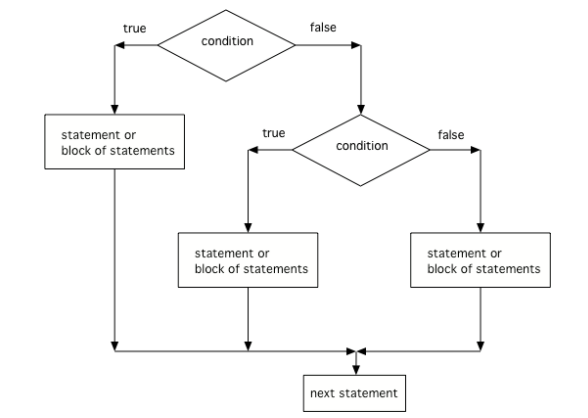
The order that statements execute in a conditional with 3 options: if, else if, and else
Another way to handle 3 or more conditional cases is to use the
switchandbreakkeywords, but these will not be on the exam. For a tutorial on using switch see https://docs.oracle.com/javase/tutorial/java/nutsandbolts/switch.html.
Check your understanding: What does the following code print when x has been set to -5?
if (x < 0)
{
   System.out.println("x is negative");
}
else if (x == 0)
{
   System.out.println("x is zero");
}
else
{
   System.out.println("x is positive");
}
Answer it on CS Awesome: https://runestone.academy/ns/books/published/csawesome2/topic-2-4-nested-ifs.html#trace-nested-if
Check your understanding: What does the following code print when x has been set to 2000?
if (x < 0)
{
   System.out.println("x is negative");
}
else if (x == 0)
{
   System.out.println("x is zero");
}
else
{
   System.out.println("x is positive");
}
Answer it on CS Awesome: https://runestone.academy/ns/books/published/csawesome2/topic-2-4-nested-ifs.html#trace-nested-ifs2
Check your understanding: What does the following code print when x has been set to .8?
if (x < .25)
{
    System.out.println("first quartile");
}
else if (x < .5)
{
    System.out.println("second quartile");
}
else if (x < .75)
{
    System.out.println("third quartile");
}
else
{
    System.out.println("fourth quartile");
}
Answer it on CS Awesome: https://runestone.academy/ns/books/published/csawesome2/topic-2-4-nested-ifs.html#trace-nested-ifs3
Exercise 2
The else-if connection is necessary if you want to hook up conditionals together. In the code, there are 4 separate if statements instead of the if-else-if pattern. Will this code print out the correct grade? First, trace through the code to see why it prints out the incorrect grade. Then, fix the code by adding in 3 else’s to connect the if statements and see if it works.
Open the
02-ifElseIfDebugfolder and editIfDebug.java. Press Run to try it; Run Tests checks it (5 tests). Run feeds it the input ininput.txt; change that file to try other input.
Exercise 3
Finish the code so that it prints “Plug in your phone!” if the battery is below 50, “Unplug your phone!” if it is at or above 100, and “All okay!” otherwise. Change the battery value to test all 3 conditions.
Open the
03-ifelseifBatteryfolder and editBatteryTest.java. Press Run to try it; Run Tests checks it (3 tests). Run feeds it the input ininput.txt; change that file to try other input.
Dangling Else Statements
Sometimes with nested ifs we find a dangling else that could potentially belong to either if statement. The rule is that the else clause will always be a part of the closest unmatched if statement in the same block of code, regardless of indentation.
// Nested if with dangling else
if (boolean expression)
   if (boolean expression)
      Do statement;
   else  // belongs to closest if
      Do other statement;
Exercise 4
Try the code with a dangling else. Notice that the indentation does not matter to the compiler (but you should make it your habit to use good indentation just as a best practice). How could you get the else to belong to the first if statement?
Open the
04-danglingelsefolder and editDanglingElseTest.java. Press Run to try it; Run Tests checks it (4 tests). Run feeds it the input ininput.txt; change that file to try other input.
You can use curly braces ({}) to enclose a nested if and have the else clause belong to the top level if clause like below:
// Nested if with dangling else
if (boolean expression)
{
   if (boolean expression)
      Do this statement;
}
else  // belongs to first if
  Do that statement;
In fact many experienced Java programmers always use curly braces, even when they are not technically required to avoid this kind of confusion.
Coding Challenge: Adventure
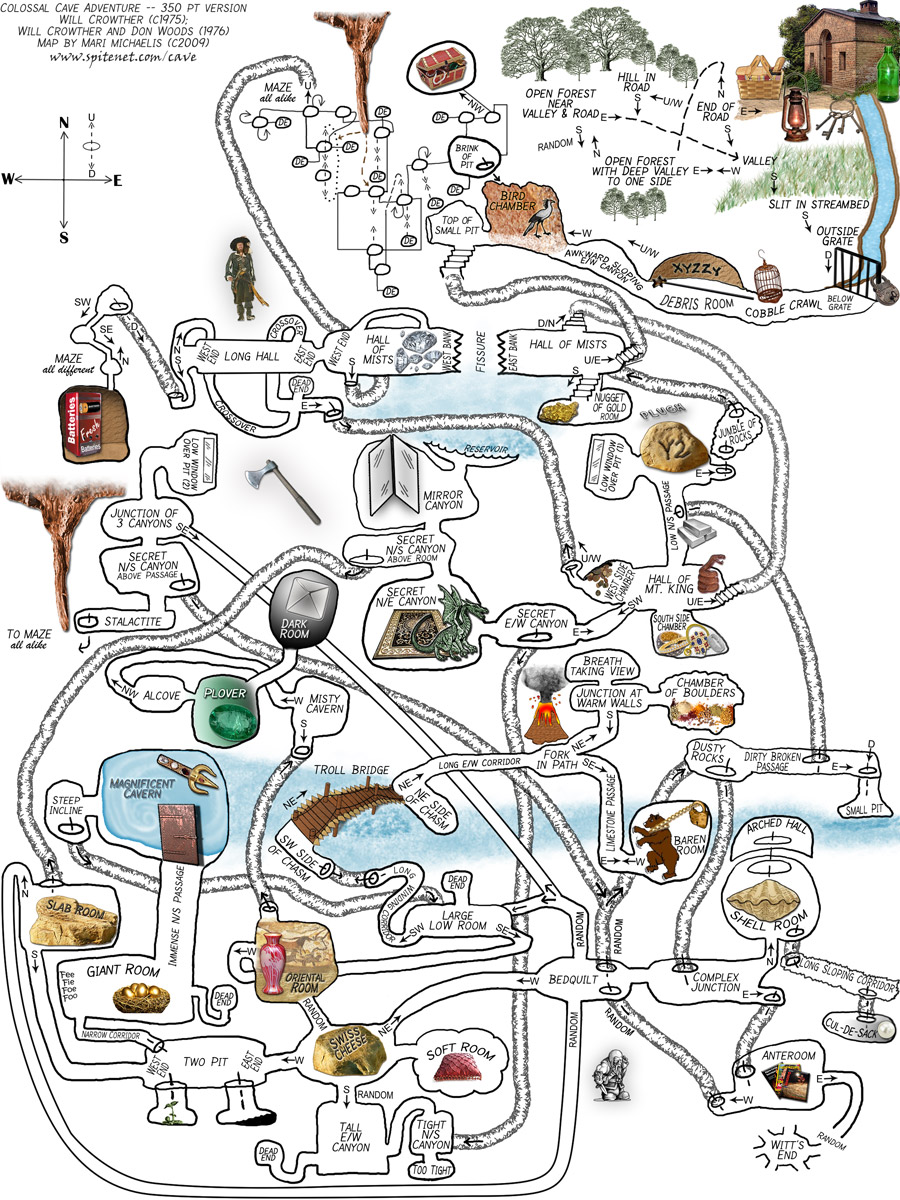
One of the first games coded for early computers in the 1970s was called Colossal Cave Adventure. It was a text-based interactive fiction game where you had to make your way through an elaborate cave. The program only understood one word or phrase commands like north, south, enter, take, etc. You can try playing adventure recreated online following some of the commands in this walkthrough. Part of the challenge is finding the commands that the code will understand.
In a game like Adventure, else if statements can be used to respond to commands from the user like n, s, e, w. Try the program below. This current adventure game asks the user whether they want to move n, s, e, or w, but right now only the north direction is coded. It leads to a new method called forest().
In the main method, add in else if statements to go in the directions of “s” for south, “e” for east, “w” for west, and an else statement that says “You can’t go in that direction”. Be creative and come up with different locations in each direction. Have each direction call a static method that you will write. The forest() and sea() methods are shown as examples for two of the diretions. You will need to change the input in input.txt to s or e or w and then run to test these branches. How many test-cases are needed to test all branches of your code? You can also connect locations to one another by calling their methods. If you have time, you can expand this game further with more nested if/else statements and come up with a different adventure location.
Exercise 5
This is a text adventure game that lets the user move in 4 different directions. Right now, it only lets the user move north. Add in else if statements to go in the directions of "s" for south, "e" for east, "w" for west, and an else statement that says "You can't go in that direction". Be creative and come up with different locations in static methods below main for each direction. There are 5 TODO steps below.
Open the
05-challenge-ElseIf-Adventurefolder and editAdventure.java. Press Run to try it; Run Tests checks it (4 tests). Run feeds it the input ininput.txt; change that file to try other input. Its tests check your code, not what it prints: “Number of if statements”, “Number of else if statements”, “Ending else statement”, “Number of public static methods”.
Summary
- (AP 2.4.A.1) Nested if statements consist of if, if-else, or if-else-if statements within if, if-else, or if-else-if statements.
- (AP 2.4.A.2) The Boolean expression of the inner nested if statement is evaluated only if the Boolean expression of the outer if statement evaluates to true.
- (AP 2.4.A.3) A multi-way selection (if-else-if) is used when there are a series of expressions with different segments of code for each condition. Multi-way selection is performed such that no more than one segment of code is executed based on the first expression that evaluates to true. If no expression evaluates to true and there is a trailing else statement, then the body of the else is executed.
// 3 way choice with else if
if (boolean expression)
{
   statement1;
}
else if (boolean expression)
{
   statement2;
}
else
{
    statement3;
}
AP Practice
Check your understanding: Assume an int variable x has been properly declared and initialized. Which of the following code segments will print out “High” if x is 66 and above, “Medium” is x is between 33-65, and “Low” if x is below 33.
I.   if (x > 66)
     {
       System.out.println("High");
     }
     else if (x > 33)
     {
       System.out.println("Medium");
     }
     else {
       System.out.println("Low");
     }

II.  if (x < 33)
     {
       System.out.println("Low");
     }
     else if (x < 66)
     {
       System.out.println("Medium");
     }
     else {
       System.out.println("High");
     }

III. if (x >= 66)
     {
       System.out.println("High");
     }
     if (x >= 33)
     {
       System.out.println("Medium");
     }
     if (x < 33)
     {
       System.out.println("Low");
     }
Answer it on CS Awesome: https://runestone.academy/ns/books/published/csawesome2/topic-2-4-nested-ifs.html#AP-nested-if-else
For teachers
2.4 Nested if Statements
Students read CSAwesome2's “Nested if Statements” in CS Room and work through its 5 Java coding exercises.
- Time: 2 class periods
- Tests: 19 in 5 graded exercises, set up for you when you import the lesson
Goals
- (AP 2.4.A.1) Nested if statements consist of if, if-else, or if-else-if statements within if, if-else, or if-else-if statements.
- (AP 2.4.A.2) The Boolean expression of the inner nested if statement is evaluated only if the Boolean expression of the outer if statement evaluates to true.
- (AP 2.4.A.3) A multi-way selection (if-else-if) is used when there are a series of expressions with different segments of code for each condition. Multi-way selection is performed such that no more than one segment of code is executed based on the first expression that evaluates to true. If no expression evaluates to true and there is a trailing else statement, then the body of the else is executed.
Before class
- Import the lesson into your class from the Lessons page, or with New assignment → Use a lesson. It arrives as a draft with its tests already set up.
- Publish it.
- The original page, with its multiple-choice questions, is on CS Awesome: https://runestone.academy/ns/books/published/csawesome2/topic-2-4-nested-ifs.html
- CS Awesome's own teacher materials: the CS Awesome teacher site
In class
- Students read
README.md. Questions that need CS Awesome's interactive widgets link back to it. - Students do exercises 01–05, each in its own folder, pressing Run to try their code.
- Run Tests checks every graded exercise at once; scores appear in the Gradebook. Grading uses your copy of the tests, so a student who edits theirs does not change the grade.
Exercises
| Folder | File | Grading | Tests |
|---|---|---|---|
01-TryElseIf | TryElseIf.java | Autograded | 3 |
02-ifElseIfDebug | IfDebug.java | Autograded | 5 |
03-ifelseifBattery | BatteryTest.java | Autograded | 3 |
04-danglingelse | DanglingElseTest.java | Autograded | 4 |
05-challenge-ElseIf-Adventure | Adventure.java | Checks code text only | 4 |
Teachers can download a reference solution after signing in.