2.2 Boolean Expressions
From CS Awesome 2CC BY-NC-SA 4.0Original page
Java1 class period5 exercises6 graded tests
Files
2.2 Boolean Expressions
Each coding exercise has its own folder. Open its .java file and press Run to try it. Run Tests checks every graded exercise in this lesson at once.
Testing Equality (==)
The relational operators == and != (not equal) can be used to compare values. They return true or false boolean values.
One
=sign changes the value of a variable. Two==equal signs are used to test if a variable holds a certain value, without changing its value!
Watch the following video which shows what happens in memory as primitive types like int and reference types like Dog are compared with == in a physical model of Java memory.
The following code shows how == is used with primitive types like int.
Exercise 1
What will the code print out? Try to guess before you run it! Note that 1 equal sign (=) is used for assigning a value and 2 equal signs (==) for testing values. Then, add 3 more lines of code that sets year to 15 and prints out whether age is equal to year and whether age is not equal to year.
Open the
01-bool1folder and editBoolTest1.java. This one is not graded, so check it yourself.
We can also use == or != to test if two reference values, like Turtle and String objects, refer to the same object. In the figure below, we are creating two separate Turtle objects called juan and mia. They do not refer to same object or turtle. Then, we create a reference variable called friend that is set to mia. The turtle mia will have two ways (references or aliases) to name her – she’s both mia and friend, and these variables refer to the same object (same Turtle) in memory. If two reference variables refer to the same object like the turtle on the right in the image below, the test with == will return true which you can see in the code below.
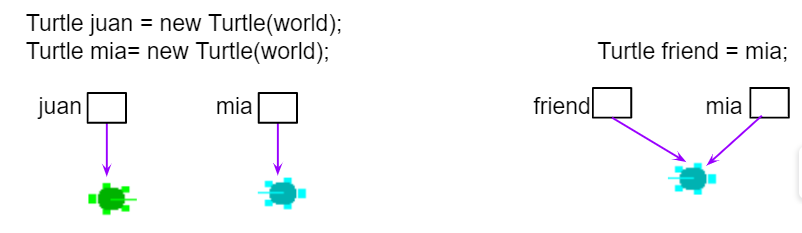
Turtle Reference Equality
Exercise 2
What will the code print out? Try to guess before you run it! Then, add another Turtle friend2 and set it to juan. Does friend2 == juan? Does friend2 == friend? Print out the Boolean expressions for these.
Open the
02-boolReffolder and editBoolTestRef.java. This one is not graded, so check it yourself. It draws pictures: Run saves the drawing as an image in its folder.
Relational Operators (<, >)
The relational operators below are used to compare numeric values or arithmetic expressions. Although some programming languages allow using relational operators like < to compare strings, Java only uses these operators for numbers, and uses the methods compareTo and equals for comparing String values.
<Less Than>Greater Than<=Less than or equal to>=Greater than or equal to==Equals!=Does not equal
If you have trouble telling < and > apart, think of < and > as arrows where the pointy end should point to the smaller value. If < (less than) points towards a smaller number on the left, then it evaluates to true. On the other hand a > (greater than) expression will be true only if the smaller number is on the right hand side. Or maybe you prefer the “hungry alligator” mnemonic beloved by elementary school teachers—think of < and > as the mouths of hungry alligators which always want to eat the bigger number; a < or > expression is only true if the alligator is in fact about to eat the bigger number.
To remember the correct order of the two characters in <= and >=, just write them in the same order you would say them in English: “less than or equal to” not “equal to or less than”.
Exercise 3
Try to guess what the code will print out before you run it. Then, set year to 15 and print the boolean expression for whether age is less than or equal to year.
Open the
03-bool2folder and editBoolTest2.java. Press Run to try it; Run Tests checks it (1 test). Its test checks your code, not what it prints: “Code contains<=”.
Boolean variables or expressions have true or false values. Relational operators can be used to compare two variables or compare a variable against a constant value or expression. For example, the following Boolean expressions can be used to see whether a number is positive or negative by seeing if it is greater than 0 or less than 0:
// Test if a number is positive
(number > 0)
//Test if a number is negative
(number < 0)
Check your understanding: Drag the boolean expression from the left and drop it on what it is testing on the right. — answer it on CS Awesome: https://runestone.academy/ns/books/published/csawesome2/topic-2-2-booleans.html#BooleanExps
Testing with remainder (%)
The remainder operator (%) is very useful in coding. The following Boolean expressions can be used to test whether a number is even or odd by seeing if there is a remainder when it is divided by 2 or if it is divisible by another number:
//Test if a number is even by seeing if the remainder is 0 when divided by 2
(number % 2 == 0)
//Test if a number is odd by seeing if there is a remainder when divided by 2
(number % 2 != 0)
//Test if a number is a multiple of x (or divisible by x with no remainder)
(number % x == 0)
Exercise 4
Try the expressions containing the % operator below to see how they can be used to check for even or odd numbers. All even numbers are divisible (with no remainder) by 2. Then, add another expression that tests to see if age1 is divisible by 3.
Open the
04-boolRemfolder and editBoolRem.java. Press Run to try it; Run Tests checks it (1 test). Its test checks your code, not what it prints: “boolean check for divisibility by 3”.
A warning: because Java’s
%is a remainder operator and not a true mathematical modulo operator, you can’t check if a number is odd with the expressionnum % 2 == 1.That expression will be
trueifnumis positive and odd andfalsewhennumis even, both of which are correct. But ifnumis negative and odd, its remainder when divided by 2 is -1, not 1 and this expression will evaluate tofalse. Thus you should always usenum % 2 != 0to check ifnumis odd.
Coding Challenge: Prime Numbers POGIL
We encourage you to do this activity as a POGIL (Process Oriented Guided Inquiry Learning) group activity or using Think-Pair-Share collaboration. POGIL groups are self-managed teams of 4 students where everyone has a POGIL role and works together to solve the problems, making sure that everyone in the team participates and learns.
In this activity, you will write a Java program that uses boolean expressions to determine if a number is prime. A prime number is an integer number that is only divisible by 1 and itself. For example, 3 is a prime number because it’s only divisible by 1 and 3 and no other numbers, but 4 is not a prime number because it’s divisible by 2 as well as 1 and 4. You will write methods that test whether a number is positive, negative, odd, even, and divisible by another number. You will then experiment with these methods to determine if the numbers 5, 6, and 7 are prime. And to ask questions about prime numbers like whether all odd numbers are prime.
Exercise 5
Complete the methods below to determine if a number is positive, negative, odd, even, or divisible by another number by returning boolean expressions testing the argument number. Then, experiment with these methods to determine if the numbers 5, 6, and 7 are prime.
Open the
05-challenge-primeNumbersfolder and editPrimeNumbers.java. Press Run to try it; Run Tests checks it (4 tests). Its tests check your code, not what it prints: “boolean expression for isNegative”, “boolean expression for isEven”, “boolean expression for isDivisible”, “method call in main to isDivisible to see whether number is divisible by 7”.
With your POGIL group, use the code you completed above to experiment to see if 5, 6, and 7 are prime. Answer the following questions:
Check your understanding: Is 5 prime? — answer it on CS Awesome: https://runestone.academy/ns/books/published/csawesome2/topic-2-2-booleans.html#prime1
Check your understanding: Is 6 prime? — answer it on CS Awesome: https://runestone.academy/ns/books/published/csawesome2/topic-2-2-booleans.html#prime2
Check your understanding: Is 7 prime? — answer it on CS Awesome: https://runestone.academy/ns/books/published/csawesome2/topic-2-2-booleans.html#prime3
Check your understanding: Are all odd numbers prime? Can you find an odd number that is not prime by using your code above? What is the smallest odd number that is not prime and has divisors other than 1 and itself? — answer it on CS Awesome: https://runestone.academy/ns/books/published/csawesome2/topic-2-2-booleans.html#prime4
Check your understanding: Are all even numbers not prime? Can you find an even prime number using your code above? What is the smallest even number that is prime? — answer it on CS Awesome: https://runestone.academy/ns/books/published/csawesome2/topic-2-2-booleans.html#prime5
Prime numbers are very useful in encryption algorithms because they can be used as keys for encoding and decoding. If you have the key, you can use it to divide a large number that represents something encrypted to decode it, but if you don’t have the key, it’s very hard to guess the factors of a large number to decode it. If you’re curious about this, watch this Numberphile video.
Summary
- (AP 2.2.A.1) Values or expressions can be compared using the relational operators
==and!=to determine whether the values are the same. With primitive types, this compares the actual primitive values. With reference types, this compares the object references. - (AP 2.2.A.2) Numeric values or expressions can be compared using the relational operators (
<,>,<=,>=) to determine the relationship between the values. - (AP 2.2.A.3) An expression involving relational operators evaluates to a
Booleanvalue oftrueorfalse. - The remainder operator
%can be used to test for divisibility by a number. For example,num % 2 == 0can be used to test if a number is even.
AP Practice
Check your understanding: Consider the following statement.
boolean x = (5 % 3 == 0) == (3 > 5);What is the value of x after the statement has been executed?
Answer it on CS Awesome: https://runestone.academy/ns/books/published/csawesome2/topic-2-2-booleans.html#AP2-2-1
Check your understanding: Consider the following Boolean expression in which the int variables x and y have been properly declared and initialized.
(x >= 10) == (y < 12)Which of the following values for x and y will result in the expression evaluating to true ?
Answer it on CS Awesome: https://runestone.academy/ns/books/published/csawesome2/topic-2-2-booleans.html#AP2-2-2
Relational Operators Practice Game
Try the game below to practice. Click on Relationals, evaluate the relational expression and click on None, All, or the numbers that make the expression true. Check on Compound for an added challenge. We encourage you to work in pairs and see how high a score you can get.
Play the game on CS Awesome: https://runestone.academy/ns/books/published/csawesome2/topic-2-2-booleans.html#relational-operators-practice-game
For teachers
2.2 Boolean Expressions
Students read CSAwesome2's “Boolean Expressions” in CS Room and work through its 5 Java coding exercises (3 graded, 2 ungraded).
- Time: 1 class period
- Tests: 6 in 3 graded exercises, set up for you when you import the lesson
Goals
- (AP 2.2.A.1) Values or expressions can be compared using the relational operators
==and!=to determine whether the values are the same. With primitive types, this compares the actual primitive values. With reference types, this compares the object references. - (AP 2.2.A.2) Numeric values or expressions can be compared using the relational operators (
<,>,<=,>=) to determine the relationship between the values. - (AP 2.2.A.3) An expression involving relational operators evaluates to a
Booleanvalue oftrueorfalse.
Before class
- Import the lesson into your class from the Lessons page, or with New assignment → Use a lesson. It arrives as a draft with its tests already set up.
- Publish it.
- The original page, with its fill-in, matching and multiple-choice questions, is on CS Awesome: https://runestone.academy/ns/books/published/csawesome2/topic-2-2-booleans.html
- CS Awesome's own teacher materials: the CS Awesome teacher site
In class
- Students read
README.md. Questions that need CS Awesome's interactive widgets link back to it. - Students do exercises 01–05, each in its own folder, pressing Run to try their code.
- Run Tests checks every graded exercise at once; scores appear in the Gradebook. Grading uses your copy of the tests, so a student who edits theirs does not change the grade.
Exercises
| Folder | File | Grading | Tests |
|---|---|---|---|
01-bool1 | BoolTest1.java | Not graded; students check it themselves | 0 |
02-boolRef | BoolTestRef.java | Not graded; students check it themselves (draws pictures) | 0 |
03-bool2 | BoolTest2.java | Checks code text only | 1 |
04-boolRem | BoolRem.java | Checks code text only | 1 |
05-challenge-primeNumbers | PrimeNumbers.java | Checks code text only | 4 |
Teachers can download a reference solution after signing in.