1.4 Assignment and Input
From CS Awesome 2CC BY-NC-SA 4.0Original page
Java1 class period4 exercises7 graded tests
Files
1.4 Assignment and Input
Each coding exercise has its own folder. Open its .java file and press Run to try it. Run Tests checks every graded exercise in this lesson at once.
Assignment Statements
Assignment statements initialize or change the value stored in a variable using the assignment operator =. An assignment statement always has a single variable on the left hand side. The value of the expression (which can contain math operators and other variables) on the right of the = sign is assigned to and stored in the variable on the left side.
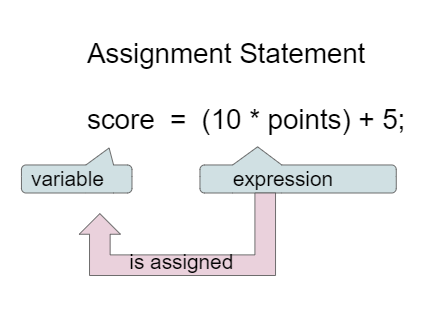
Assignment Statement (variable = expression;)
Instead of saying equals for the = in an assignment statement, say “gets” or “is assigned” to remember that the variable gets or is assigned the value on the right. In the figure above score is assigned the value of the expression 10 times points (which is another variable) plus 5.
The following video by Dr. Colleen Lewis shows how variables can change values in memory using assignment statements.
As we saw in the video, we can set one variable’s value to a copy of the value of another variable like y = x;. This won’t change the value of the variable that you are copying from.
Let’s step through the following code in the Java visualizer to see the values in memory ([step through it in the Java visualizer](http://www.pythontutor.com/visualize.html#code=public+class+Test2%0A%7B%0A+++public+static+void+main(String%5B%5D+args%29%0A+++%7B%0A+++++int+x+%3D+3%3B%0A+++++int+y+%3D+2%3B%0A+++++System.out.println(x%29%3B%0A+++++System.out.println(y%29%3B%0A+++++x+%3D+y%3B%0A+++++System.out.println(x%29%3B%0A+++++System.out.println(y%29%3B%0A+++++y+%3D+5%3B%0A+++++System.out.println(x%29%3B%0A+++++System.out.println(y%29%3B%0A+++%7D%0A%7D&mode=display&origin=opt-frontend.js&cumulative=false&heapPrimitives=false&textReferences=false&py=java&rawInputLstJSON=%5B%5D&curInstr=0)).
public class Test2
{
  public static void main(String[] args)
  {
    int x = 3;
    int y = 2;
    System.out.println(x);
    System.out.println(y);
    x = y;
    System.out.println(x);
    System.out.println(y);
    y = 5;
    System.out.println(x);
    System.out.println(y);
  }
}
Step through this code on CS Awesome: https://runestone.academy/ns/books/published/csawesome2/topic-1-4-assignment.html#codelensAsgn
Check your understanding: What are the values of x, y, and z after the following code executes? You can step through this code by clicking on this [Java visualizer](http://www.pythontutor.com/visualize.html#code=public+class+Test2%0A%7B%0A+++public+static+void+main(String%5B%5D+args%29%0A+++%7B%0A+++++int+x+%3D+0%3B%0A+++++int+y+%3D+1%3B%0A+++++int+z+%3D+2%3B%0A+++++x+%3D+y%3B%0A+++++y+%3D+y+*+2%3B%0A+++++z+%3D+3%3B%0A+++++System.out.println(x%29%3B%0A+++++System.out.println(y%29%3B%0A+++++System.out.println(z%29%3B%0A+++%7D%0A%7D&mode=display&origin=opt-frontend.js&cumulative=false&heapPrimitives=false&textReferences=false&py=java&rawInputLstJSON=%5B%5D&curInstr=0) link.
int x = 0;
int y = 1;
int z = 2;
x = y;
y = y * 2;
z = 3;
Answer it on CS Awesome: https://runestone.academy/ns/books/published/csawesome2/topic-1-4-assignment.html#qasgn1
Check your understanding: The following has the correct code to ‘swap’ the values in x and y (so that x ends up with y’s initial value and y ends up with x’s initial value), but the code is mixed up and contains one… — answer it on CS Awesome: https://runestone.academy/ns/books/published/csawesome2/topic-1-4-assignment.html#swapParsons
Data Types in Assignments
Every variable must be assigned a value before it can be used in an expression. That value must be from a compatible data type. A variable is initialized the first time it is assigned a value. During execution, an expression is evaluated to produce a single value. The value of an expression has a type based on the types of the values and operators evaluated in the expression. For example, an arithmetic expression that uses at least one double value will evaluate to a double value and must be saved in a double variable, as seen in the exercise below. In the next lesson, we will see how to change a variable or expression from one type to another.
Exercise 1
The code looks okay at first glance, but if you run it, you will see that there is an error of incompatible types. Change the data type of one of the variables to fix the error.
Open the
01-assignmentTypesfolder and editAsgn.java. Press Run to try it; Run Tests checks it (1 test).
Reference types like String can be assigned a new object or null if there is no object. The literal null is a special value used to indicate that a reference is not associated with any object.
// String variables can be assigned null
// or a new String object
String str = null;
str = "new object";
Adding 1 to a Variable
If you use a variable to keep score, you would probably increment it (add one to the current value) whenever score should go up. You can do this by setting the variable to the current value of the variable plus one (score = score + 1) as shown below. The formula would look strange in math class, but it makes sense in coding because it is assigning a new value to the variable on the left that comes from evaluating the arithmetic expression on the right. So, the score variable is set to the previous value of score plus 1.
Exercise 2
Try the code to see how score is incremented by 1. Try substituting 2 instead of 1 to see what happens.
Open the
02-incrementScorefolder and runTest1.java. It is an example, so it has no tests.
Input with Variables
Variables are a powerful abstraction in programming because the same algorithm can be used with different input values saved in variables. Input can come in a variety of forms, such as tactile for example by clicking on a button, audio with speech, visual using a webcam, or the most common form, text that the user types in. The Scanner class in Java is one way to obtain text input from the keyboard.
The code below using the Scanner class will say hello to anyone who types in their name and will have different results for different name values. Try again with a friend’s name. The code works for any name: behold, the power of variables!
Exercise 3
The code will say hello to anyone who types in their name. Try again with a friend’s name.
Open the
03-inputNamefolder and runMain.java. It is an example, so it has no tests. Run feeds it the input ininput.txt; change that file to try other input.
Although you will not be tested in the AP CSA exam on using the Java input from the keyboard, learning how to do input in Java is very useful and fun. For more information on using the Scanner class, go to https://www.w3schools.com/java/java_user_input.asp, and for the newer Console class, https://howtodoinjava.com/java-examples/console-input-output/.
Coding Challenge: Dog Years

In this coding challenge, you will calculate your age, and your pet’s age from your birthdates, and your pet’s age in dog years. In the code below, type in the current year, the year you were born, the year your dog or cat was born (if you don’t have one, make one up!) in the variables below. Then write formulas in assignment statements to calculate how old you are, how old your dog or cat is, and how old they are in dog years which is 7 times a human year. Finally, print it all out. If you are pair programming, switch drivers (who has control of the keyboard in pair programming) after every line of code.
Exercise 4
Calculate your age and your pet’s age from the birthdates, and then your pet’s age in dog years.
Open the
04-challenge1-4folder and editChallenge1_4.java. Press Run to try it; Run Tests checks it (6 tests).
Summary
- (AP 1.4.A.2) The assignment operator (
=) allows a program to initialize or change the value stored in a variable. The value of the expression on the right is stored in the variable on the left. - (AP 1.4.A.1) Every variable must be assigned a value before it can be used in an expression. That value must be from a compatible data type.
- (AP 1.4.A.1) A variable is initialized the first time it is assigned a value.
- (AP 1.4.A.1) Reference types can be assigned a new object or
nullif there is no object. The literalnullis a special value used to indicate that a reference is not associated with any object. - (AP 1.4.A.3) During execution, an expression is evaluated to produce a single value. The value of an expression has a type based on the types of the values and operators used in the expression.
- (AP 1.4.B.1) Input can come in a variety of forms, such as tactile, audio, visual, or text. The
Scannerclass is one way to obtain text input from the keyboard, although input from the keyboard will not be on the AP exam.
AP Practice
Check your understanding: Consider the following code segment.
int a = 5;
int b = a/2;
double c = a/2.0;
double d = 5 + a / b * c - 2;
System.out.println(d);
What is printed when the code segment is executed?
Answer it on CS Awesome: https://runestone.academy/ns/books/published/csawesome2/topic-1-4-assignment.html#apcsa_sample1
For teachers
1.4 Assignment and Input
Students read CSAwesome2's “Assignment and Input” in CS Room and work through its 4 Java coding exercises (2 graded, 2 examples).
- Time: 1 class period
- Tests: 7 in 2 graded exercises, set up for you when you import the lesson
Goals
- (AP 1.4.A.2) The assignment operator (
=) allows a program to initialize or change the value stored in a variable. The value of the expression on the right is stored in the variable on the left. - (AP 1.4.A.1) Every variable must be assigned a value before it can be used in an expression. That value must be from a compatible data type.
- (AP 1.4.A.1) A variable is initialized the first time it is assigned a value.
- (AP 1.4.A.1) Reference types can be assigned a new object or
nullif there is no object. The literalnullis a special value used to indicate that a reference is not associated with any object. - (AP 1.4.A.3) During execution, an expression is evaluated to produce a single value. The value of an expression has a type based on the types of the values and operators used in the expression.
- (AP 1.4.B.1) Input can come in a variety of forms, such as tactile, audio, visual, or text. The
Scannerclass is one way to obtain text input from the keyboard, although input from the keyboard will not be on the AP exam.
Before class
- Import the lesson into your class from the Lessons page, or with New assignment → Use a lesson. It arrives as a draft with its tests already set up.
- Publish it.
- The original page, with its mixed-up code and multiple-choice questions, is on CS Awesome: https://runestone.academy/ns/books/published/csawesome2/topic-1-4-assignment.html
- CS Awesome's own teacher materials: the CS Awesome teacher site
In class
- Students read
README.md. Questions that need CS Awesome's interactive widgets link back to it. - Students do exercises 01–04, each in its own folder, pressing Run to try their code.
- Run Tests checks every graded exercise at once; scores appear in the Gradebook. Grading uses your copy of the tests, so a student who edits theirs does not change the grade.
After class
This lesson ends the section for the College Board Unit 1 part A. You can now do the College Board Progress Check A for Unit 1 in the AP Classroom. Or you can choose to wait until after lesson 1.6 where you will find links to the end of unit practice and review which will help you to prepare for the progress check.
Exercises
| Folder | File | Grading | Tests |
|---|---|---|---|
01-assignmentTypes | Asgn.java | Autograded | 1 |
02-incrementScore | Test1.java | Example, not graded | 0 |
03-inputName | Main.java | Example, not graded | 0 |
04-challenge1-4 | Challenge1_4.java | Autograded | 6 |
Teachers can download a reference solution after signing in.