1.2 Variables and Data Types
From CS Awesome 2CC BY-NC-SA 4.0Original page
Java1 class period5 exercises4 graded tests
Files
1.2 Variables and Data Types
Each coding exercise has its own folder. Open its .java file and press Run to try it. Run Tests checks every graded exercise in this lesson at once.
What is a Variable?
A variable is a memory location in the computer that can store a value that can change or vary while the program is running. The following video explains what a variable is and gives some real word examples of variables.
For example, when you play a game, it will often have a score. Scores often start at 0 and increase, so they can change. A score can be stored in a variable.
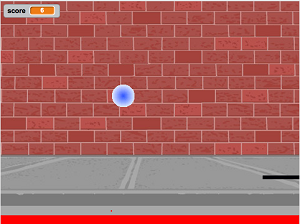
A pong game in Scratch with a score shown in the upper left.
Data Types
Every variable has a name and a data type that determines the kind of data it can hold. There are two types of variables in Java: primitive variables that hold values of primitive types like numbers and reference variables that hold a reference to a more complex object. A reference is a way to find the object (like a UPS tracking number helps you find your package).
The primitive types on the Advanced Placement Computer Science A exam are:
intwhich can represent integers, i.e. numbers with no fractional part such as 3, 0, -76, and 20393.doublewhich can represent non-integer numbers like 6.3 -0.9, and 60293.93032. Computer people call these “floating point” numbers because the decimal point “floats” relative to the magnitude of the number, similar to the way it does in scientific notation like 6.5 ✕ 10⁸. The namedoublecomes from the fact thatdoubles are represented using 64 bits, double the 32 bits used for the typefloatwhich used to be the normal size floating point number when most computers did math in units of 32-bits. (floatis rarely used these days and is not part of the AP curriculum.)booleanwhich can represent only two values:trueandfalse. (The data type is named for George Boole, a 19th century English mathematician who invented Boolean algebra, a system for dealing with statements made up of only true and false values.)
String is one of the object types on the exam and is the name of a class in Java. A String is written in a Java program as a sequence of characters enclosed in a pair of double quotes - like "Hello". You will learn more about String objects later.
A data type is a set of values (a domain) and a set of operations on them. For example, you can do addition operations with ints and doubles but not with booleans and Strings.
Check your understanding: What type should you use to represent the average grade for a course? — answer it on CS Awesome: https://runestone.academy/ns/books/published/csawesome2/topic-1-2-variables.html#chooseType1
Check your understanding: What type should you use to represent the number of people in a household? — answer it on CS Awesome: https://runestone.academy/ns/books/published/csawesome2/topic-1-2-variables.html#chooseType2
Check your understanding: What type should you use to hold the first name of a person? — answer it on CS Awesome: https://runestone.academy/ns/books/published/csawesome2/topic-1-2-variables.html#chooseType3
Check your understanding: What type should you use to record if it is raining or not? — answer it on CS Awesome: https://runestone.academy/ns/books/published/csawesome2/topic-1-2-variables.html#chooseType4
Check your understanding: What type should you use to represent the time of the gold medal winner in the 100 meter dash in the Olympics? — answer it on CS Awesome: https://runestone.academy/ns/books/published/csawesome2/topic-1-2-variables.html#chooseType5
Declaring Variables in Java
To create a variable, you must tell Java its data type and its name. Creating a variable is also called declaring a variable. The type is a keyword like int, double, or boolean, but you get to make up the name for the variable. When you create a primitive variable Java will set aside enough bits in memory for that primitive type and associate that memory location with the name that you used.
Computers store all values using bits (binary digits). A bit can represent two values and we usually say that the value of a bit is either 0 or 1. When you declare a variable, you have to tell Java the type of the variable because Java needs to know how many bits to use and how to represent the value. The 3 different primitive types all require different number of bits. An integer gets 32 bits of memory, a double gets 64 bits of memory and a boolean could be represented by just one bit.
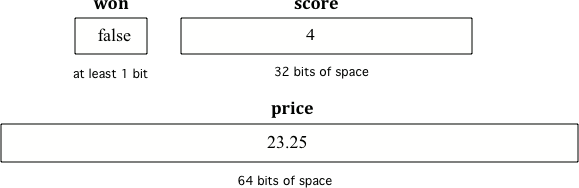
Examples of variables with names and values. Notice that the different types get a different amount of memory space.
To declare (create) a variable, you specify the type, leave at least one space, then the name for the variable and end the line with a semicolon (;). Java uses the keyword int for integer, double for a floating point number (a double precision number), and boolean for a Boolean value (true or false).
Here is an example declaration of a variable called score.
int score;
After declaring a variable, you can give it a value like below using an equals sign = followed by the value.
int score;
score = 4;
Or you can set an initial value for the variable in the variable declaration. Here is an example that shows declaring a variable and initializing it all in a single statement.
int score = 4;
When you are printing out variables, you can use the string concatenation operator + to add them to another string inside System.out.print. Never put variables inside quotes "" because that will print out the variable name letter by letter. You do not want to print out the variable name, but the value of the variable in memory. If you’re not sure what this means, try putting quotes around the variable and see what happens. In the print out, if you want spaces between words and variables, you must put the space in the quotes. If you forget to add spaces, you will get smushed output like “HiJose” instead of “Hi Jose”.
Exercise 1
Run the code to see what is printed. Then, change the values and run it again. Try adding quotes to variables and removing spaces in the print statements to see what happens.
Open the
01-strConcatDemofolder and editTest2.java. This one is not graded, so check it yourself.
Variables are never put inside quotes (
"") in System.out.print statements. This would print the variable name out letter by letter instead of printing its value.
Check your understanding: Click on all of the variable declarations in the following code.
public class Test2
{
    public static void main(String[] args)
    {
        int numLives;
        numLives = 0;
        System.out.println(numLives);
        double health;
        health = 8.5;
        System.out.println(health);
        boolean powerUp;
        powerUp = true;
        System.out.println(powerUp);
    }
}
Answer it on CS Awesome: https://runestone.academy/ns/books/published/csawesome2/topic-1-2-variables.html#var_declare
Check your understanding: Click on all of the variable initializations (first time the variable is set to a value) in the following code.
public class Test2
{
    public static void main(String[] args)
    {
        int numLives;
        numLives = 0;
        System.out.println(numLives);
        double health = 8.5;
        System.out.println(health);
        boolean powerUp = true;
        System.out.println(powerUp);
    }
}
Answer it on CS Awesome: https://runestone.academy/ns/books/published/csawesome2/topic-1-2-variables.html#var_init
The equal sign here = doesn’t mean the same as it does in a mathematical equation where it implies that the two sides are equal. Here it means set the value in the memory location associated with the variable name on the left to a copy of the value on the right. The first line above sets the value in the box called score to 4. A variable always has to be on the left side of the = and a value or expression on the right.
Exercise 2
This assignment statement below is in the wrong order. Try to fix it to compile and run.
Open the
02-asgn-orderfolder and editTest3.java. Press Run to try it; Run Tests checks it (1 test).
Check your understanding: Fill in the following to declare age to be an integer and set its value to 5:
age =;— answer it on CS Awesome: https://runestone.academy/ns/books/published/csawesome2/topic-1-2-variables.html#fillDecVar1
Check your understanding: What type should you use for a shoe size like 8.5? — answer it on CS Awesome: https://runestone.academy/ns/books/published/csawesome2/topic-1-2-variables.html#fillDecVar2
Check your understanding: What type should you use for a number of tickets? — answer it on CS Awesome: https://runestone.academy/ns/books/published/csawesome2/topic-1-2-variables.html#fillDecVar3
Mixed up Code Problems
Check your understanding: The following code declares and initializes variables for storing a number of visits, a person’s temperature, and if the person has insurance or not. It also includes extra blocks that are not needed in a correct solution. — answer it on CS Awesome: https://runestone.academy/ns/books/published/csawesome2/topic-1-2-variables.html#declareVars1
Naming Variables
While you can name your variable almost anything, there are some rules. A variable name should start with an alphabetic character (like a, b, c, etc.) and can include letters, numbers, and underscores _. It must be all one word with no spaces.
You can’t use any of the keywords or reserved words as variable names in Java (for, if, class, static, int, double, etc). For a complete list of keywords and reserved words, see https://docs.oracle.com/javase/specs/jls/se22/html/jls-3.html#jls-3.9.
The name of the variable should describe the data it holds. A name like score helps make your code easier to read. A name like x is not a good name for a variable holding a score, because it gives no clues what the variable is used for. On the other hand, don’t use names that are too long like theNumberThatHoldsTheScore as those are also hard to read. Choose names that make your code easier to understand, not harder.
- Use meaningful variable names!
- Start variable names with a lower case letter and use camelCase.
- Variable names are case-sensitive and spelling sensitive! Each use of the variable in the code must match the variable name in the declaration exactly.
- Never put variables inside quotes (
"").
The convention in Java and many programming languages is to always start a variable name with a lower case letter and then uppercase the first letter of each additional word, for example gameScore. Variable names can not include spaces so uppercasing the first letter of each additional word makes it easier to read the name. Uppercasing the first letter of each additional word is called camel case because it looks like the humps of a camel. Another option is to use underscore _ to separate words, but you cannot have spaces in a variable name.
Exercise 3
Java is case sensitive so gameScore and gamescore are not the same. Run and fix the code to use the right variable name.
Open the
03-varCaseSensitivefolder and editCaseSensitiveClass.java. This one is not graded, so check it yourself.
Check your understanding: What is the camel case variable name for a variable that represents a shoe size? — answer it on CS Awesome: https://runestone.academy/ns/books/published/csawesome2/topic-1-2-variables.html#fillName1
Check your understanding: What is the camel case variable name for a variable that represents the top score? — answer it on CS Awesome: https://runestone.academy/ns/books/published/csawesome2/topic-1-2-variables.html#fillName2
Debugging Challenge: Weather Report
Debug the following code that reads out a weather report. Make sure the data types match the values put into the variables. Can you find all the bugs and get the code to run? Work with a programming buddy if you get stuck.
Exercise 4
Debug the code. Can you find the all the bugs and get the code to run?
Open the
04-challenge1-2-weatherfolder and editChallenge1_2_weather.java. Press Run to try it; Run Tests checks it (1 test).
Coding Challenge: Mad Libs
Have you ever played MAD LIBS? In this game, you first choose a bunch of words following clues like give me a color or a plural noun, without looking at the story, and then those words are filled into the story to make it sound very wacky! Fill in the variables below with silly words, and then run to see the wacky story.
Then, working in pairs, come up with another silly story that uses at least 5 new String variables. When you're done, try another team's mad libs code. Your teacher may ask you to create this program using the Scanner class to read in input into the variables.
Exercise 5
Replace the text “Replace” below with silly words following the description in the variable names (for example, “cats” for a plural noun, “blue” for a color, etc.) to create a silly poem. Run the code to see the poem. Then, create your own silly story using 5 more String variables.
Open the
05-challengeMadLibsfolder and editMadLibs1.java. Press Run to try it; Run Tests checks it (2 tests).
Summary
-
(AP 1.2.B.2) A variable is a memory storage location that holds a value, which can change while the program is running.
-
(AP 1.2.B.2) Every variable has a name and an associated data type that determines the kind of data it can hold. A variable of a primitive type holds a primitive value from that type.
-
A variable can be declared and initialized with the following code:
int score; double gpa = 3.5; -
(AP 1.2.A.1) A data type is a set of values and a corresponding set of operations on those values. Data types can be primitive types (like int) or reference types (like String).
-
(AP 1.2.A.2) The primitive data types used in this course define the set of values and corresponding operations on those values for numbers and Boolean values.
-
(AP 1.2.A.3) A reference type, like String, is used to define objects that are not primitive types.
-
(AP 1.2.B.1) The three primitive data types used in this course are int (integer numbers), double (decimal numbers), and boolean (true or false).
-
Stringis a reference data type representing a sequence of characters.
AP Practice
Check your understanding: Which of the following pairs of declarations are the most appropriate to store a student’s average course grade in the variable GPA and the number of students in the variable numStudents? — answer it on CS Awesome: https://runestone.academy/ns/books/published/csawesome2/topic-1-2-variables.html#AP1-2-types
For teachers
1.2 Variables and Data Types
Students read CSAwesome2's “Variables and Data Types” in CS Room and work through its 5 Java coding exercises (3 graded, 2 ungraded).
- Time: 1 class period
- Tests: 4 in 3 graded exercises, set up for you when you import the lesson
Goals
- (AP 1.2.B.2) A variable is a memory storage location that holds a value, which can change while the program is running.
- (AP 1.2.B.2) Every variable has a name and an associated data type that determines the kind of data it can hold. A variable of a primitive type holds a primitive value from that type.
- (AP 1.2.A.1) A data type is a set of values and a corresponding set of operations on those values. Data types can be primitive types (like int) or reference types (like String).
- (AP 1.2.A.2) The primitive data types used in this course define the set of values and corresponding operations on those values for numbers and Boolean values.
- (AP 1.2.A.3) A reference type, like String, is used to define objects that are not primitive types.
- (AP 1.2.B.1) The three primitive data types used in this course are int (integer numbers), double (decimal numbers), and boolean (true or false).
Before class
- Import the lesson into your class from the Lessons page, or with New assignment → Use a lesson. It arrives as a draft with its tests already set up.
- Publish it.
- The original page, with its click-the-answer, fill-in, mixed-up code and multiple-choice questions, is on CS Awesome: https://runestone.academy/ns/books/published/csawesome2/topic-1-2-variables.html
- CS Awesome's own teacher materials: the CS Awesome teacher site
In class
- Students read
README.md. Questions that need CS Awesome's interactive widgets link back to it. - Students do exercises 01–05, each in its own folder, pressing Run to try their code.
- Run Tests checks every graded exercise at once; scores appear in the Gradebook. Grading uses your copy of the tests, so a student who edits theirs does not change the grade.
Exercises
| Folder | File | Grading | Tests |
|---|---|---|---|
01-strConcatDemo | Test2.java | Not graded; students check it themselves | 0 |
02-asgn-order | Test3.java | Autograded | 1 |
03-varCaseSensitive | CaseSensitiveClass.java | Not graded; students check it themselves | 0 |
04-challenge1-2-weather | Challenge1_2_weather.java | Autograded | 1 |
05-challengeMadLibs | MadLibs1.java | Autograded | 2 |
Teachers can download a reference solution after signing in.