1.12 Objects - Instances of Classes
From CS Awesome 2CC BY-NC-SA 4.0Original page
Java1 class period6 exercises9 graded tests
Files
1.12 Objects - Instances of Classes
Each coding exercise has its own folder. Open its .java file and press Run to try it. Run Tests checks every graded exercise in this lesson at once.
Java is an object-oriented programming language. That means that one of the primary ways of designing and organizing a Java program is in terms of objects. Objects combine data and the code that operates on that data into a single unit. To create objects, we first define a class which provides a blueprint for creating the objects. In Java, all programs are built out of classes. This is why, every Java program starts with public class. In this unit, you will learn the vocabulary of object-oriented programming and to create and use objects of a class written for you. In later units, you will learn to write your own classes.
What are Classes and Objects?
You can think of a class as something like a blueprint of a house that is used to construct houses (objects), or like a cookie cutter that is used to create the cookies (objects). The cookie cutter (class) can be used to create as many cookies (objects) as you want. The cookies (objects) are all the same shape and size, but they can have different colors and decorations.
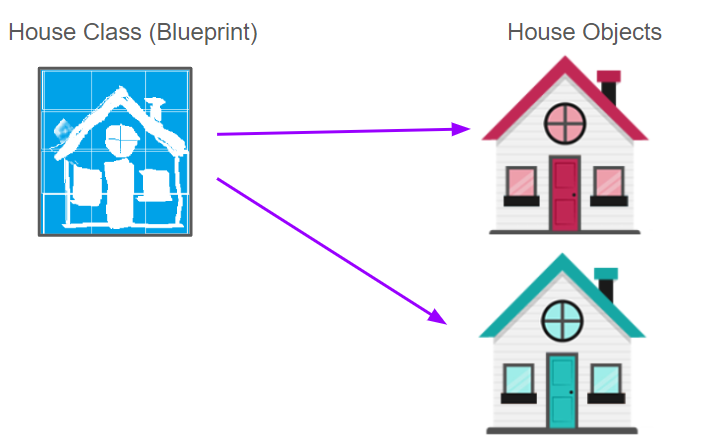
Using a blueprint (class) to construct houses (objects)
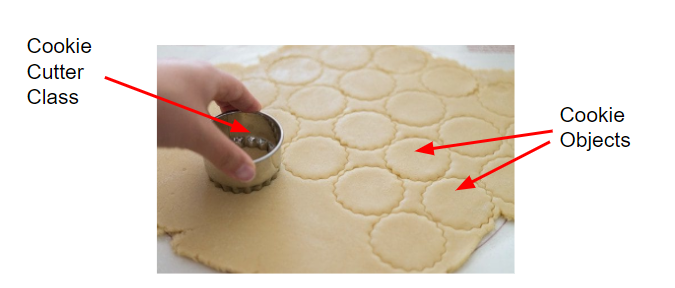
Using a cookie cutter (class) to make cookies (objects)
You can also think of a class as defining a new data type. In this lesson, we will use the class Turtle to make animated turtle objects. Just like you use int to declare variables that hold numbers, you can use Turtle to declare many variables, animated turtle objects, who are instances of the Turtle class.
// Creating 2 Turtle objects called yertle and myrtle
Turtle yertle;
Turtle myrtle;
Watch the following video by Dr. Colleen Lewis about classes and objects:
Attributes and Behaviors
A class defines the attributes (data) and behaviors (methods) that all objects of that class will have. The objects are the specific instances of the class that have their own values for the attributes. Attributes are the data or properties that an object knows about itself, for example, a turtle object’s color and size. Behaviors are the things that an object can do. For example, a turtle object can go forward, turn left, or turn right. The attributes and behaviors of a class are defined in the class, but each object has its own values for the attributes.
This video shows another class called Belt and how it has 3 instance variables to define its attributes. Every belt object can have different values stored in the instance variables.
The following picture has lots of cats (objects of the type cat). They are all different, but they share the same attributes and behaviors that make up a cat. They are all instances of cat with different values for their attributes. Name some of the attributes and behaviors of the cats below. For example, the color ( attribute) of the first cat is black ( attribute value) and it is playing ( behavior).
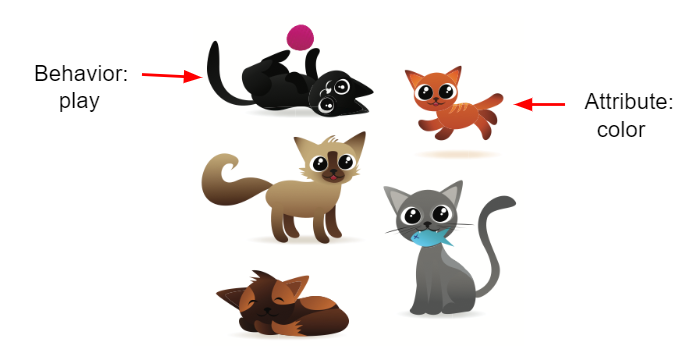
Pictures of cats (cat objects)
Discuss with your class: What are some attributes of cats? What are some behaviors of cats? (Note that attributes are often nouns or adjectives describing features of cats, and behaviors are often verbs).
Discuss this with your class, or answer it on CS Awesome: https://runestone.academy/ns/books/published/csawesome2/topic-1-12-objects.html#cats
The following picture of a turtle shows some of the Turtle attributes like name, width, height, color in the body of the turtle and its methods like forward(), backward(), written around the turtle.
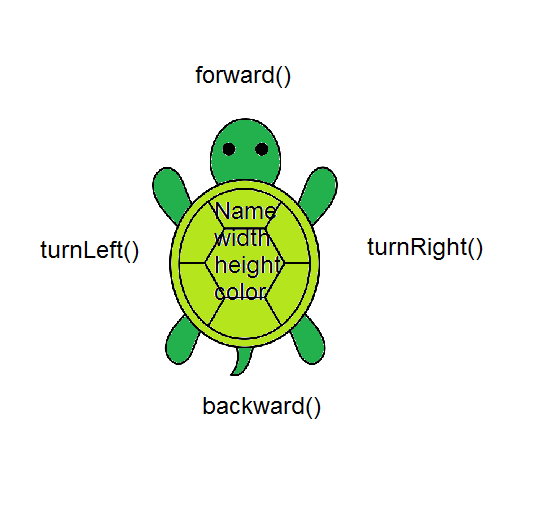
Turtle Attributes and Behaviors
Check your understanding: Drag the definition from the left and drop it on the correct concept on the right. — answer it on CS Awesome: https://runestone.academy/ns/books/published/csawesome2/topic-1-12-objects.html#vocab2_1
Check your understanding: How many objects can you create from a class in Java? — answer it on CS Awesome: https://runestone.academy/ns/books/published/csawesome2/topic-1-12-objects.html#howmanyobjects
Check your understanding: What specifies the behavior for objects of a class in Java? — answer it on CS Awesome: https://runestone.academy/ns/books/published/csawesome2/topic-1-12-objects.html#mcq_behaviors
Check your understanding: What are the data or properties of an object called? — answer it on CS Awesome: https://runestone.academy/ns/books/published/csawesome2/topic-1-12-objects.html#mcq_data
Turtle Class
The Turtle class (that we’ve written for you and hidden on this page) is a blueprint for turtle objects. It defines attributes for graphical turtles like their color and position and methods to make the turtles move. Try the Java program below that creates a Turtle object called yertle using the Turtle class.
Exercise 1
Try pressing Run to see what the following program does.
Open the
01-TurtleTestfolder and runTurtleTest.java. It is an example, so it has no tests. It draws pictures: Run saves the drawing as an image in its folder.
The following video shows how the program creates a World object called habitat and a Turtle object called yertle in memory.
The dot operator (.) is used to run an object’s method. You can think of the (.) as asking the object to do something (execute one of its methods). For example, yertle.forward() asks the turtle yertle to go forward. It doesn’t tell yertle how much to go forward, so it goes forward 100 pixels by default. The parentheses () after a method name are there in case you need to give the method arguments (some data) to do its job, for example to go forward 50 pixels instead of 100 in yertle.forward(50); Try changing the code above to go forward 50 pixels instead and then run it again.
Exercise 2
In the code, yertle goes forward and then turns left. Can you change the code to make yertle go forward twice and then turnRight?
Open the
02-TurtleTest2folder and editTurtleTest2.java. Press Run to try it; Run Tests checks it (2 tests). Its tests check your code, not what it prints: “yertle.forward() twice”, “yertle.turnRight()”. It draws pictures: Run saves the drawing as an image in its folder, and Run Tests checks the code without the drawing.
A variable like yertle of a reference type like Turtle holds an object reference, which can be thought of as the memory address of that object. Variables that are of a primitive types like int hold just a single number value. But objects are complex and contain a collection of values called attributes, for example the color and the size of the turtle.
Creating Turtle Objects
When you write a class like the Turtle class, you can create many objects of that class type. In the code below, two turtle objects are created: yertle and myrtle. You can name your turtle and add in a line like the following in the main method to make it move:
// To create or declare a new object, write:
// ClassName variableName = new ClassName(arguments);
Turtle yourTurtleName = new Turtle(habitat);
yourTurtleName.forward();
Exercise 3
Can you add another turtle object to the code?
Open the
03-TurtleTest3folder and editTurtleTest3.java. Press Run to try it; Run Tests checks it (1 test). Its test checks your code, not what it prints: “Add a new Turtle(s)”. It draws pictures: Run saves the drawing as an image in its folder, and Run Tests checks the code without the drawing.
Class Hierarchy and Inheritance
Another important concept in object-oriented programming is inheritance. Although the AP CSA exam no longer covers inheritance, you should know what it means. Inheritance is a way to create a new class that is based on an existing class. The new class, called a subclass, inherits the attributes and behaviors of the existing class, called a superclass. In Java, all classes are subclasses of a superclass called Object.
For example, you could have a superclass called Pet with attributes like name and age and behaviors like eat and sleep. You could then have subclasses like Dog and Cat and Turtle that inherit the attributes and behaviors of the Pet class. Each subclass could add attributes and behaviors specific to that type of pet. For example, a Dog subclass could have an attribute called breed and a behavior called bark.
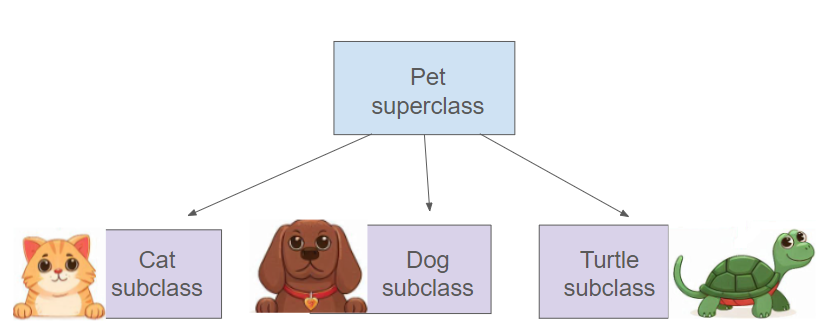
Inheritance hierarchy for Pet superclass with the subclasses Dog, Cat, and Turtle
Turtle Methods
Let’s practice more with the Turtle class and its methods. Here is a class diagram that shows some of the attributes and methods in the class Turtle.
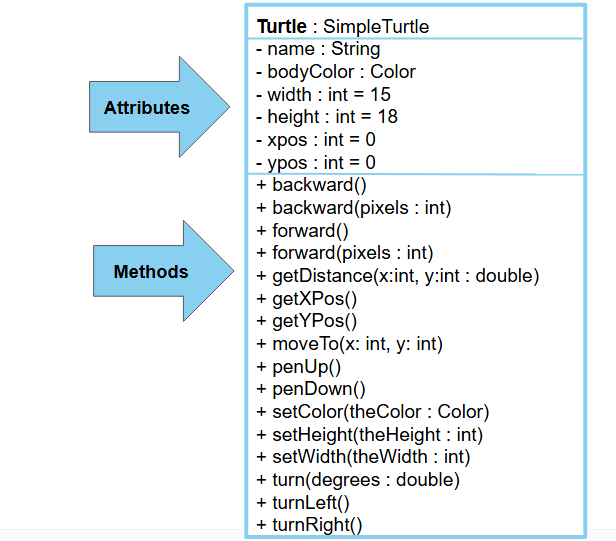
Turtle Class Diagram
The Turtle world does not use the Cartesian coordinate system with (0,0) in the middle the screen. Instead, (0,0) is at the top left corner of the screen and x increases to the right and y increases towards the bottom of the screen. Most computer graphics systems use this coordinate system which is a carry over from before computers could display graphics and had to approximate the graphics with text print outs.
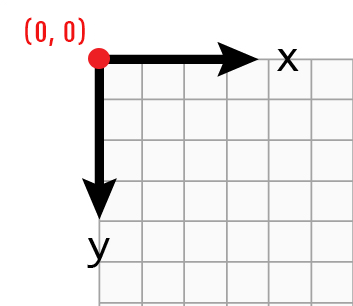
The coordinate (0,0) is at the top left of the Turtle world.
Check your understanding: The following code uses a turtle to draw the digital number 7 (with just straight lines), but the code is mixed up. Remember that the turtle is facing the top of the page when it is first created. — answer it on CS Awesome: https://runestone.academy/ns/books/published/csawesome2/topic-1-12-objects.html#ParsonsDraw7
After you put the mixed up code in order above, type in the same code below to make the turtle draw a 7.
Exercise 4
Can you make yertle draw a 7 by going forward to go up and then left?
Open the
04-TurtleDrawSevenfolder and editTurtleDraw7.java. Press Run to try it; Run Tests checks it (1 test). Its test checks your code, not what it prints: “Code containsyertle.forward(); yertle.turnLeft(); yertle.forward();”. It draws pictures: Run saves the drawing as an image in its folder, and Run Tests checks the code without the drawing.
Exercise 5
Can you make yertle draw the digital number 8, as 2 squares on top of each other?
Open the
05-TurtleDrawEightfolder and editTurtleDraw8.java. Press Run to try it; Run Tests checks it (3 tests). Its tests check your code, not what it prints: “Code has been changed”, “Calls to forward()”, “Calls to turnRight() or turnLeft()”. It draws pictures: Run saves the drawing as an image in its folder, and Run Tests checks the code without the drawing.
Coding Challenge: Draw Letters
Working in pairs, use the area below to have your turtle draw simple block-style letters for your first or last name initials using just straight lines (no curves or diagonals).
It may help to act out the code pretending you are the turtle. Remember that which way you turn depends on which direction you are facing, and the turtle begins facing north (towards the top of the page).
Here are some simple turtle methods that you can use:
forward()turnLeft()turnRight()backward()penUp()penDown()
You may notice that it is challenging to have your turtle draw with these simple methods. In the next lessons, we will use more complex Turtle methods where you can indicate how many steps to take or what angle to turn that will make drawing a lot easier!
Exercise 6
Have your turtle create a block drawing of the initials of your name. Use straight lines (no curves or diagonals unless you want to try adding arguments to the turtle methods).
Open the
06-challenge-Turtle-Letterfolder and editTurtleLetter.java. Press Run to try it; Run Tests checks it (2 tests). Its tests check your code, not what it prints: “Code has been changed”, “Adding a reasonable amount of lines to code”. It draws pictures: Run saves the drawing as an image in its folder, and Run Tests checks the code without the drawing.
Summary
- (AP 1.12.A.1) A class defines a new data type (a classification). It is the formal implementation, or blueprint, of the attributes and behaviors of the objects of that class.
- (AP 1.12.A.1) An object is a specific instance of a class with defined attributes. Objects are declared as variables of a class type.
- (AP 1.12.B.1) A variable of a reference type holds an object reference, which can be thought of as the memory address of that object.
- An attribute or instance variable is data the object knows about itself. For example a turtle object knows the direction it is facing or its color.
- A behavior or method is something that an object can do. For example a turtle object can go forward 100 pixels.
- (AP 1.12.A.2) A class hierarchy can be developed by putting common attributes and behaviors of related classes into a single class called a superclass. Classes that extend a superclass, called subclasses, can draw upon the existing attributes and behaviors of the superclass without replacing these in the code. This creates an inheritance relationship from the subclasses to the superclass. Designing and implementing inheritance relationships are outside the scope of the AP Computer Science A course and exam.
- (AP 1.12.A.2) All classes in Java are subclasses of the Object class.
AP Practice
Try these AP practice questions that will help to prepare you for the AP Classroom progress checks.
Check your understanding: A student has created a
Dogclass. The class contains variables to represent the following.
- A String variable called
breedto represent the breed of the dog- An int variable called
ageto represent the age of the dog- A String variable called
nameto represent the name of the dogThe object
petis declared as type Dog. Which of the following descriptions is accurate?Answer it on CS Awesome: https://runestone.academy/ns/books/published/csawesome2/topic-1-12-objects.html#AP-attributes
Check your understanding: A student has created a
Partyclass. The class contains variables to represent the following.
- An int variable called
numOfPeopleto represent the number of people at the party.- A boolean variable called
discoLightsOnto represent whether the disco ball is on.- A boolean variable called
partyStartedto represent whether the party has started.The object
myPartyis declared as type Party. Which of the following descriptions is accurate?Answer it on CS Awesome: https://runestone.academy/ns/books/published/csawesome2/topic-1-12-objects.html#AP-objects
For teachers
1.12 Objects - Instances of Classes
Students read CSAwesome2's “Objects - Instances of Classes” in CS Room and work through its 6 Java coding exercises (5 graded, 1 example).
- Time: 1 class period
- Tests: 9 in 5 graded exercises, set up for you when you import the lesson
Goals
- (AP 1.12.A.1) A class defines a new data type (a classification). It is the formal implementation, or blueprint, of the attributes and behaviors of the objects of that class.
- (AP 1.12.A.1) An object is a specific instance of a class with defined attributes. Objects are declared as variables of a class type.
- (AP 1.12.B.1) A variable of a reference type holds an object reference, which can be thought of as the memory address of that object.
- (AP 1.12.A.2) A class hierarchy can be developed by putting common attributes and behaviors of related classes into a single class called a superclass. Classes that extend a superclass, called subclasses, can draw upon the existing attributes and behaviors of the superclass without replacing these in the code. This creates an inheritance relationship from the subclasses to the superclass. Designing and implementing inheritance relationships are outside the scope of the AP Computer Science A course and exam.
- (AP 1.12.A.2) All classes in Java are subclasses of the Object class.
Before class
- Import the lesson into your class from the Lessons page, or with New assignment → Use a lesson. It arrives as a draft with its tests already set up.
- Publish it.
- The original page, with its free-response, matching, mixed-up code and multiple-choice questions, is on CS Awesome: https://runestone.academy/ns/books/published/csawesome2/topic-1-12-objects.html
- CS Awesome's own teacher materials: the CS Awesome teacher site
In class
- Students read
README.md. Questions that need CS Awesome's interactive widgets link back to it. - Students do exercises 01–06, each in its own folder, pressing Run to try their code.
- Run Tests checks every graded exercise at once; scores appear in the Gradebook. Grading uses your copy of the tests, so a student who edits theirs does not change the grade.
Exercises
| Folder | File | Grading | Tests |
|---|---|---|---|
01-TurtleTest | TurtleTest.java | Example, not graded (draws pictures) | 0 |
02-TurtleTest2 | TurtleTest2.java | Checks code text only (draws pictures; graded without the drawing) | 2 |
03-TurtleTest3 | TurtleTest3.java | Checks code text only (draws pictures; graded without the drawing) | 1 |
04-TurtleDrawSeven | TurtleDraw7.java | Checks code text only (draws pictures; graded without the drawing) | 1 |
05-TurtleDrawEight | TurtleDraw8.java | Checks code text only (draws pictures; graded without the drawing) | 3 |
06-challenge-Turtle-Letter | TurtleLetter.java | Checks code text only (draws pictures; graded without the drawing) | 2 |
Teachers can download a reference solution after signing in.