1.10 Calling Class Methods
From CS Awesome 2CC BY-NC-SA 4.0Original page
Java1 class period3 exercises10 graded tests
Files
1.10 Calling Class Methods
Each coding exercise has its own folder. Open its .java file and press Run to try it. Run Tests checks every graded exercise in this lesson at once.
Most of the methods we have used so far are static methods, which are also called class methods. These methods are associated with the class and include the keyword static in the method header. The main method is always static, which also means that there is only one copy of the method.
Here is a template for a static method. In the method header, the keyword static is used before the return type. Up until now, we have used the keyword void as the return type for methods that do not return a value. We will now look at methods that calculate and return a value of a specific type.
// static method header
public static return-type method-name(parameters)
{
    // method body
}
Non-void Methods
Most of the methods we have used so far have been void methods, which do not return a value. However, many methods act like mathematical functions that calculate and return a value given some arguments. These methods are called non-void methods. You can imagine a non-void method as a calculating machine that takes numbers as arguments and returns a calculated result or like a toaster that takes bread as an argument and changes it to return toast.
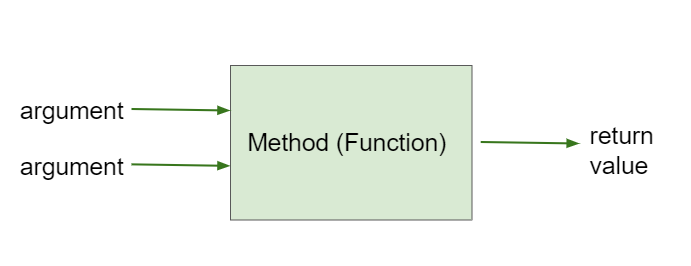
Method that takes arguments and returns a value
In the next lesson, we will look at the Math library in Java, but consider a simple method that squares a number. For example, square(3) would return 9.
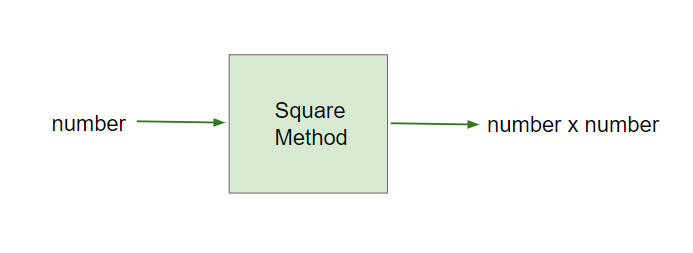
The Square Method
Here is a simple implementation of this method which takes an int number as an argument, squares that number, and returns the result. Notice that instead of static void, the header includes static int to indicate that the method returns an integer value. There could be another overloaded version of this method that takes a double number and returns a double value; remember methods are overloaded when there are multiple methods with the same name but different signatures with a different number or types of parameters.
public static int square(int number)
{
    int result = number * number;
    return result;
}
The return statement is used to return a value from the method back to the calling code. The return value must be the same type as the return type in the method header. The return statement also ends the method execution, so any code after the return statement is not executed. Let’s try this below.
public class SquareMethod
{
   public static int square(int number)
   {
         int result = number * number;
         return result;
   }

   public static void main(String[] args)
   {
         int x = 5;
         int y = square(x);
         System.out.println("The square of " + x + " is " + y);
         x = 4;
         System.out.println("The square of " + x + " is " + square(x));
   }
}
Step through this code on CS Awesome: https://runestone.academy/ns/books/published/csawesome2/topic-1-10-calling-class-methods.html#codelensSquare
When calling the square method, the return value can be stored in a variable or used as part of an expression. In the main method above, the variable y is assigned the return value of the square method. The return value can also be used directly in the print statement without storing it in a variable, for example System.out.println(square(4));.
// Saving the returned value of the square method in a variable
int y = square(5);
System.out.println(y); // prints 25
// Printing the returned value of the square method directly
System.out.println(square(4)); // prints 16
Exercise 1
Add another call to the square method in the main method that prints out the square of 6.
Open the
01-squareMethodfolder and editSquareMethod.java. Press Run to try it; Run Tests checks it (2 tests).
Check your understanding: What does the following code print out? (visualization)
public class MethodTrace
{
    public static int square(int x)
    {
        return (x * x);
    }

    public static int divide(int x, int y)
    {
        return (x / y);
    }

    public static void main(String[] args)
    {
        System.out.println(square(3) + divide(5,2));
    }
}
Answer it on CS Awesome: https://runestone.academy/ns/books/published/csawesome2/topic-1-10-calling-class-methods.html#traceMethods1
Common Errors with Methods
A common error with non-void methods is forgetting to do something with the value returned from a method. When you call a method that returns a value, you should do something with that value like assigning it to a variable or printing it out. To use the return value when calling a non-void method, it must be stored in a variable or used as part of an expression.
Another common error is a mismatch in types or order for the arguments or return values. For example, if a method returns a double value, you cannot assign it to an int variable.
Exercise 2
Fix the method calls in the main method. Make sure the type, how many, and order of the arguments match what the methods expect. Are the returned values saved in the right type of variables? Do not change the methods other than main.
Open the
02-fixMethodCallsfolder and editMathMethods.java. Press Run to try it; Run Tests checks it (4 tests).
Methods Outside the Class
In the examples above, we called the methods by using the method name. However, if we call a method from a different class, we need to include its class name. For example, if the square method is in a class called MathFunctions, we would call it as MathFunctions.square(3). Class methods are typically called using the class name along with the dot operator (.). When the method call occurs in the defining class, the use of the class name is optional in the call.

In the next lesson, we will learn to use the methods in the Math class in Java and will need to call them with the class name Math. There is a method to compute the square of a number in the Math library, but it is called pow instead of square, and it takes 2 arguments to return a number raised to the power of an exponent number. Here’s a quick preview of two of the methods in the Math class:
Math.sqrt(double number): returns the square root of a given numberMath.pow(double base, double exponent): returns base^exponent, the value of base, the first argument, raised to the power of exponent, the second argument.
Here is an example of how to use these methods:
double x = Math.pow(3, 2); // 3^2 is 9.0
double y = Math.sqrt(9); // the square root of 9 is 3.0
Coding Challenge: Ladder on Tower
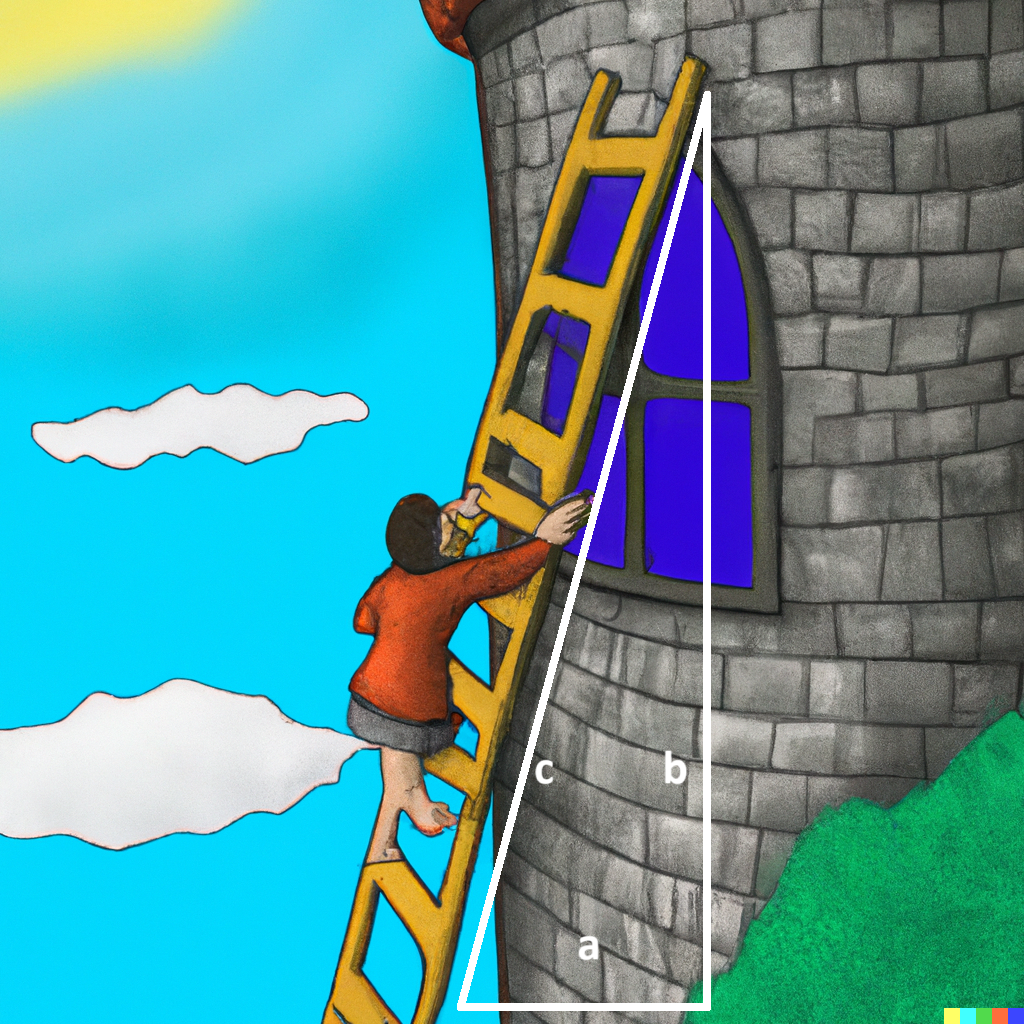
The Pythagorean theorem states that the length of the hypotenuse (the side opposite the right angle in a right triangle) is the square root of the sum of the squares of the lengths of the other two sides, also called the “legs” or the width and height of the triangle. (Incidentally, the Pythagorean theorem is named for Pythagoras who was also the leader of the gang of Greek mathematicians who legend has it allegedly drowned their fellow mathematician for showing that √(2) is irrational.) Here’s the formula for this theorem:
- c = √(a² + b²) where a and b are the width and height of the triangle and c is the length of the hypotenuse.
One common use for the Pythagorean theorem is to calculate the length of ladder you will need to reach the window of your beloved, given that their cruel parents have locked them in a tower surrounded by a moat. The ladder will be the hypotenuse of a triangle whose legs are the height of the window of your beloved’s room in the tower and the width of the moat since you have to place the base of the ladder on the edge of the moat.
Check your understanding: Which of the following are correct Java expressions to compute the hypotenuse of a triangle with legs
aandbgiven the Pythagorean Theorem c = √(a² + b²) where a and b are the lengths of the legs and… — answer it on CS Awesome: https://runestone.academy/ns/books/published/csawesome2/topic-1-10-calling-class-methods.html#hypotenuse-java-mc
Exercise 3
Complete the ladderSizeNeeded method using the Pythagorean Theorem and the Math.sqrt method. Then in the main method, write a method call to test the ladderSizeNeeded method with arguments for the height of 30 and the width of 40. The method should return the length of the ladder needed to reach the window of your beloved.
Open the
03-challenge-1-10-pythagoreanfolder and editLadderHelper.java. Press Run to try it; Run Tests checks it (4 tests).
Summary
- (AP 1.10.A.1) Class methods are associated with the class (not instances of the class which we will see in later lessons).
- (AP 1.10.A.2) Class methods include the keyword static in the header before the method name.
- (AP 1.9.B.1) A void method does not have a return value and is therefore not called as part of an expression.
- (AP 1.9.B.2) A non-void method returns a value that is the same type as the return type in the header.
- (AP 1.9.B.2) To use the return value when calling a non-void method, it must be stored in a variable or used as part of an expression.
- Common errors with methods are mismatches in the order or type of arguments, return values, and forgetting to do something with the value returned from a method. When you call a method that returns a value, you should do something with that value like assigning it to a variable or printing it out.
- (AP 1.10.A.2) Class methods are typically called using the class name along with the dot operator. When the method call occurs in the defining class, the use of the class name is optional in the call.
AP Practice
Check your understanding: Consider the following method.
public static double calculatePizzaBoxes(int numOfPeople, double slicesPerBox)
{ /*implementation not shown */}
Which of the following lines of code, if located in a method in the same class as calculatePizzaBoxes, will compile without an error?
Answer it on CS Awesome: https://runestone.academy/ns/books/published/csawesome2/topic-1-10-calling-class-methods.html#AP1-10-static-method
Check your understanding: Consider the following methods:
public static void inchesToCentimeters(double i)
{
    double c = i * 2.54;
    printInCentimeters(i, c);
}

public static void printInCentimeters(double inches, double centimeters)
{
    System.out.print(inches + "-->" + centimeters);
}
Assume that the method call
inchesToCentimeters(10)appears in a static method in the same class. What is printed as a result of the method call?Answer it on CS Awesome: https://runestone.academy/ns/books/published/csawesome2/topic-1-10-calling-class-methods.html#AP1-10-static-method2
For teachers
1.10 Calling Class Methods
Students read CSAwesome2's “Calling Class Methods” in CS Room and work through its 3 Java coding exercises.
- Time: 1 class period
- Tests: 10 in 3 graded exercises, set up for you when you import the lesson
Goals
- (AP 1.10.A.1) Class methods are associated with the class (not instances of the class which we will see in later lessons).
- (AP 1.10.A.2) Class methods include the keyword static in the header before the method name.
- (AP 1.9.B.1) A void method does not have a return value and is therefore not called as part of an expression.
- (AP 1.9.B.2) A non-void method returns a value that is the same type as the return type in the header.
- (AP 1.9.B.2) To use the return value when calling a non-void method, it must be stored in a variable or used as part of an expression.
- (AP 1.10.A.2) Class methods are typically called using the class name along with the dot operator. When the method call occurs in the defining class, the use of the class name is optional in the call.
Before class
- Import the lesson into your class from the Lessons page, or with New assignment → Use a lesson. It arrives as a draft with its tests already set up.
- Publish it.
- The original page, with its multiple-choice questions, is on CS Awesome: https://runestone.academy/ns/books/published/csawesome2/topic-1-10-calling-class-methods.html
- CS Awesome's own teacher materials: the CS Awesome teacher site
In class
- Students read
README.md. Questions that need CS Awesome's interactive widgets link back to it. - Students do exercises 01–03, each in its own folder, pressing Run to try their code.
- Run Tests checks every graded exercise at once; scores appear in the Gradebook. Grading uses your copy of the tests, so a student who edits theirs does not change the grade.
Exercises
| Folder | File | Grading | Tests |
|---|---|---|---|
01-squareMethod | SquareMethod.java | Autograded | 2 |
02-fixMethodCalls | MathMethods.java | Autograded | 4 |
03-challenge-1-10-pythagorean | LadderHelper.java | Autograded | 4 |
Teachers can download a reference solution after signing in.